




Steele1925
Members
-
Joined
-
Last visited
Everything posted by Steele1925
-
The way that I fix it is by pressing "N". Just open and close the menu, this should fix it. Why this happens is unknown to me however. Hope this helps buddy.
-
-
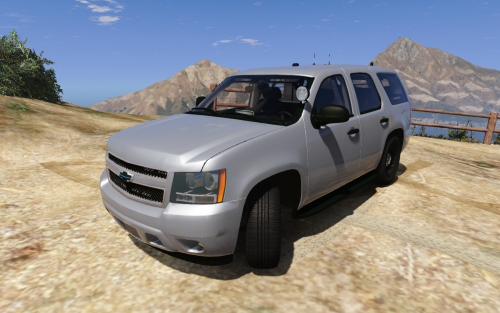 @ISPfan12 Don't worry about the hateful comments buddy... To those who (or is it whom in this case?) are having an issue, the Mod Author clearly states that "THIS IS INTENDED FOR THOSE THAT ARE UNFAMILIAR WITH MAKING THEIR OWN SKINS" .
- 12 comments
- 8 reviews
-
 Yes, I'm currently using it with the Sheriff2 slot, without issue. So it would seem this model works well wherever you place it... Also @Gump do you mind if I ask what Visual Mods you're using? Thanks in any case buddy, loving this vehicle!
- 39 comments
- 27 reviews
-
 Depends on which version you use. In the Custom Version, I had to mute that file, and it was replaced via other audio files to say "All Units you can clear this call, return to patrol". However, with the "Standard Version", all Dispatcher audio is left mostly untouched. The only changes to her in the Standard Version are the "uhhhh" audio, which I've removed. I highly recommend the Standard Version at this point. Hope this helps
- 311 comments
- 39 reviews
-
"I like the ISD design maybe for the setup for like PBPD?" Sure thing bud, whatever feels right with you. Just tossing ideas around, can't wait for release!!!
-
@t0y 2 types of Departments have been mostly neglected here... So as far as "Something New", I'd like to present the following Ideas, that could go along with a pack that you might release. Constable and ISD Police. Idea images below are from my local Departments. In any case, I LOVE your stuff buddy, keep em coming!
-
Well "better" is in the eyes of the beholder... However, I personally believe that GTA 5 is better, because it seems to be MUCH more stable. I have never crashed from LSPDFR in GTA 5, the only crashes I've had, were from my own mistakes with installing a plugin/vehicle incorrectly. Today, my game is smooth as butter. Contrast that with GTA 4 (my experience, yours may differ). I crashed every 10 to 20 minutes, guranteed. Not to mention that it would occasionally lock my PC up when it happened, until I figured out how to add windowed mode as a command. This is not the fault of the Mod Devs, but the fault of the Game Devs. GTA 5 however is absolutely stable, so that's my recommendation. For that, Steam has the minimum recommened PC Specs for the game, though I suggest going above the minimum. http://store.steampowered.com/app/271590/Grand_Theft_Auto_V/ The Specs are just above the Comments.
-
Are you attempting to play LCPDFR (GTA IV) or LSPDFR (GTA V)?
-
 Lol well that won't go over well. But, thanks again buddy. Keep up the great work here!
- 783 comments
- 86 reviews
-
@PNWParksFan Hey buddy quick question/suggestion if you don't mind. Would it be possible to add an option for ELS enabled vehicles to have them keep their lights on, yet turn their sirens off when they arrive on scene? At the moment, my ELS enabled vehicles will sit there with their sirens blaring lol. Partly because I have them set to not leave until the scene is cleared, but I do that for realism purposes. In any case, thanks for this great mod!!!
- 783 comments
- 86 reviews
-
Yeah I use that trick as well, just gets old lol. Can't believe there's not a fix for it yet.
-
I like to do that, however, the "Hold E (or DPadRight)" mechanic usually stops working for one reason or another. So I figured something of this sort would be a good workaround.
-
So I have a slight gripe about attempting to search someone's vehicle during a traffic stop... When I take them out of the vehicle, one of two things must happen. I must either allow them to walk around, which usually results in them leaving. Or, I must arrest them, which was not my intention. My idea is to have a plugin that would give a dialogue option to the Player stating "I need to search your vehicle", that would cause the Ped to walk to the passenger's side of their vehicle and wait while the Player conducts a search. After which the Player could then either release the Ped to their vehicle or arrest them. This is a little closer to the way that Police typically handle situations such as this. They normally tell you to "Sit on the curb", but that's a tough one in GTA, so the Ped simply waiting by their vehicle would suffice (or by the Player's). Is this something that anyone would be interested in creating?
-
-
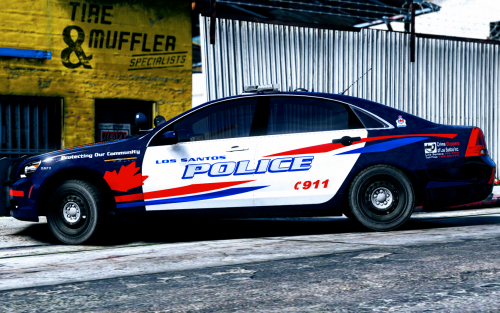 @harrison90 Hey I love this pack! Would you mind doing a version for this car?
- 23 comments
- 12 reviews
-
-

- 1
-
-
-
Well I still have one more idea... It could be the Compression Method. I'm trying to downsize some unused files, and do a Normal Compression rather than Ultra. I'll link again once that's done. Okay, here's the new link. Simply called "PoliceScanner". Also, it could be a program issue. For reference purposes, I'm using 7Zip on Windows 10. https://mega.nz/#!4AMSgaoQ!v7xGWoliS2SyBH2aT9wG2RXdPLBG_4Q1kexUQ4QBazE
- 311 comments
- 39 reviews
-
Damn... Not sure what it could be. If it were plausible I'd just upload the files one by one to you, but there's hundreds lol.
- 311 comments
- 39 reviews
-
-
Okay, here's the Mega.nz link. Choose "Download Through Browser" and with my fingers crossed... It should work. https://mega.nz/#!0IkkwLJC!Ed7pj7zur2d0UftBB0E4n-QBQjabQUmuEDfzHbY-5Ig
- 311 comments
- 39 reviews
-
Hmm... Not sure.. But I'll go ahead and create a Mega.nz link for ya in a few minutes, and we'll see if that works.
- 311 comments
- 39 reviews
-
 Hey @Albo1125 just a quick question... I've got an odd and random bug that leaves a blip flashing for a previously "grabbed" ped. Just wondering if it's a known issue, and what exactly I'm doing to cause it. Thank you in advance. How it happens : Arrest Ped Shift + T to grab. (Yellow blip begins on Ped) G to place in vehicle Call for Transport Ped leaves as usual, blip occasionally remains however, in the last spot the Ped was prior to being picked up and cannot be gotten rid of as far as I know. Attempted several "CleanUp/CleanWorld/ClearTasks" commands in the Console, but none of this has worked yet. Again, thank you for any advice.
- 1,915 comments
- 242 reviews
-
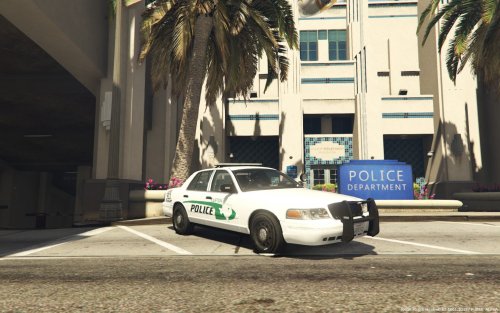 Looks great! You had me at Texas
 -
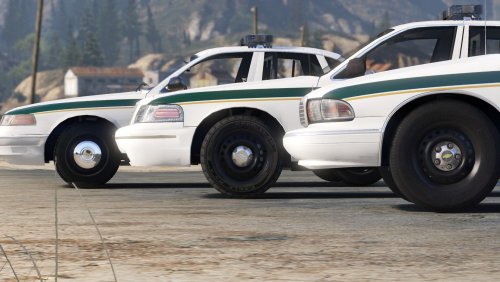 You know, I was just thinking today that "I would love to see an ELS enabled 90's Caprice." I'm glad you released this man, it's exactly what I was looking for! Models are great, lightbars are great, skins are great, and lighting patterns are great. Love it! 5/5
- 60 comments
- 14 reviews
-
-
- 2
-

