



Original Light
Friends of LSPDFR
-
Joined
-
Last visited
Everything posted by Original Light
-
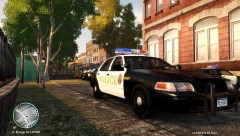 Where did you get that car? Also, does it have Steady Burns? Thanks in advance.
 -
Hey guys, I just decided to go back and play GTA Vice City on the Xbox 360 (it can play the older Xbox Games), and for a couple of years now, there has been a song in the game I always wanted to know the name of. It's in the drug deal clip where you know who dies. Skip to 3:58 in the video to hear it. Listen carefully, as the helicopter and talking overpower it slightly. It sounds like something from Miami Vice, but I'm not sure. It's not in any of the in-game Radio Stations that I know of. I think it's catchy... I would do aything to know the name of it. Any ideas? Thanks in advance, -Nick
-
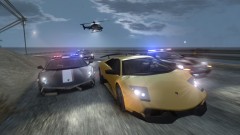 Looks great, and looks like NFS: Hot Pursuit (2010).
 -
I use Fraps (Trial Version) Download Link: http://www.fraps.com/download.php "Print Screen" never worked for me, I always got a black picture.
-
For shooting automatic wepons, I would recommend firing in short bursts. This will reduce bullet spread. Also, always aim for the head. Though, this is for Story mode only, as in most cases in LCPDFR, you want to keep criminals alive. Unless you're in a shootout or another hostile situation.
-
Run it as Administrator.
-
Have you tried using the Diagnostics tool? If not, download it, and post you results here.
-
I think it's all random. If you want more crimes, just keep pressing ALT + F11.
-
R.I.P I wonder what would happen if he killed all 7 Officers in the Department? They sure would have to find some replacements fast... Or they would have to find a few Officers from another Department to patrol.
-
Are you using Windows 7? This is a known version for some versions, can't remember which one. Either 32 or 64 bit. There is a way to get by it, if I find the topic, I'll let you know. But then again, I may not be right.
-
LCPDFR does not require internet to work. You can choose xliveless in the LCPDFR installer. Post your Specs, as GTA IV is a power hungry game. GTA IV doesn't like old computers. GTA V is not out yet, so we don't know if it works on Windows 7, or if LCPDFR will even be possible with GTA V (I hope it is).
-
Okay, there aren't any pics or any Diagnostics in the post. Or I'm going blind.
-
Well... you should upload the picture then... but you're not giving me anything to go off of, so I can't help you unless you give me more information, whether it's by a picture or posting results from the Diagnostics tool. Also, did you try using the Left ALT when starting LCPDFR?
-
Try using the Left ALT. Use the LCPDFR Diagnostics tool: After you use it, post your results here.
-
You are using the left ALT, not the one on the right hand side, correct? When using LCPDFR, you should complete the first mission in the game before using it (The Cousins Belic: GTA IV, Clean and Serene: TLaD, I Luv LC: TBoGT)
-
Try using ELS V5. Many people have said it's more stable, but I've never used it (I use V6). ELS V5: http://gtapolicemods.com/downloads.php?do=file&id=1379 That's all I know. Sorry for not being able to assist you further.
-
Do you have Simple Native Trainer? A Mod that lets you do... you name it... in the game. Car spawner, Object Spawner, Ped Spawner, and crazy shit. So you don't have it? I'm not sure if this would have anything to do with it, but is your game up to date? (Patch 1.0.7.0 for GTA IV and 1.1.2.0 for EFLC)?
-
You have to open the Trainer in-game (press F4). I don't know how I can explain it any easier... Start the game, press F4 when the game is loaded, turn Caps Lock on, press Num Pad 5 (which is like the enter key when browsing the trainer), scroll down until you come across "Disable Keys". Edit: Scroll down with Num Pad 2 and go up with Num Pad 8. *******EDIT: Try using F3*******
-
Okay, you have to Open the Trainer in-game, (press F4). Also, Staff members here don't like it when you double post, especially quadruple posting. There's an Edit button on the bottom right corner of your post.
-
What department is it? If you find that out, you will be able to narrow down results and have a greater chance of finding it. The vehicle may already be out there (that CVPI with that lightbar) but the person who made the video created a custom skin for it, meaning that it's not released. You should ask the person who created the video, unless they are very well known, and won't reply to PM's, since they probably get one every minute.
-
It would be cool. I think there is already something like that, but maybe not exactly like it.
-
You have to disable key shorcuts for the trainer if you are using a trainer, if you do that, you will be able to call for back up and do anything else LCPDFR related without the trainer also sharing a command, ex; spawning a car when calling for backup.
-
You are pressing "J" to turn on Primary, "K" to turn on secondary, "L" to turn on take-downs, and ALT+M to open the ELS Control Panel, correct? You have an ASI Loder, Scripthook, etc...? If you are using a trainer, you have disabled key shortcuts by going to Options>Disable Keys?
-
Are you using a Trainer? If so, go to Options>Disable Keys. This will disable the key shorcuts that LCPDFR uses.
-
Try backing up your cdimages (vehicles for the most part) so when you have the new copy, you don't have to reinstall every car mod again. Unless it was a corrupt vehicle file. Also, click on your GTA IV Folder, right click and select Properties, and go to Previous Versions. If you have an older time/restore point, you can make your GTA Folder the way it was a few days ago, a month ago, etc... So if you do that, you may not have to reinstall at all. When ever my GTA isn't working, I always restore it to an earlier time period. Just throwing in my two cents.
