



Original Light
Friends of LSPDFR
-
Joined
-
Last visited
Everything posted by Original Light
-
Pictures of non-police vehicles.
-
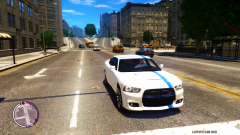
From the album: Vehicle Pictures
Driving EVI's 2012 Dodge Charger. If you want the ENB I'm using, feel free to PM me. -
I agree with you 100%. It also looks more like the Crown Victoria, if at all. The lights just look so much better. Now the only thing they should do is replace those ugly tail lights. It looks like they're trying to copy a Honda or something, give it a more "American" look if you know what I mean.
-
 Yes, it is TBoGT.
 -
You're welcome man, enjoy.
-
Go to the in Game Graphics menu and turn "Definition" on. You can also press P in game to turn blur on/off.
-
One thing I'm wondering is... wouldn't you know the issue if you were a coder?
-
Make sure your GTA IV installation directory is not set as read only. This is a common issue, so you should have looked around before posting this!
-
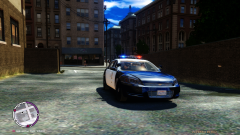
From the album: Police Vehicle Pictures
Leaving the lot in EVI's LAPD Impala with the steady burns glowing. -
Have you tried using 0.95? Or are you having the same issue with that?
-
Ha, its up to you. I'm sorry I couldn't find a better one for you, but that's all I can find. GPM messed up all the links with the constant upgrades, so I can't find the one that's really good. If I ever do find it again, I'll shoot you a PM if that's okay with you.
-
Change the car.defaultlight.emissive.on to a higher value, I currently use 137.50.
-
Here, try this: http://www.4shared.com/file/259379956/f51248ea/New_Rumbler_Sirens.html Video before you download it: http://www.youtube.com/watch?v=v2-7AT9uQL4
-
We don't know when the new LCPDFR comes out. Only Staff members know. If you're having trouble with LCPDFR, you should go in the support section.
-
Nice! But the one in the video seemed slower, or it's my mind playing tricks on me... It's still great, you got yourself another downloader.
- 22 comments
- 6 reviews
-
There was one a while agon on GPM, but there are many dead links to mods now that don't work. If I find it, I'll give you a link. Edit: Use the one above me. I got beaten to it.
-
Cool! Can't wait! Man, it looks really awesome.
-
Not really, all you can do is remove the "scripts" folder from your game directory, until you're done with a certin mission or what ever you're needing it for.
-
Thanks. +1
-
Same here! I like it, and it isn't overkill like most ENB's. Nice and simple, and clean looking.
-
Does it work okay with LCPDFR? Or do you get the Police Computer glitch?
-
You don't have to ask them to edit it, you just can't upload it without their word. So you can edit it without asking, but don't upload it anywhere.
-
May I ask how you got those crispy clean, clear graphics?
-
Can you try changing it into WAV before puting it in IVaud?
-
If I remember correctly, you have to use IVaud. Since you can't import files into the resident.rpf with Spark IV or Open IV. @OP Creating a siren can be difficult, and most people have trouble with it. I'm just giving you a tip that you need patience.

