Sam
Community Founder
-
Joined
-
Last visited
Everything posted by Sam
-
Exceptions during the vehicle spawn selection are absolutely nothing to do with LCPDFR. If there is an exception during the selection, this simply means that the script couldn't load the vehicle, which is usually a result of the game trying to load horribly unoptimized or really large car mods/corrupt vehicles. You can use the preload models setting in the .ini file to fix this somewhat.Nope, we can't really do anything about that without Lt.Caine's help, but he is concentrating on his real life at the moment, so there's nothing that can be done.
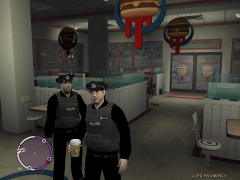 I quite liked the other skins that you posted, but I'm not too sure about these ones. The grey on the vest looks too light in my opinion - it should be a lot darker. That said, regarding your upcoming British pack, it simply wouldn't be complete without the Scottish capital, so I'd like to see you attempt some Lothian and Borders Police skins.This looks like a problem with the .net scripthook, as something is obviously preventing it from running and loading the script. It's most likely that one of its dependencies is missing, so make sure that you have this http://www.microsoft.com/downloads/details.aspx?FamilyID=a7b7a05e-6de6-4d3a-a423-37bf0912db84, and this http://www.microsoft.com/download/en/details.aspx?displaylang=en&id=17718AREA LIVERY MOD BRIEF SUMMARY The Area Livery Mod (ALM) is a simple modification that allows you to restrict the liveries on certain modded vehicles to certain areas of Liberty City. Basically, this script allows you to set up vehicle paintjobs exactly to your liking, with the ability to have different paintjobs for Alderney, Algonquin, Broker/Dukes, Bohan, Port Tudor and Francis International Airport. MAIN FEATURES The ability to restrict all four liveries of any car in GTA IV/EFLC to certain areas of Liberty City ANYTHING ELSE This script requires the .NET ScriptHook for GTA IV, please see: http://www.gtaforums...howtopic=392325 This script functions automatically and contains an .ini configuration file where numerous livery related settings can be customized.
- 30 comments
- 38 reviews
-
-

- 1
-
To disable the responding vehicles, use the following value in the .ini file. ChanceOfRandomDispatch = 9999Terrifying....Absolutely no bug reports have been missed, most are already in the hub as reported by testers, and for those that aren't, we ourselves are aware of them.Is this a rhetorical question?Sorry about that, it should work now.I don't like the graphics mod, it looks like it slows down the gameplay and causes drops in the FPS which spoils the video a little imho. Other than that, its pretty cool.It's Liberty City -- if you pulled over a cop, I think they'd shoot the shit out of you in retaliation.Check your internet history for the YT page?Not really, the mod will still work without completing the first mission, but you will fail it after going on duty and be forced to restart the mission again, so you should complete it. Now that you have reinstalled the game, reinstall the mod as well and then post your diagnostics report.It clearly states in the Support forum and when making a post in the Support forum that you need to follow the Support Forum Guidelines. We really can't help you quickly and efficiently if all you do is post what your problem is as we need information about your system configuration and the data from your log dumps. Please comply with the relevant procedures for the support forum when posting in it, and reply to this with the required information as set forth below. http://www.lcpdfr.com/cops/forum/forum-20/announcement-5-need-support-read-this-first/ChanceCrimeIsComittedMultiplier relates to call-outs only, it controls how likely it is that a new call-out will be generated, after the minimum time between call-outs has been reached. DelayBetweenCalloutsMin/MaxSeconds do what they say on the tin (the script will wait the minimum amount before using random functions and the multiplier to generate new call-outs at random and will force a call-out after the maximum time has been reached. MaxNumberOfWorldEvents controls how many simultaneously running world events there can be at once. Changing this setting to higher values will have limited effect as the mathematical calculations involved in generating new world events are designed to generate them quite infrequently. Setting this to a lower value will reduce the limit, and setting it to 0 will disable world events. PreloadAllModels is intended for those who use car modifications - it pre-loads models into the game's memory so that they can be quickly accessed when needed.You can view the model in the newer versions of OpenIV which displays a poly count. As a general point, most Crown Victorias contain anywhere between 120,000 polygons, to 160,000, whereas the default police vehicles have around 14,000.Lmao, that's one of my worst typos to date :D Regarding the original subject of discussion, before we all started destroying our property through involuntary laughter and its associated side effects, I reckon we could probably work out some sort of system that would allow you a degree of freedom in the megaphone stuff, maybe something like most people will pull over when lights/sirens are activated, but some won't and will need you to press a key to use the megaphone to get their attention?I don't think so, my guess is that if you delete the lines, SNT will recognise that they are invalid and just use default ones.If you use the SHIT key with the light mode 3, it shouldn't play the megaphone speech.PPM cheat is still enabled, yes :)