




Sam
Community Founder
-
Joined
-
Last visited
Everything posted by Sam
-
d = vt PLS I CAN HAS COOKIEZ? :D
-
Jokes are meant to be funny though :S
-
We try to be as relaxed as we possibly can be when it comes to forum moderation, although recently there has been a bit of a spike in terms of stupid and irrelevant content (like this), so you will also see a spike in the amount of closed topics.
-
Hey, you're a bit of a celebrity now dude. I suppose when we make you a moderator, at least everyone will know who you are!
-
I would ban you, but you're providing too much comedic entertainment at the moment. I need to sell the rights to this to some network executives.
-
I guess we can learn 3 things from this then. 1) It's not a very good idea to demand moderator status after just registering on a forum, especially when you don't even know the rules of internet forums. 2) Flaming members and the site as a whole really doesn't do anything to increase your already rather slim chance of becoming a moderator. 3) Hilarity ensues when Tom H goes into teacher mode.
-
I don't see your problem, you came on the forum, you asked to be a moderator, and it didn't go so well. Be happy that we at least allow you the freedom to make silly posts like you do, why don't you go over to www.invisionpower.com and ask to be a moderator, and then when you get ridiculed by the community, why not post an "Invision Power Services sucksI as" topic, and see how many minutes it takes you to get banned?
-
Sorry for the belated reply, but better late than never. I used to play football (soccer for you Americans) a while back as a goalkeeper, and I also played hockey for a short while too. I play the occasional game of badminton and short tennis, although just for fun and nothing else. I don't watch much in the way of sports, although I do quite enjoy watching the Rugby Union Six Nations, and the FIFA World Cup when they come around.
-
Topic reopened, spam bots dealt with.
-
-
It's not really possible to add a spotlight.
-
You can kill people in the game, why should dogs be given special treatment?
-
It's Liberty City, not NY, there is about 100x less traffic in LC, I don't see how pursuits aren't plausible?
-
-
The possibilities offered by this are only really restricted in terms of how much I can code in. Basically, you have a system where you are just drawing lights at a position within the game, so the things you can do with it are pretty awesome. You could easily change the light size, colour, position and pattern ingame. Also, as these are just proper GTA IV lights being drawn at a position in the world, they are not bound to any extra parts or anything, meaning there is much greater flexibility as far as patterns are concerned. You could also easily create a visual difference between different types of lights, as you could have a strobe system where the light starts out small, gets bigger, and goes smaller really quickly, or you could have an LED system where you just have the lights going on and off. As for multiplayer support, as long as everyone uses the same settings then it would be fine. At this point in time, I'm looking for some ideas from car modders about the best way to design this system. The way I see it, it would have a .ini file where you could add the car model in square brackets, and then you could have a bunch of options under that. Hopefully I can create some way of making and positioning lights ingame, so that when your car is done, you can just create the lights and patterns for it ingame, in a similar fashion to the simple native trainer's object spawning/attaching. This would take a while to do however, and it would probably have to wait until after 0.95.
-
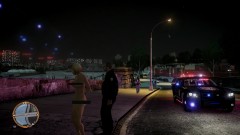 You kinda failed at censoring her boobs, dude. I don't even know why you would go to the effort anyway, it's a pixelated reskinned character - no need to censor.
 -
Reflections are already in the script, you can see them in the screenshots. Again, to change the colour all you would have to do is edit a value. Furthermore, instead of the reflections just being generated from a point above the car, these reflections would actually be generated from where the light is.
-
-
-
-
After a pretty major code rewrite, ELS-DN is now beginning to take shape and I think it is at a point of functionality where I can begin to show some of the stuff it can do. As promised a few weeks ago, I do plan on getting some video footage out, although that will require some of the front-end (controls, displays, etc.) to be complete which might take a little while. As posted in the gallery a few hours ago, this is the latest screenshot of the code in action: What ELS-DN can currently do: Load vehicle configuration files Load pattern configuration files Process user-defined patterns Support up to 50 user-defined lights per car Support AI vehicles Simulate rotating beacon (almost fully) and LED lights (partially) Dynamically and automatically create environmental lights Flash the headlights and taillights individually (this has some problems which LMS is working on) Display an exact replica of the ELS display panel (uses the same exact code - Lt.Caine has been helping with this) Vehicle configuration files: Probably one of the best bits about ELS-DN is the vehicle configuration files. They work by creating a folder in scripts/ELSDN called Vehicles, and then creating a new folder for each vehicle inside there. Inside each vehicle folder is a configuration file and a patterns folder which contains three separate folders for primary, secondary and warning patterns (those of you who've used ELS will be familiar with these). The vehicle configuration file stores everything about the vehicle itself, including up to 50 custom light definitions (meaning you can create some really hideous Christmas trees), the model which the config file is assigned to and the default patterns for it too. Vehicle configuration files are designed to be easily shared, all you have to do is plop the vehicle's folder into your Vehicles folder and it's ready to go. Pattern configuration files: The pattern configuration files allow you to make your own fully customisable patterns. A pattern is either primary, secondary or warning in type and is assigned to a specific vehicle. This means that every vehicle has its own patterns folder with its own patterns. Next steps: Unfortunately there's a lot of work that needs to be done on the user interface, in particular the controls and adding stuff like the ability to browse through patterns, etc. On top of that, I need to complete support for different light types (LEDs and bulbs) and then think about siren controls, which may or may not make it into the first version. Hopefully, though, I should have some sort of video to show fairly shortly.
-
Yes, we did.
-
-
The Naked Gun series is pretty awesome.
-
Jim Brass my ERP and FCRP buddy?


