Skip to content
View in the app

A better way to browse. Learn more.

LCPDFR.com

A full-screen app on your home screen with push notifications, badges and more.

To install this app on iOS and iPadOS
  1. Tap the Share icon in Safari
  2. Scroll the menu and tap Add to Home Screen.
  3. Tap Add in the top-right corner.
To install this app on Android
  1. Tap the 3-dot menu (⋮) in the top-right corner of the browser.
  2. Tap Add to Home screen or Install app.
  3. Confirm by tapping Install.

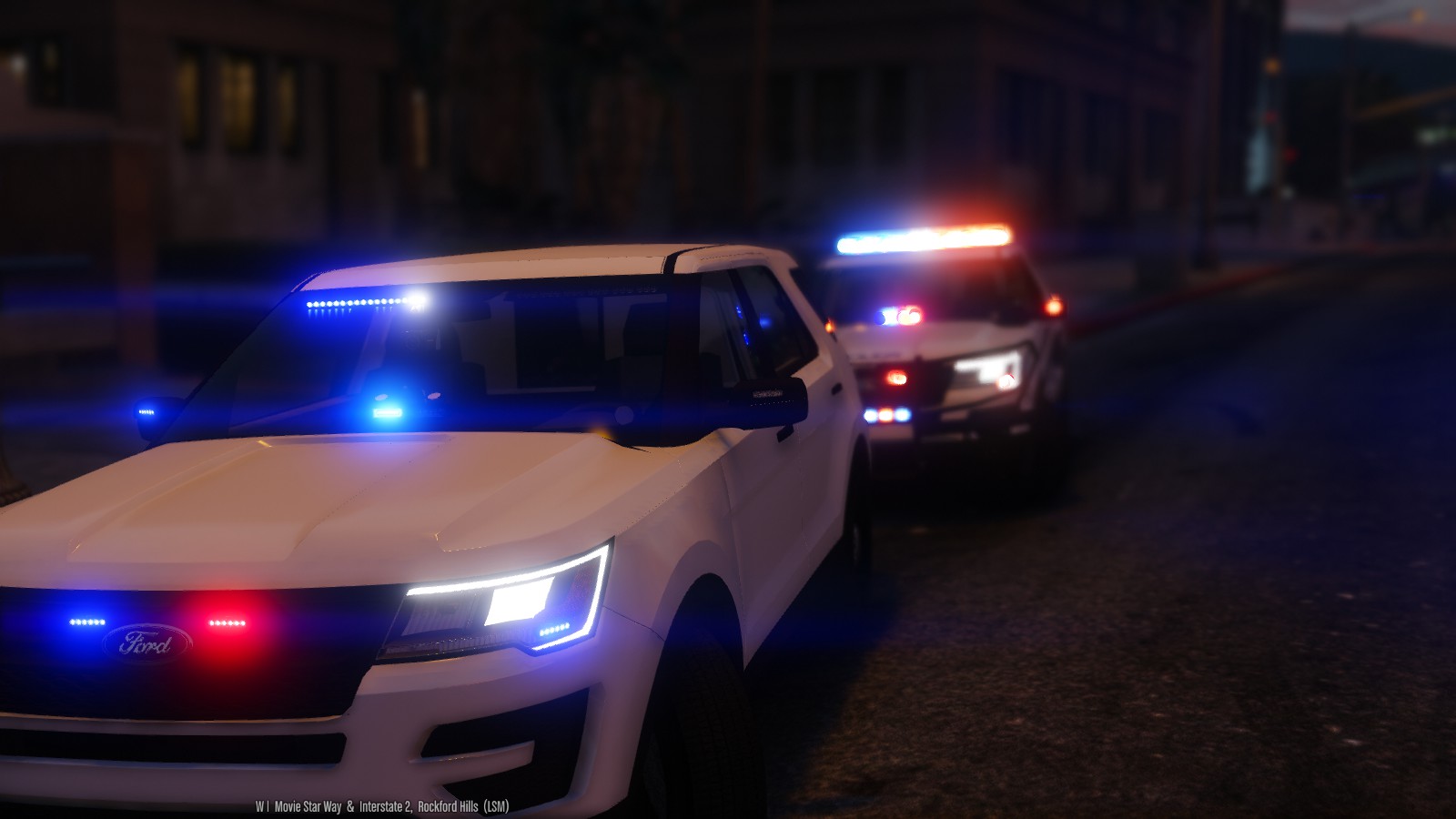
2016 LSPD FPIU 1.2.0

(67 reviews)

10 Screenshots


THIS MODEL IS NOW OUTDATED, AND I DO NOT RECCOMEND USING IT! I HAVE UPLOADED A BRAND NEW MODEL

OF THE 2016 UTILITY WITH A HQ INTERIOR, WITH GENERALLY THE SAME LIGHT SETUP. FIND IT HERE:


MODEL OVERVIEW
=================================
- NAME: 2016 LSPD FPIU
- VERSION: V1.0
- EXTRA PARTS: N/A
- OPTIMIZED FOR: ANY 

!!!!!IMPORTANT NOTE!!!!!!

iF YOU WISH TO HAVE THIS VEHICLE AS ANY OTHER SLOT YOU MUST INSTALL THE FILE 
NAMED: use this file to make any slot act like sheriff2

IF YOU DO NOT USE THIS FILE, THEN THE VEHICLE WILL NOT LIGHT UP PROPERLY

Instillation Instructions
=================================
To install this model, all you have to do is just put it in 
Mods>Update>x64>dlcpacks>patchday9>dlc.rpf>x64>levels>gta5>vehicles.rpf

To install the CarVariations line, all you have to do is go to:
mods\update\x64\dlcpacks\mpvalentines2\dlc.rpf\common\data

Add what i put in the carvar.txt to the end of your carvariations.

If you dont have patch day 9 in your mods folder, then just copy it from the base files

Extras List
=================================
Extra 1: Hood Interceptor Text
Extra 2: Whelen Inner Edge 
Extra 3: Whelen Legacy
Extra 4: Westin Rambar
Extra 5: Rambar Wrap Lower
Extra 6: Rambar Wrap Upper
Extra 7: Spotlight
Extra 8: Traffic Advisor 
Extra 9: Boot Whelen Ions

Model Notes
=================================
- "YA FUCKIN CUNTS" -Goose, The man who Flys

- YOU MUST HAVE RADIANCE V INSTALLED FOR THE LIGHTS TO HAVE BLOOM AND LOOK GOOD!!!!!!!

- This is probably one of the most customizable vehicles i have ever made, and it actually features
the use of every single siren available to GTA V.

- There has been over 30 hours to get this vehicle to be in its current state. There are a few small bugs,
but they aren't too noticable.

- The interior is nothing how I want it to be, which is unfortunate but I have nothing better to put in the 
vehicle.

- If there are any bugs with the model, please feel free to let me know.

- This model is very highpoly, around 220k pollys. The file size is also on the larger size, around 6.5mb,
I apologize for this.

- I have included Multiple skins that you can install with the model, or you can install them all if you want to. 
**To install the skins, you must name them explorer_sign_# (replace # with whatever number you want)**

- All skins are in 4k, so adding them all will increase file size

- The file size of this model is quite large, as is the poly count (220k). If you cant use the vehicle, i'm sorry
but i cant make it any lower for what i have on the vehicle.

- Please check the extras folder for anything you need with the model, including templates, extra files, etc...

- A huge thank you to everyone who made this vehicle possible to convert; Jasonct203, GTAxB0SS, and IronicRainbow

- Enjoy! And before you ask, yes i will be doing a 13-15 Utility with a lightbar.

Disclaimer
=================================
-You are not to attempt to modify or rip this model in any way shape or form.
-I (Thehurk) am not resposible for any damages done to your game. Please make a backup of any edited files!
-Do not attempt to make a profit off this model in any way shape or form.
-Do not upload this file to any other site, claiming it as your own. 
-Do not re-upload this file, make a link to it.
-If you want to use this file in a clan, PLEASE ask me before doing so. 


Enjoy!!

BEAUTIFUL video of the utility by MrOxPlay


visualsettings.dat

What's New in Version 1.2.0

Released

- Updated lights not being bright at a distance
- Updated headlights/running lights

User Feedback

Recommended Comments

AMSAGENT000

Members

@Thehurk It's me again. Thanks for adding the spotlights :)

Any chance you could add some screenshots of the interior? 

baba76

Members

Ok, I try it, thank you.

Thehurk

Members Author

4 minutes ago, AMSAGENT000 said:

@Thehurk It's me again. Thanks for adding the spotlights :)

Any chance you could add some screenshots of the interior? 

Probably not, the interior is almost the exact same as my 13-15 Utility

officerAMR

Members

Thanks for adding police vehicle that aren't a CVPI to GTA V. I was getting a bit fed up of Crown Vics and Chargers 

Lazerus

Members

"no words....no words" *little tear falls from his eyes"


Azteco

Members

Looks very sweet. Ironic this morning 2 brand new Ford fpiu were delivered and sat at the bay and now this. My day has been made. Can't wait to try the model out. 

PoliceWomen

Members

the files its sheriff2  not policeold cari and handling not works  lights its white

MarshallSantini

Members

(edited)

Very nice! But what does component 8 do? I see it says traffic advisor, but for me, its already in the rear window. I keep adding and removing it but Im not seeing a difference. Also, for me everything works, except the visor bar. I installed in police in the default 64e, with the carvariations in the valentines2.

Edited by Marshall8946

Ravalli

Members

I love this car!!!!

But do have 1 question. I did a random spawn of this vehicle hundreds of time, but it would only spawn the roof lights 5-10% of the time. Anyway I can have them spawn all the time? Reason I ask is for the backup units coming with not having lights on top. Thanks!

kcoynejr

Members

Can you make a video for if you want to put the vehicle in a different slot? Also you said that it will act like sheriff2 if put in a different slot. Will it have the sheriff2 siren as well. 

Thanks best vehicle for lspdfr imo!

thegreathah

Friends of LSPDFR

2 hours ago, Marshall8946 said:

Very nice! But what does component 8 do? I see it says traffic advisor, but for me, its already in the rear window. I keep adding and removing it but Im not seeing a difference. Also, for me everything works, except the visor bar. I installed in police in the default 64e, with the carvariations in the valentines2.

It changes it from amber traffic advisor to just red and blues.

MarshallSantini

Members

1 hour ago, thegreathah said:

It changes it from amber traffic advisor to just red and blues.

Oh, I kept looking at that but it didnt do that for me. It always stays red/blue.

connn911

Members

Great car! In the future could you add the feature for making the in game tinted windows work?  

Thehurk

Members Author

3 minutes ago, Marshall8946 said:

Oh, I kept looking at that but it didnt do that for me. It always stays red/blue.

You I'm guessing you didnt install the file named: use this to make any car act like sheriff2, When installing it make sure to change the slot that the lines youre installing to whatever slot you want to replace.


42 minutes ago, kcoynejr said:

Can you make a video for if you want to put the vehicle in a different slot? Also you said that it will act like sheriff2 if put in a different slot. Will it have the sheriff2 siren as well. 

Thanks best vehicle for lspdfr imo!

It's not hard, rename the file to whatever slot you want to replace, Then install the Lines in the file stated up above and replace the slot to police3 for instance.

3 hours ago, PoliceWomen said:

the files its sheriff2  not policeold cari and handling not works  lights its white

What...?

MarshallSantini

Members

1 hour ago, Thehurk said:

You I'm guessing you didnt install the file named: use this to make any car act like sheriff2, When installing it make sure to change the slot that the lines youre installing to whatever slot you want to replace.

I already did. I replaced Police. I then replace the text line in carvariations to police. Do you know then if police pulls from a different carvariations?

Thehurk

Members Author

3 minutes ago, connn911 said:

Great car! In the future could you add the feature for making the in game tinted windows work?  

The only reason why i don't do this on 90% of my models is because they all have window templates. If you wanted to tint the windows, just go into that and change the windows.

It shouldn't im not sure where it would man, i've searched before and never been able to find it. What you could do and all you really need from the file is where the lines say <sirenSettings value="1" />

1 minute ago, Marshall8946 said:

I already did. I replaced Police. I then replace the text line in carvariations to police. Do you know then if police pulls from a different carvariations?

It shouldn't im not sure where it would man, i've searched before and never been able to find it. What you could do and all you really need from the file is where the lines say <sirenSettings value="1" />

Thehurk

Members Author

5 minutes ago, nt51 said:

-snip-

I love you nate

MarshallSantini

Members

Thank you guys, I fixed the problem. It was my own stupidity. out of repetition I placed everything in the vehicles meta like most other vehicles would have needed to. It wasn't until I went back and checked I realized that.

Thehurk

Members Author

18 minutes ago, Marshall8946 said:

Thank you guys, I fixed the problem. It was my own stupidity. out of repetition I placed everything in the vehicles meta like most other vehicles would have needed to. It wasn't until I went back and checked I realized that.

I'm Glad you got the car working

bingo16166

Members

does anyone know how to replace it police3? if so can you make a video on how to do it please

Thehurk

Members Author

50 minutes ago, bingo16166 said:

does anyone know how to replace it police3? if so can you make a video on how to do it please

Replace the name of the lines that the slot that the carvar.txt to police 3 and foilow the instructions


keger

Members

It may just be me, but your model appears smaller than the other FPIU out there. Is this the case, or is the 2016 model just smaller then previous years? 

AMSAGENT000

Members

@Thehurk If everyone chipped in, I assume you could upgrade the interior with an HQ model? 

PoliceWomen

Members

(edited)

help my lights its white installed the car into patchday9 carivations meta sheriff 2  drop into mpvalentines2 common data ...

GTA5 2016-04-19 09-23-26-51.png

GTA5 2016-04-19 09-23-29-43.png


would anyone give his carvarations meta where are lights in blue red I despair just ... 
do not know where the next fault could be thanks


GTA5 2016-04-19 09-32-31-15.png

GTA5 2016-04-19 09-32-34-90.png


so all again but now is something wrong with the colors -.-

Edited by PoliceWomen

Create an account or sign in to comment

Account

Navigation

Search

Search

Configure browser push notifications

Chrome (Android)
  1. Tap the lock icon next to the address bar.
  2. Tap Permissions → Notifications.
  3. Adjust your preference.
Chrome (Desktop)
  1. Click the padlock icon in the address bar.
  2. Select Site settings.
  3. Find Notifications and adjust your preference.










