
Skip to content
View in the app

A better way to browse. Learn more.

LCPDFR.com

A full-screen app on your home screen with push notifications, badges and more.

To install this app on iOS and iPadOS
  1. Tap the Share icon in Safari
  2. Scroll the menu and tap Add to Home Screen.
  3. Tap Add in the top-right corner.
To install this app on Android
  1. Tap the 3-dot menu (⋮) in the top-right corner of the browser.
  2. Tap Add to Home screen or Install app.
  3. Confirm by tapping Install.

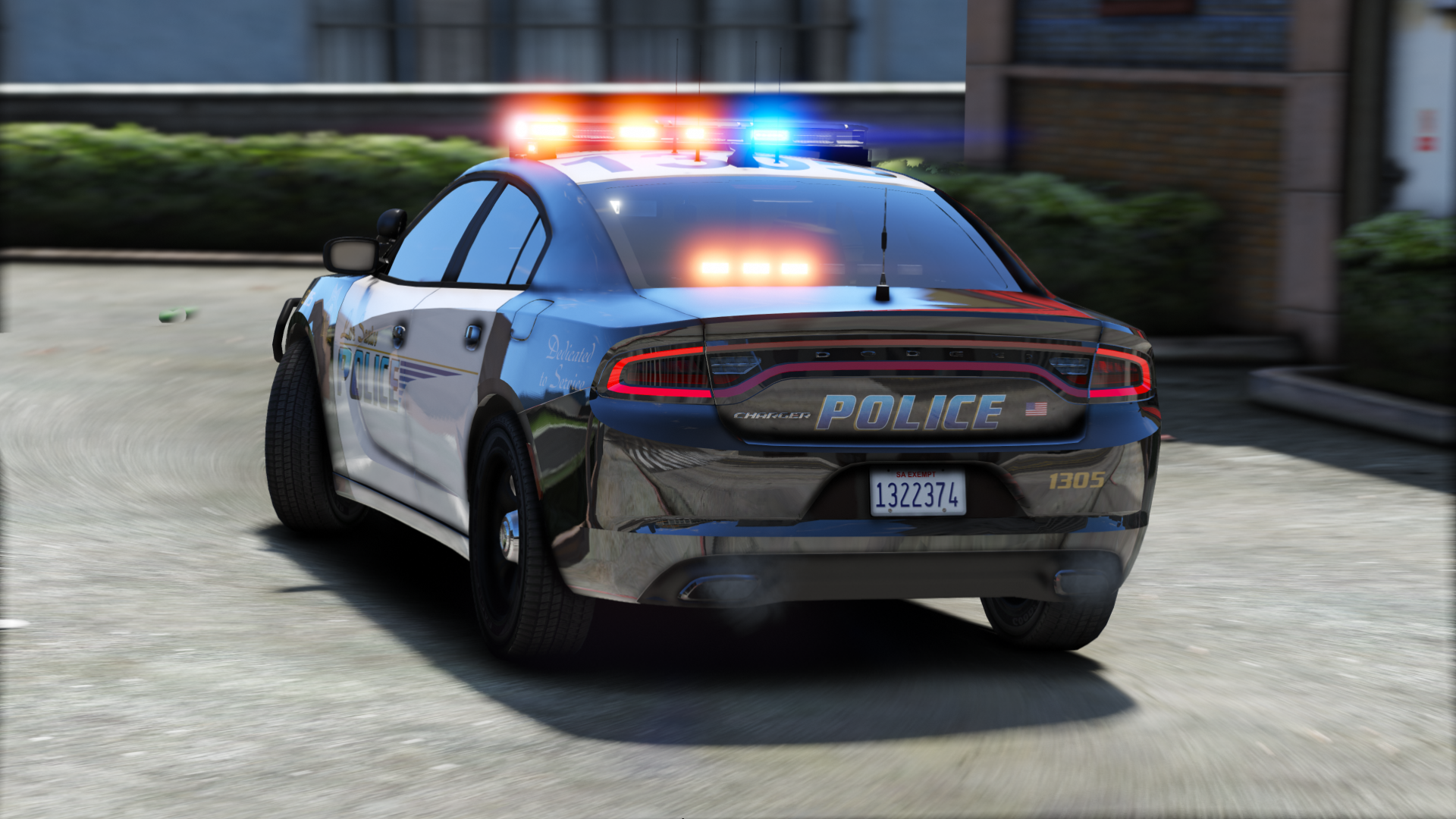
LSPD Pack [ELS] 4.0

(59 reviews)

16 Screenshots

We haven't gotten an upload from that loser hah in like 2 weeks... Where is he?


Contains seven sexy vehicles, outfitted with a good amount of lights, and sexy skins from Getinmybelly! 


Please lemme know if I missed a credit!

What's New in Version 4.0

Released

-Redid much of the 2016 FPIU (Push bar is also an extra now)

-Fixed dirt mapping on FPIU

-Added window tint to 2014 Charger

-Added partition to 2015 Charger


Note: I messed up the screens for the FPIU. There are dual spotlights despite what it looks like on the screenshot.

User Feedback

Recommended Comments

thegreathah

Friends of LSPDFR Author

1 minute ago, Schecter004 said:

Cars itself looking good.

Love the lightbar.

But i don't like the dash lights. In my opinion the lights are over the top.


2 minutes ago, Slendis said:

You made my favourite vehicles! Can't wait to try these out!


Just now, TacticalPotato said:

Great Job man keep it up!!!!

Thanks guys! 'ppreciate ya 

motive007

Members

I'm not seeing any els vcf files in download just the 3 car models template read me and credits?

fucken great cars love em just idk where els files are


thegreathah

Friends of LSPDFR Author

7 minutes ago, OfficerSwag said:

The vehicles look great but the VCF files aren't in any of the folder


12 minutes ago, motive007 said:

I'm not seeing any els vcf files in download just the 3 car models template read me and credits?

fucken great cars love em just idk where els files are


Oh shit. Sorry guys!

Chris B.

Members

(edited)

Gonna beta test some new unreleased stuff using your cvpi. Nice work bud, really good job.


@thegreathahMore the detailed point, thank you for moving the bloody ELS IF to the outside housing of the headlights.

Edited by Chris B 1B 86

OfficerSwag

Members

3 minutes ago, thegreathah said:


Oh shit. Sorry guys!

Thank you for updating it quickly

PantherP71

Members

This is really good!! I am using in game as we speak, but. The light bar is a Little bit too big, I reccomend scaling it down just a tiny bit, since on the Cvpi, the feet are over the door jam where they should just be on the roof :)


OfficerMike32

Members

Vehicle looks amazing!

only question is am I able to take the sheriff looking Star off the car?

J T

Members

(edited)

love the vic and light set up, wish the chargers had dual spotlights like the cv otherwise its a sick pack

Edited by The Knight

thegreathah

Friends of LSPDFR Author

11 hours ago, OfficerMike32 said:

Vehicle looks amazing!

only question is am I able to take the sheriff looking Star off the car?

Of course. Export the skin from the ytd and open it in paint or photoshop. Color over the star, then replace the skin in the ytd


13 hours ago, PantherP71 said:

This is really good!! I am using in game as we speak, but. The light bar is a Little bit too big, I reccomend scaling it down just a tiny bit, since on the Cvpi, the feet are over the door jam where they should just be on the roof :)


Thanks man! I will downscale on the CVPI! I kinda like the way it looks on the chargers though.


12 hours ago, Problematic said:

Holy shit dude. very nice.


12 hours ago, suffixez said:

So damn sexy. 

Thanks bbys


12 hours ago, ringiskong said:

Any chances of adding your Explorer to this pack 

Once I get a new 2016 base (Very soon) I will!


16 hours ago, Chris B 1B 86 said:

Gonna beta test some new unreleased stuff using your cvpi. Nice work bud, really good job.


@thegreathahMore the detailed point, thank you for moving the bloody ELS IF to the outside housing of the headlights.

Thanks man! That IF was suppppper annoying so I moved it. I like it more now!

shadowdiver710

Members

@thegreathah Loving the tahoe's pushbar! While I doubt I had any influence, it still gives me a sneaking suspicion that I had something to do with the tahoe not having a wrap around. 😜

SoarHawk

Members

(edited)

@thegreathah Great pack... seriously really good job and I love the amount of lights. I just had a couple issus / glitches I am facing. On the Tahoe... for some reason there are no plates and also the wheels slightly are cut off or like sinking into the ground (if that makes any sense). On the Charger, when the back doors get damaged they seem to disappear completely. Also, I would love to see some window tints on the Charger. When I try to add them, it makes the lightbar black. Other than that, I'm very happy with this pack. 


Edit: Just looked at the template... the plates are just in a different spot than the normal template I'm used to. So nevermind on that plate issue. 

Edited by SoarHawk

Schecter004

Members

Any chance of a Version without all the windshield lights?

Deactivated Member

Deactivated

Please add FPIU too! Amazing pack <3

minddriver

Members

Hey @thegreathah,

For the moment I am using only police and police 2 from pack and I noticed one small bug with CVPI - front left indicator doesn't work. Also with yours ELS's config in menu all activated buttons are not in orange (default els color for activated). I made a quick screen what I mean.

2017.03.05-22.11.png

manios

Members

Had a suggestion, I'm in love with this pack, and as you know all your other ones as well. Do you think you could add intersection lights in the side rear windows of the tahoe? Think it would look spectacular especially on this setup!

Create an account or sign in to comment

Latest Mods

Account

Navigation

Search

Search

Configure browser push notifications

Chrome (Android)
  1. Tap the lock icon next to the address bar.
  2. Tap Permissions → Notifications.
  3. Adjust your preference.
Chrome (Desktop)
  1. Click the padlock icon in the address bar.
  2. Select Site settings.
  3. Find Notifications and adjust your preference.












