
Skip to content
View in the app

A better way to browse. Learn more.

LCPDFR.com

A full-screen app on your home screen with push notifications, badges and more.

To install this app on iOS and iPadOS
  1. Tap the Share icon in Safari
  2. Scroll the menu and tap Add to Home Screen.
  3. Tap Add in the top-right corner.
To install this app on Android
  1. Tap the 3-dot menu (⋮) in the top-right corner of the browser.
  2. Tap Add to Home screen or Install app.
  3. Confirm by tapping Install.

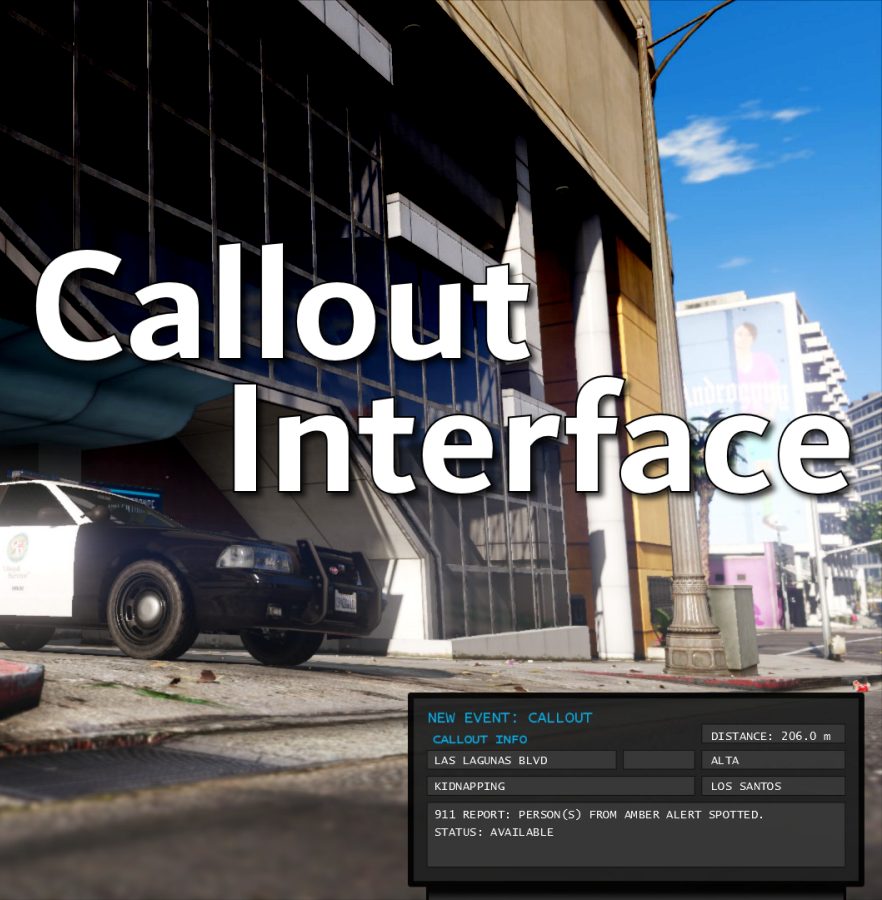
Callout Interface 1.4.1

(46 reviews)

7 Screenshots


Callout Interface
A new way to interact with callouts.
 

Features:

  • RAGENativeUI menu front-end to start a callout
  • Force a random callout via keybind
  • Advanced MDT with multiple status buttons and tabs
  • Callouts can be sent to the MDT while you're on another callout
  • A fully functioning ALPR system with advanced camera layouts
  • External license plate display


Support:
Discord Serverhttps://discord.gg/AuJCUag

Developer API https://github.com/Immersive-Plugins-Team/CalloutInterfaceAPI


Recommended Callout Packs:

686 Callouts  link
Chaos Calloutslink
Super Calloutslink


New in Version 1.4.1


Edited by opus49
added latest dev diary and some new screenshots

What's New in Version 1.4.1

Released

New in Version 1.4.1

Added

  • Dependency checker
  • Hot key for toggling ALPR key on/off
  • Automatic tab switching (when enabled)
  • Automatic blips for ALPR
     

Changed

  • Toggling off MDT will exit interactive mode
  • Delayed and put checks around camera object creation


Fixed

  • Fixed a bug with ALPR debug mode where the graphics would get stuck


New in Version 1.4

Added

  • Realistic multi-camera ALPR system
  • Dynamic traffic stop that nobody someone likes
  • External license plate display widget
  • Silent callout system and log

Changed

  • Completely overhauled the MDT
  • Migrated graphics handling to RawCanvasUI

Short Description

Interface with callouts.

User Feedback

Recommended Comments

Echooo

Members

Love this concept! I always found myself wanting an MDT that you typically see in rp servers for lspdfr, would it be possible to add a description to the call in the MDT? I would love to go into the plugin and be able to make a customized description for every callout that I have installed, as well as have multiple description options per call that the plugin chooses from randomly, would definitely help to add immersion. Kind of like how stoptheped has xml files for questions that players can edit.

opus49

Insiders Author

9 minutes ago, Echooo said:

Love this concept! I always found myself wanting an MDT that you typically see in rp servers for lspdfr, would it be possible to add a description to the call in the MDT? I would love to go into the plugin and be able to make a customized description for every callout that I have installed, as well as have multiple description options per call that the plugin chooses from randomly, would definitely help to add immersion. Kind of like how stoptheped has xml files for questions that players can edit.


That's an interesting idea.  Would you be willing to give me more of an example of what you mean specifically? 

Echooo

Members

1 minute ago, opus49 said:


That's an interesting idea.  Would you be willing to give me more of an example of what you mean specifically? 

In stoptheped there is a bunch of questions you can ask AI, these questions are determined by an xml file in the plugin files that shows the questions and all the possible answers. I notice that this plugin also has pretty much the same functions as callout manager, so maybe there could be a way within the menu or an xml file that you could link a customizable description(s) to each callout that the callout menu sees, and show that description in the MDT. Not entirely sure how this would be done, but if somehow there was a way to do this (preferably using xml files), people in the LSPDFR community can make their own little description packs for various callout packs and upload them to the visual and data section of this site, like how people already upload question packs for stoptheped. 

opus49

Insiders Author

1 minute ago, Echooo said:

In stoptheped there is a bunch of questions you can ask AI, these questions are determined by an xml file in the plugin files that shows the questions and all the possible answers. I notice that this plugin also has pretty much the same functions as callout manager, so maybe there could be a way within the menu or an xml file that you could link a customizable description(s) to each callout that the callout menu sees, and show that description in the MDT. Not entirely sure how this would be done, but if somehow there was a way to do this (preferably using xml files), people in the LSPDFR community can make their own little description packs for various callout packs and upload them to the visual and data section of this site, like how people already upload question packs for stoptheped. 


I'm sorry I should have been more clear 🙂  I understand the technical aspect of what you're suggesting, I meant, what kinds of information would you want displayed?  Like, pick a specific callout you like and give me an example of what additional information would be displayed for it.

Echooo

Members

1 minute ago, opus49 said:


I'm sorry I should have been more clear 🙂  I understand the technical aspect of what you're suggesting, I meant, what kinds of information would you want displayed?  Like, pick a specific callout you like and give me an example of what additional information would be displayed for it.

Maybe for a public intoxication callout there could be a description like "RP reports a person that appears to be incoherent walking around in the street, possibly under the influence" or for a domestic violence call "We have reports of some yelling and screaming at a home, the house has a history of domestic violence" I feel like with some callouts the information given of the call is a bit too basic, and adding a little bit of detail in the form of a description in the MDT could give the player a better idea of what they're responding to, and how to deal with it. Of course since there would be multiple descriptions that the plugin randomly chooses from, sometimes you may get a detailed description of the call, and sometimes a more basic one, and the description of the call might sometimes be slightly off due to miscommunication from the caller and the dispatcher 

opus49

Insiders Author

4 minutes ago, Echooo said:

Maybe for a public intoxication callout there could be a description like "RP reports a person that appears to be incoherent walking around in the street, possibly under the influence" or for a domestic violence call "We have reports of some yelling and screaming at a home, the house has a history of domestic violence" I feel like with some callouts the information given of the call is a bit too basic, and adding a little bit of detail in the form of a description in the MDT could give the player a better idea of what they're responding to, and how to deal with it. Of course since there would be multiple descriptions that the plugin randomly chooses from, sometimes you may get a detailed description of the call, and sometimes a more basic one, and the description of the call might sometimes be slightly off due to miscommunication from the caller and the dispatcher 

Very interesting idea.  Thank you!

MRFLAME's

Members

(edited)

This plugin doesn't work, i don't know why


I installed the plugin as it said to install but it doesn't work, can you help me?

Edited by MRFLAME's

opus49

Insiders Author

13 minutes ago, MRFLAME's said:

This plugin doesn't work, i don't know why


I installed the plugin as it said to install but it doesn't work, can you help me?


Please use the discord server for support.  

Devin Plays

Members

This is a fantastic idea, and I love that you did it. Ill be looking forward to using it in videos in the near future!

Sly

Members

52 minutes ago, opus49 said:

Very interesting idea.  Thank you!

I didn't want to make a separate suggestion in the discord since Echooo had originally suggested it, but building off of this... It would be a cool to have updated notes that appear as you get closer to a callout location, possibly triggered by a radius around the original callout starting point. For instance, as you get closer to a call, the notes for a domestic violence callout update to reflect that the caller saw someone leave the building with a knife and it's no longer just yelling they are hearing next door. This would allow things to feel more realistic for callouts and would make them feel like changing situations rather than "someone just called the cops on this ped and now they are standing there until you show up to react". Even if it's all artificial storytelling, it would add some depth to calls.


Excellent mod and one I'm adding to my "must have collection". Thank you for this and I can't wait to see what ideas stem out of it!  

SlimInAZ

Insiders

Just installed and used it for about an hour, worked like a charm - thanks! Only thing I'd like to see is a line (perhaps smaller text) indicating which callout pack the callout is triggering from. That would help troubleshoot if a particular pack is causing issues or just not working as described.

opus49

Insiders Author

16 minutes ago, SlimInAR said:

Just installed and used it for about an hour, worked like a charm - thanks! Only thing I'd like to see is a line (perhaps smaller text) indicating which callout pack the callout is triggering from. That would help troubleshoot if a particular pack is causing issues or just not working as described.


Thanks! Can you expand on that a bit?  A line where exactly?


SlimInAZ

Insiders

27 minutes ago, opus49 said:


Thanks! Can you expand on that a bit?  A line where exactly?


Perhaps above the distance box or below the description box (at the bottom of the MDT screen).

opus49

Insiders Author

6 minutes ago, SlimInAR said:

Perhaps above the distance box or below the description box (at the bottom of the MDT screen).


I see.  The problem is that the MDT is separate from the menu itself.  The MDT is fed from LSPDFR events when callouts are triggered.  If the menu fails to start a callout, it's probably because that callout isn't registered with LSPDFR, which means there's no event.

chadc78

Members

This is a great start and a welcome addition can't wait to see how it progresses it would be nice to see a operational MDT that you can interact with. Downloading and will be trying later, thank you 

Haze Studios

Members

Few questions, 


Will this work with the normal lspdfr call system? Like if a call comes in without requesting it/forcing it..... Will the window still pop up?


Do you think it would be possible to remove the lspdfr call notification and like add that as an option in an .ini?  

opus49

Insiders Author

3 minutes ago, Syther's Warehouse said:

Will this work with the normal lspdfr call system? Like if a call comes in without requesting it/forcing it..... Will the window still pop up?

Yes.


3 minutes ago, Syther's Warehouse said:

Do you think it would be possible to remove the lspdfr call notification and like add that as an option in an .ini?  

I do not think that is possible.  Those notifications are from LSPDFR itself.


Haze Studios

Members

1 minute ago, opus49 said:

Yes.


I do not think that is possible.  Those notifications are from LSPDFR itself.


Alright thank you!

davidchase911

Members

(edited)

greatz, can you add a setting "Hide a information callout"  ( hide:  holdup )?

sometime i just want hear that. and dont want to see that

and can you hide a basic notification of left down screen?  just only callout interface .


after test , i know some bug : callout interface not be hide after 3sec ?

Edited by davidchase911

opus49

Insiders Author

46 minutes ago, davidchase911 said:

greatz, can you add a setting "Hide a information callout"  ( hide:  holdup )?

sometime i just want hear that. and dont want to see that

and can you hide a basic notification of left down screen?  just only callout interface .


after test , i know some bug : callout interface not be hide after 3sec ?

It will auto hide if you haven't toggled it on.

Lapd Code 3

Members

6 minutes ago, Lapd Code 3 said:

I LOVE IT THX @opus49

hey @opus49 are we allowed to make custom interfaces for this? or will it only take the one thats made for it?

opus49

Insiders Author

4 minutes ago, Lapd Code 3 said:

hey @opus49 are we allowed to make custom interfaces for this? or will it only take the one thats made for it?

Yes as long as the image size is the same and the text boxes line up, you should be able to replace the image.  In fact, I'd like to add the ability to standardize that so people can make their own "skins" and switch between them in game.

Create an account or sign in to comment

Latest Mods

Account

Navigation

Search

Search

Configure browser push notifications

Chrome (Android)
  1. Tap the lock icon next to the address bar.
  2. Tap Permissions → Notifications.
  3. Adjust your preference.
Chrome (Desktop)
  1. Click the padlock icon in the address bar.
  2. Select Site settings.
  3. Find Notifications and adjust your preference.




