





Stalker Dual SL Radar
Demo
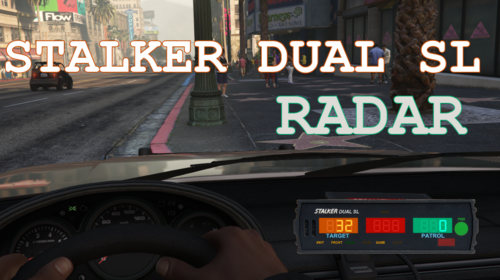
Bring the Stalker Dual SL police radar to LSPDFR and RPH with an authentic recreation designed for immersive traffic enforcement. Inspired by the real radar unit used by law enforcement agencies, this plugin delivers realistic speed tracking, Doppler audio, and a faithful display.
Whether you're running highway patrol, city traffic enforcement the Stalker Dual SL Radar adds a new level of realism to every speed enforcement operations.
Might fail AV check due to font injecting into the game instance (Font used for the speed displays)
Features
Stalker Dual SL inspired interface
Patrol, target and Fast speed displays
Same Direction and Opposite Direction tracking
Doppler audio simulation
MPH and KPH support
Customizable keybinds
Adjustable HUD position
7-segment digital display font
Controls
Toggle HUD: F9 (Hold to move the hud around)
Power Radar : F10
Lock / Unlock Speed : NumPad9
Toggle Doppler Audio : Scroll Lock
All keybinds can be changed in the configuration file at plugins/StalkerDualSL/StalkerDualSL.ini
Configuration
Customize nearly every aspect of the radar:
Speed Units (MPH / KMH)
Detection Range
Scan Refresh Rate
HUD Position
HUD Scale
Doppler Volume
Audio Settings
Keybinds
Direction Modes
Installation
1. Download the latest release.
2. Extract the archive.
3. Copy the contents into your GTA V directory.
6. Activate the radar using the configured power key.
Planned Features
Better doppler audio simulation
Automatic lock after threshold
Integration with LSPDFR
Credits
Developer: FritoQC
The Stalker Dual SL Radar was built with a strong focus on realism while remaining simple to use and highly configurable for every patrol style.
Thank you for downloading Stalker Dual SL Radar! If you encounter any issues or have suggestions for future updates, feel free to leave a comment or join the discord server https://discord.gg/humWVheRhu.
Edited by FritoQC
Added demo video
What's New in Version 1.0.0.1
Released
Fixed:
Target speed will no longer display 0 when target is not moving
Modified Fast Target colors to be more readable
Added:
"INOP" tape over "Rear" indicator
Short Description
AI disclosure
The author has disclosed that AI tools were used in creating the following aspects of this file:
- Description




.thumb.png.fc8bcf4c49efb0f46604702b368d2431.png)
![[FiveM Ready] Ko's Tactical Weapon Reanimations 1.1.0](http://s3-screenshots.int-cdn.lcpdfrusercontent.com/monthly_2026_07/thumb.png.b283ec2bda81273e772accb09e4fee78.thumb.png.5420bd422737991c0354bba03593a37c.png)





![國道警車 National Highway Police Car(BMW 530d)[Add-on|ELS|Rotating Lightbar]](http://s3-screenshots.int-cdn.lcpdfrusercontent.com/resize/500/-/monthly_2026_07/271590_20260622024235_1.thumb.png.3ff86895855bc073f6be361549132cb7.png)
Recommended Comments
Create an account or sign in to comment