Skip to content
View in the app

A better way to browse. Learn more.

LCPDFR.com

A full-screen app on your home screen with push notifications, badges and more.

To install this app on iOS and iPadOS
  1. Tap the Share icon in Safari
  2. Scroll the menu and tap Add to Home Screen.
  3. Tap Add in the top-right corner.
To install this app on Android
  1. Tap the 3-dot menu (⋮) in the top-right corner of the browser.
  2. Tap Add to Home screen or Install app.
  3. Confirm by tapping Install.

MRFLAME's

Members
  • Joined

  • Last visited

  1. Jeff Macniel     Went on-duty at USCG Sector/Station Los Santos in Mission Row, Atlee Street
  2. Jeff Macniel     Finished responding to a Debris on the freeway in The Alamo Sea, Calafia Road
  3. Jeff Macniel     Finished responding to a Venditore Abusivo in Puerto Del Sol, Shank Street
  4. Jeff Macniel     Finished responding to a Controllo 24/7 Interno in Downtown Vinewood, Clinton Avenue
  5. Jeff Macniel     Finished responding to a Controllo 24/7 Interno in West Vinewood, Las Lagunas Boulevard
  6. Jeff Macniel     Finished responding to a Venditore Abusivo in West Vinewood, Vinewood Boulevard
  7. Jeff Macniel     Responded to a Disturbo Quiete in Burton, Hawick Avenue
  8. Jeff Macniel     Finished responding to a Venditore Abusivo in Burton, Hawick Avenue
  9. Jeff Macniel     Finished responding to a Merce Contraffatta in Vinewood, Del Perro Freeway
  10. Jeff Macniel     Responded to a Merce Contraffatta in Alta, Elgin Avenue
  11. Jeff Macniel     Finished responding to a Venditore Abusivo in Alta, Occupation Avenue
  12. Jeff Macniel     Responded to a Caccia Illegale in Mount Josiah, Calafia Road
  13. Jeff Macniel     Reported a PC245 in Rancho, Jamestown Street
  14. Jeff Macniel     Finished responding to a 3.Assault in Bolingbroke Pen., Route 68
  15. Jeff Macniel     Finished responding to a [Adam69 Callouts] Naked Drug User in Bolingbroke Pen., Route 68
  16. Jeff Macniel     Finished responding to a PedestrianHit in Elysian Island, Plaice Place
  17. Jeff Macniel     Finished responding to a [DC] Store Robbery in Elysian Island, Plaice Place
  18. Jeff Macniel     Finished responding to a [JM Callouts] Police Ambush in Davis, Grove Street
  19. Jeff Macniel     Responded to a [JM Callouts] Police Ambush in Little Seoul, Vespucci Boulevard
  20. Jeff Macniel     Performed a traffic stop on a Blue Silver Huntley S with registration 23FYG263 in Pillbox Hill, Alta Street
    • 25 downloads
    • Version 1.0.0
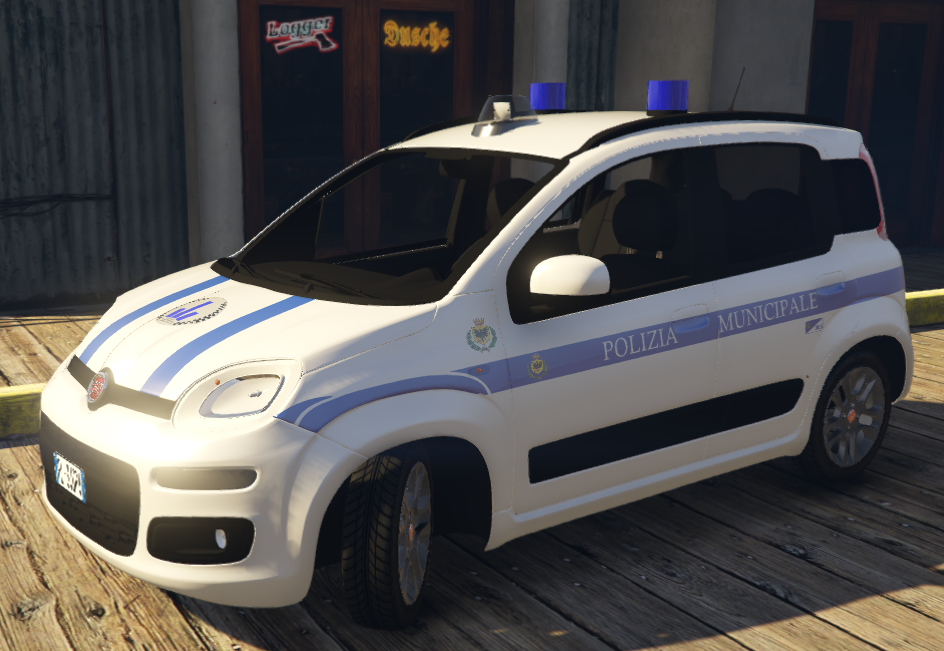
    Modello Originale -> Original Model -> Model Credits: https://www.lcpdfr.com/profile/461543-thxvz/ (ThXvZ) --------------------------------------------------------- PER INSERIRLA SU GTA 5 (INSTALLAZIONE) Mods\Update\x64\dlcpacks\patchday19ng\dlc.rpf\x64\levels\gta5\vehicles.rpf\ Crediti della Livrea: MRFLAME's Vehicle skin made by MRFLAME's
  21.    ThXvZ reacted to a comment on a file: Asfinag Traffic Manager
  22. Pantera1986 started following MRFLAME's
  23. Could you make a Road Traffic Collision callout? Thanks, good plugin
  24. MattGliMTC started following MRFLAME's
  25. I need other help, i have the Loader.loader.net error, how can i fix that?
  26. I can't play the LCPDFR as when I downgrade gta 4, the game doesn't start and crashes.
  27. I installed this plugins but when i do Force Duty, my lspdfr crash RagePluginHook.log
  28. The character starts writing but the GUI does not open and I cannot make the ticket
  29. Why does it not work when I create a ticket and does it do so? Same thing as the interaction menu
  30. Another question, how can I uninstall an OIV package that I installed with the OpenIV package installer? Please answer me because I am sorry to have to play with FPS lag problems
  31. After I play LSPDFR for 10 minutes, the game starts losing FPS, making the game not smooth
  32. After 10 minutes of play, the game starts to lag and is no longer fluid. As if there was a drop in FPS, do you know why? I tried to lower the quality but nothing
  33. Where can I see what has been updated?
  34. When was the last update of LSPDFR? Even small

Account

Navigation

Search

Search

Configure browser push notifications

Chrome (Android)
  1. Tap the lock icon next to the address bar.
  2. Tap Permissions → Notifications.
  3. Adjust your preference.
Chrome (Desktop)
  1. Click the padlock icon in the address bar.
  2. Select Site settings.
  3. Find Notifications and adjust your preference.