


Ekalb
Members
-
Joined
-
Last visited
Everything posted by Ekalb
-
Just FYI, I think the fbi slot can only have 4 siren/lights so the 2 you have on the front don't show.
- 10 comments
- 5 reviews
-
-

- 1
-
-
So you have PPM and LCPDFR installed now? Post a diagnostic log that shows the beginning please. (follow links in my signature). You're right in thinking that it is most likely related to your ASI loader.
-
So this will be similar to some of the light effects in PPM? Very interesting, good job.
- 54 comments
- 39 reviews
-
On the topic of police tv shows, the only realistic and proper police tv series is The Wire. Hands down.
-
Hazard systems (aren't too common though; Australia, Hong Kong, maybe NZ?) http://www.hazard.com.au/ProductPages/Product_Info.cfm?PartID=20%20Series%20Lightbars&catalog=5 http://www.hazard.com.au/ProductPages/Product_Info.cfm?PartID=90%20SERIES%20LIGHTBARS&catalog=5
-
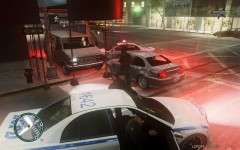 Yeah it's not a great shot for the lights unfourtunately. The lightbar version has (obviously) a modified Streehawk lightbar that probably looks more like an MX7000 and has 3 red and 3 blue lights either side. The slicktop version has 2 lights in the grill and 2 on the rear deck (same as the default fib buffalo).
 -
Van out of fucking nowhere.
-
From the album: My Vehicles
LCPD Vincent's close in on the suspect in the stolen silver Sentinel -
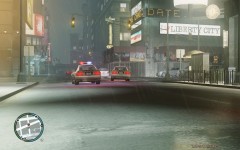
From the album: My Vehicles
LCPD's latest purchase, the Maibatsu Vincent Police Package, in slicktop and lightbar variants pursuing a suspect in a silver Sentinel. -
You should be more interested in the read only properties of the files themselves, not the folders. A filled box does not mean the same as a ticked box.
-
Would love to see a video showcasing how you might use this Tom, if you have time.
- 82 comments
- 26 reviews
-
Coloured square = some files in the folder are read only Ticked square = all files are read only Empty square = no files are read only. As long as you have disabled read-only properly the first time, it should have worked. If you still get a coloured square but clicking the individual files themselves gives you an empty square, it's because there are some hidden files that are still read-only that you can't change the properties of. Try to post a diagnostic log to see if there are any other problems.
-
Ticked =! coloured in. Post a diagnostic log.
-
Do a diagnostic report anyway to make sure you have all the other pre-reqs and game requirements. It could be possibly relate to your game version But really, did you actually go in an turn off read-only for your gta files?
-
Do you have any mods installed? Can you computer/your internet connection handle playing the game online?Have you tried the chevy trailblazer and the aus police skins for that? That's about the only Australian SUV skins there are. You could also try KevinDV's recently released Hilux. The only real SUVs that Australian police use are ford territorys and toyota landcruisers. There are no models of a ford territory anywhere but you might be lucky to find some skins for a landcruiser model.
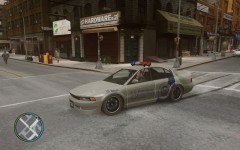
From the album: Other Modding
Some UV-mapping issues are evident and this is just a quick texture but otherwise it's progressing.A skin for the Noose patriot or an entirely new vehicle? Most Australian vehicle modding you'll find here http://gtapolicemods.com/showthread.php?98-Australian-Emergency-TexturesFrom memory, some models that have custom number plates have the door edge you are talking about mapped in the numberplate area. I don't think it can be fixed unless the vehicle was re-mapped or you remove the number plates from the texture.Is there a readme or instructions document included in the download?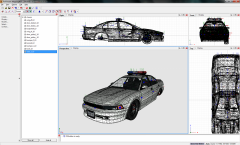 Streethawk lightbar provided in unlocked format by Lt. Caine. Will be converted to non-els.
From the album: Other Modding
Current work in progress. Intention is to have two versions, slicktop and lightbar with other police equipment and multiple liveries. Fit for a new police or noose vehicle.Please follow the links in my signature and post a diagnostics log if you haven't fixed the problemWhat Ross is trying to say as, it'd be great to show us a video of it in action so we know how it works.- 13 comments
- 4 reviews

