


Ekalb
Members
-
Joined
-
Last visited
Everything posted by Ekalb
-
If you adjust these three figures in your firstresponse.ini ( found inside rockstar games/grand theft auto iv/scripts) you'll get more callouts: [CALLOUTS] CalloutTriggerMultiplier = 350 MaxDelayBetweenCallouts = 180 MinDelayBetweenCallouts = 30 You could also try downloading some other mods to have more crimes in your game world such as Criminal acts script Found in this pack (you don't have to install the rest of the mods in the pack): http://www.gtaforums.com/index.php?showtopic=474950&st=0 Drunk peds mod: http://www.gtaforums.com/index.php?showtopic=474950&st=0 Abandoned vehicle cleanup: http://www.gtagaming.com/downloads/gta-iv/script-mods/8690
-
Maybe lower the game's settings and see if that lets you play longer?
-
You are pretty much free to do those types of things on your own at the moment, there just aren't enough specialised callouts. However, the mod has always been designed around general duties police officers on patrol, hence the name First Response, as it's based on first responding officers so it's not too likely to go down the way of specialisations. It doesn't hurt too to think up your own cases, maybe that's something we can start doing as a community.
-
We seem to have an increase in these kind of reports in pretty much the last 48 hours. I don't know if it's just because people are deciding to post here for general support or because games/rockstar social club/gfwl updated somehow and are causing it. See how you go with what I've suggested there and try googling your message to see if anyone online has found any other things for you to try.
-
Are you running the game as administrator? What if you launch it through the launchgtaiv.exe in compatibility mode? You could try posting a diagnostic log to see if that can tell us anything different but If you have already used steam to repair part of your game it's likely that LCPDFR won't work until the mod is reinstalled. You may have to reinstall the entire game from scratch if using steam to verify and repair your game content doesn't work. Also try googling your error message and seeing if anyone else has a solution. I don't think you're the first to have it but I don't believe it is related to the LCPDFR mod. Also try deleting the dsound asi loader from your gtaiv directory. And post your pc specs please.
-
Wait do you want to put an actual lightbar on your real-world car? Why? Or are you just looking for lightbar models to put on other vehicles?
-
http://www.sevenforu...pcrash-dll.html Try running as administrator or running in compatibility mode. Is it a retail copy of the game or one you downloaded?
-
Either remove the high poly cars or other mods you have that could effect memory (like trafficload) or you could try what is said in some of these discussion topics about memory problems: http://www.thegtaplace.com/forums/topic/20760-how-to-bypass-gta-iv-memory-restrictions/ http://www.gtaforums.com/index.php?showtopic=384473 Also are these photos of your computer screen? Wow.
-
It also wouldn't hurt to watch some youtube videos by NBVideoGameVids or Predatordes (search their youtube channels) for walkthroughs or other videos.
-
Can you tell us what you have tried so far, out of what we have suggested, to fix the problem, and what the problem is now? And Ross305 - the benefit of the Steam version is that if you bugger up something too much and need to reinstall you can just use the repair function and it will restore only the modified files back to their original state (where with other versions you'd have to reinstall from scratch). If you just mod safely and back up as you go along though there shouldn't be a need to use the repair function that often.
-
... I don't particularly understand you but there is nothing stopping you from selecting the police bike in LCPD:FR on TBoGT and using it to patrol. And the thing about a police helmet is that headwear is tied to the ped, so you could only pick the right ped that you have modified to have the helmet. It also means that the AI would probably wear it like they do for any other hat. So it's possible but it might have some side effects.
-
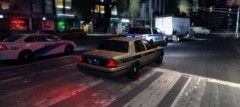 Interesting variation in your vehicles! Gotta love those pursuits with big trucks at high speed, they're never easy for a little sedan to PIT.
 -
Yeah but it's also saying that ELS.asi is what's causing the executable to fault. Remove ELS (as it could be corrupt) and see how that goes.
-
Steam repair will remove any mods and restore the game to its original state. It's like re-installing it without having to reinstall everything. If it crashes while it's loading a save file, it's also possible the savefile is corrupt so you might have to delete them by going into Appdata/local/rockstar games/gta iv/savegames.
-
Download from here: http://gtapolicemods.com/downloads.php?do=file&id=196 for example. Drag and drop ELS.asi and ELS.ini from your download into your root gta iv folder (so they are in the same folder as launchgtaiv.exe). To enable ELS on custom vehicles you have downloaded that support ELS, open the ELS.ini file and find the sections for each vehicle you want to enable ELS for. For example, if you downloaded a new 2012 dodge charger with ELS lights and you used it to replace your police2 vehicle, open els.ini and find the [ POLICE2 ] section, then make sure that Active = 1 to enable ELS for that vehicle. Then, ingame, get into the cars that you have enabled ELS for and press alt-M to open the system menu, J to activate primary lights, K to activate secondary lights. Alternatively, take a minute to read the info.pdf included with the ELS download.
-
Yeah it's just a side effect of the way the mod essentially adds them to the cars it spawns (so you can select them and so they can appear as backup) but also because those cars aren't given specific drivers, they appear like civilian cars but with no drivers. I think using traffic mods (trafficload or trafficflow for example) might be able to reduce them. Also I'm not sure but editing the cargrps.dat to include them as police vehicles may also help. Not sure though.
-
Have you attempted to install LCPDFR at all or is this just a problem with your vanilla game? I'm not quite sure why you posted the LCPDFR diagnostic log because it only tells us that you are missing just about all of the essential components for the mod (an ASI loader, scripthookdotnet etc.). Please clarify which loading screen you mean. You could also try just using steam to repair your installation.
-
Run the game as administrator and make sure the files inside your main gta iv directory are not read only. You could also try pressing alt-f11 which is a debug key to force callouts to occur. Callouts come in generally depending on what part of the map you are in.
-
Do you own TBoGT?
-
I'm not 100% if this is the right place to post this topic to get the right info I need but I'll give it a go. I've been googling and searching some other forums for a while but haven't found a solution that I understand exactly. I've been editing some of the default GTA IV cars to turn them into police variants (Rebla, Vincent, Vapid Cruiser for example). Unfourtunately though I've had a common problem with all the vehicles I export from Zmodeler. When I get into game the car doors (and I think the boot and bonnet) don't function properly. What I mean by this is that when I open the doors (and leave them ajar) they don't have a collision and I can just walk right through them. If I shoot inside the car where the door was the bullets hit an invisible wall on the outside of the car rather than passing through inside it. I'm not exactly sure but I think I'm having similar troubles with the boot and the bonnet in that the boot doesn't open and close smoothly, it'll just switch positions from all the way down to all the way up rather than actually moving smoothly. I'm pretty sure it's related to collisions or rotational limits but I haven't yet managed to find out exactly how to fix the issue. Any help from you experienced vehicle modelers could provide would be much appreciated. Edit: I think I have figured it out following what is said here: http://forum.zmodeler2.com/viewtopic.php?t=5577 I had to edit the properties of my rotational objects (doors, boot, bonnet) to rotate as spheres and then set the RotY and RotX values for their rotational limits. This thread may be closed.
-
The only real way I know how to get people to stop their cars while you are on foot is to use alt-K, the area-evacuation command. Unfortunately though, that means they get out of their cars which sort of wrecks things. Maybe it's an opportunity for a future version of a future mod.
-
Honest question, how much thought goes into your posts? http://www.lcpdfr.com/gallery/image/5651-people-wanted-a-decent-tow-truck-i-responded/
-
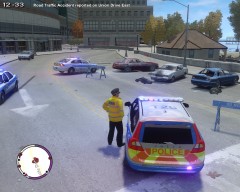 Randomly spawning car accidents? You've got my attention! But what can be done once we get there? Will it be a mod on its own or is it just left up to us to handle? Personally I'd be happy if all the mod did was make them randomly spawn and leave the rest up to the player (with LCPDFR?). Then we could attend the scene, block it off with cars, call for the ambulance/firies or try CPR with alt-M.
 -
From what I can see your diagnostic looks fine. Make sure you run as administrator, make sure any files inside your game directory are not read-only (right click > properties). Do you have any other game mods installed? Do you have any cars modded?
-
What languages are you after?


