




ineseri
Friends of LSPDFR
-
Joined
Everything posted by ineseri
-
Hm... That is really strange. I don't really know what to do... I would suggest removing Kaspersky all together and use another software. And no, the file that you are reffering to is called "GTAIV.exe.cat"
-
Do you have a legal copy of GTA IV?
-
Go to the GTA IV folder, right click on GTAIV.exe, Properties, Compatibility and select 'Run this program as administrator', do the same exact thing to the LaunchGTAIV.exe.
-
And you are running both GTAIV.exe and LaunchGTAIV.exe as administrator?
-
Kaspersky is known to be one of the troublesome ones. Can you live without it and use another one? (MS Security Essentials, AVG, Avast etc)
-
Which anti-virus software are you using? Some anti-viruses seem to block securom, and somehow generating that error. Also: Make sure DEP is disabled: http://www.vistax64.com/tutorials/120778-dep-enable-disable.html
-
Are you sure all modded peds are removed? The official stance on this is: Use the original models or prevent entering the PD by using ALT+P to go on duty and type "forceduty" in the console. Default peds can be found here: title="">http://www.lcpdfr.co...-latest-update/
-
Do you have a legal copy of the game to start with? :)
-
I'd recommend OpenIV instead, just a suggestion :)
-
Hang on, I have a tinfoil hat somewhere around here.... I think you can get one mailed to you if you are using NoScript.
-
I would say reinstall is your best course of action, since your img file is most likely corrupted. Which software do you use to install cars?
-
Really? I think I can still call for backup.
-
Do you have modded peds?
-
It should be alt+e by default.
-
First off, you will have to get used to crashes. They are quite normal in GTA IV, even without any mods. Second thing: Do you have a legal copy of GTA IV?
-
Can I see a screenshot of your GTA IV folder? Also, I recommend you using OpenIV instead as it is much more stable. Try that and see if it works.
-
I would recommend using OpenIV instead, it's much more stable IMO.
-
You can change the driving speed for the driver, I checked. That way they stay put. I just tried it :)
-
Not more mods, mods never increase stability for GTA IV. Did you try adding that line to your INI file?
-
What are your computer specs? Sounds like your system is running out of memory. You could try opening the LCPDFR ini, and add the following line under [Main] PreloadAllModels=True
-
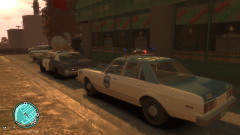 Tonight only, the fabolous BLUES BROTHERS, SHOWBAND AND REVUE. You should look them up in the SCMODS (state county municipal offender data system) by the way.
 -
Do you have a legal copy of the game?
-
It should work just fine, just skip using that file if you want the manual taser to work. You can, however use it and see if it works this time around.
-
Now I know what I am watching later, thanks for sharing!
-
Great. I'll be here, good luck!


