




ineseri
Friends of LSPDFR
-
Joined
Everything posted by ineseri
-
That^ It's just a installer error, it happens from time to time.
-
Does it work without the most recently added mods?
-
Please do :) Let me know how it goes :)
-
In the ini file there's this: KeyCones = Z // set a key for deploying road barriers (CTRL + key), road cones (SHIFT + key) // and road flares (ALT+key, or CTRL+key at night) if they are installed ... and in the manual there's this: You need to be in a car, and sometimes press the keys several times.
-
You need to enable file extentions to see the right ones (http://windows.microsoft.com/en-sg/windows/show-hide-file-name-extensions#show-hide-file-name-extensions=windows-7).
-
It would be helpful if you could try that. To run as administrator, and ensuring both are set as admin: Go to the GTA IV folder, right click on GTAIV.exe, Properties, Compatibility and select 'Run this program as administrator', do the same exact thing to the LaunchGTAIV.exe.
-
I agree with DD, it would improve security to have that kind of markings. Still, the flashing leds should be a indicator to slow down.
-
Glad to hear it :) To clarify, that was the latest game patch, needed for most mods to work.
-
Hm, I think they do that automatically, atleast they do that for me. Could someone else confirm or deny?
-
How often does the lag-out occur? Are you running the game as administrator by going to the GTA IV folder, right clicking on GTAIV.exe, Properties, Compatibility and selecting 'Run this program as administrator', and also doing the same exact thing to the LaunchGTAIV.exe file?
-
It will change automatically when running with the pistol weapon, if that is what you mean.
-
Download and install this, and try again (http://support.rockstargames.com/hc/en-us/articles/200145386-Grand-Theft-Auto-Episodes-from-Liberty-City-Title-Update-1-1-2-0-Patch-2-).
-
Well okay then: Okay. So the siren doesn't work? And you want to use the siren? Are you hosting, or joining a game? Because I think that the ELS siren won't carry over if you are joining a game, not 100% sure though.
-
Thanks for highlighting this issue, because it really is a big issue with people not keeping their distance. My local PD posted on their Facebook about this issue too, luckily we haven't had any serious accidents involving traffic stops. As you can see here: They're parked extremely closed to the traffic. Hopefully this will raise awareness to those who drive, or ride in a car. Slow down when you see the lights, Everyone has the right to a safe workplace.
-
I'd recommend you to use Ekalbs vanilla cars instead, as they are of much better quality but to answer your question: (http://www.gtamodding.com/index.php?title=Importing_Textures_with_OpenIV).
-
Have you read the vdh police helper readme?
-
What a coincidence, I just noticed this on IMDB. Looks promising.
-
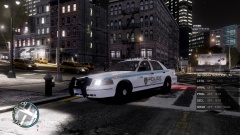 Looking good, I like it :) It reminds me a little of the Chicago PD paintjob.
 -
I'd say standby for another fix, or live with the crash sadly :/
-
That line will help improve memory problems, but I am glad you found another way to solve the issue :)
-
Which texture/skin did you download, to start with?
-
Do you have a legal, up to date, version of GTA IV?
-
Do you have a legal copy of the game? Sometimes using a crack can cause errors.
-
Hm, then I am not really sure what could be wrong really. Sorry.
-
I would recommend you using the manual installation package instead, as it seems to cause far less issues for most people.


