




ineseri
Friends of LSPDFR
-
Joined
Everything posted by ineseri
-
TrafficFlow works fine with LCPDFR 1.0a and as far as I know, it works with ELS. It happens when GTA IV runs out of available video memory. To compensate for the memory loss, GTA IV loads the model that has the least amount of polygons. In this case, that car-model is the taxi. If TrafficFlow doesn't work, it could be if you recently have installed car mods; Consider removing these. Cars with a high poly count will most likely cause memory-leaks, even on a powerful gaming pc. Restore the original cars by using the backup that you made previous to installing the car mod.
-
Indeed, anything that require the CPU to work will slow down GTA IV.
-
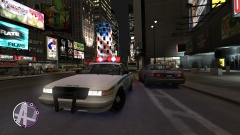
From the album: ineseris LCPDFR images
Standard issue LCPD Vapid Stanier Police Interceptor, responding to a call in Star Junction. -
I am really glad to hear that! Don't hesitate to ask if there's something else :)
-
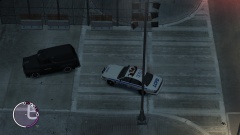 Pretty much that, yes.. If there was a 10-code for "grenades and RPG fire", it would be used.
 -
Sounds good! Looking forward to it.
-
If you are using Steam, it's very easy to take a screenshot. You do not even need to have the game bought in steam, you can just add it to steam. Use the steam overlay and take screenshots :)
-
Let me know how that works out. Also, you can post a comment asking what kind of ENB he is using.
-
There was a "after" pic, but it is too gruesome to show :p
-
You said you could play for 45 mins? I'd say that is pretty good really. I'm kind of out of options, since this could just be your system not liking GTA IV :/
-
Then it could be the visual settings again.. Try setting car.defaultlight.emissive.on 100.00 to car.defaultlight.emissive.on 140.00
-
Could you install it manually, by following this guide? '?do=embed' frameborder='0' data-embedContent>>
-
Could you disable any redundant network connections? (http://windows.microsoft.com/en-us/windows/enable-disable-network-adapter#1TC=windows-7). Not sure what could be wrong..
-
Which version of LCPDFR do you currently have installed?
-
Haha, you have to be careful with that kind of stuff... :p Hope it's healing nicely! Would love to see some screenshots, or video sometime. It would probably help with showing off, so to speak :)
-
It sounds to me like it is a normal crash. I suggest lowering your in-game settings and remove any mods you don't really need.
-
Download this: http://www.hazardx.com/details.php?file=83. Also, make sure you have a legal copy of the game.
-
How often do you get this crash?
-
Do you have the latest version of GFWL installed? (http://www.microsoft.com/en-us/download/details.aspx?id=5549)
-
Reinstall LCPDFR with the manual installation package, make sure you read this guide to the letter ('?do=embed' frameborder='0' data-embedContent>>). Then, install the taser manually, by reading this guide to the letter (>).
-
Fun fact: I never used that, so I am looking forward to hear the results!
-
I use OpenIV (http://openiv.com/) for most of what you described (installing cars, textures, viewing models etc). However, I found SparkIV (http://gtaforums.com/topic/384933-relbinsrcbeta-sparkiv/) to be better for installing sounds (sirens etc).
-
Following progress with great interest!
-
Let us know how it works out! :)
-
And how often does the crash occur? Make sure these are installed: http://www.microsoft.com/en-us/download/details.aspx?id=30679 http://www.microsoft.com/en-us/download/details.aspx?id=30653 http://www.microsoft.com/en-us/download/details.aspx?id=35 http://www.microsoft.com/en-us/download/details.aspx?id=5549 (If you haven’t updated GFWL, use this). Make sure you run the game as administrator like this: Go to the GTA IV folder, right click on GTAIV.exe, Properties, Compatibility and select 'Run this program as administrator', do the same exact thing to the LaunchGTAIV.exe.


