


NickieB
Members
-
Joined
-
Last visited
Everything posted by NickieB
-
Nice, so many good sirens coming out lately. I'll have to give it a try. About to check out the video to the other one you uploaded right now
- 11 comments
- 11 reviews
-
Lol. A lot of the questions being asked can be solved by reading the manual but apparently people don't want to read it. Would rather have us tell them the answer. I don't mean anything negative toward you Slimory, your post was more along the lines of asking for what others are using for settings No big deal
-
lol, I can't please everyone! Some prefer the rear facings as the way they are setup on here and some prefer amber or a traffic advisor.
- 18 comments
- 14 reviews
-
I didn't mean there was any problem with your video, the video is great. What I was saying is people aren't going to use it how you think they will. I also made a tutorial very similar and got the same feedback, people loved it.. But then shortly after all these models started coming out that were of horrible quality because people were overcoming the main problem by using my tut. The main problem was gettin the textures/models to import properly. People are making models in 15 minutes by just importing some parts and calling it a model and they release it. Modeling isn't about cranking something out in 15 minutes. I was hoping by writing my tutorial that it would cause people to learn the basics and then build their skills and have a good quality model before releasing something but that wasn't what happened. I'm sure you have the same intentions. This is just my opinion but others do agree with me. I guess all I can try and "convince" you of is that to preserve the quality of models that are being released, it would be my recommendation to remove it. People can figure this stuff out and clearly are if they really want to learn. We did. Some people do honestly want to learn and continue at this and I"m sure my tutorial has helped some of those who are starting to release good work. It also may have contributed to many of the sub-par models that have 15 downloads...
-
Its not those settings to achieve what he wants. Its the settings that break posted.... These values are what you need to tweak. Range - Obviously how far the lights reach and "INTEN" stands for intensity and thats pretty obvious what that will do [ ENV LIGHTING ] Range_PRML = 40 Inten_PRML = 7 Range_SECL = 3 Inten_SECL = 7 Range_WRNL = 4 Inten_WRNL = 6 EnvMult_Morning = 0.2 EnvMult_Evening = 0.5 EnvMult_Night = 1.0
-
Maybe a freedom? I'm undecided between a freedom and a Edge
-
He's exactly right, If you want to help this community and preserve the quality of model that we had you'll take it down. Otherwise the quality of models is slowly going to decline and already has.
-
I know it seems like a good idea now to upload this but in the future you'll regret you did it. I regret uploading my tutorial and thats why I took it down. If you want to know why PM me, because I"m not going to post it on here. Don't want to go off topic on your tutorial
-
Could you list the callouts that were added? I'm not asking for a detailed explanation of everyone but just an idea of what they are
- 34 comments
- 17 reviews
-
-

- 1
-
-
I have one already made that I just use in my own game. I can upload it this weekend. As for the head/reverse flashers I'll see, I don't really care for headlight flashers but maybe I'll start putting them on my cars again with the added feature in ELS7. I didn't like them because you couldn't turn them off but thats not the case anymore. PM me and maybe I'll just do a custom version for you.
- 18 comments
- 14 reviews
-
Not to many cars have been released yet that are optimized for ELS7 since it just came out a week ago. Give it some time for the modelers to put together stuff that is better suited for v7. Like some above said, all cars are compatible with ELS but not all are optimized for it.
-
-
Thanks, that car was a big success. A lot of people liked that car. It was only meant to be a private car for a friend but I had so many requests for it I decided to release it publicly. Don't hold your breath for a Caprice with that setup anytime soon. Only a few people have a good caprice model and they aren't giving it out or releasing it
-
He wasn't rude at all... To the OP - You mentioned getting permission to edit existing models. Its not only that you need permission but you need the unlocked model which you will never get. You'd have to make every model yourself if you wanted something specific or different than whats already out there. Or just ask the author for permission to either use the car in your download pack or just put a link to their car that you would recommend people use your texture with. And I think its good that models can be locked unlike, SA. That way people can't grab whatever they want from cars and you don't have thousands of cars out there with the same setups just because people wanted to release a model under their name.
-
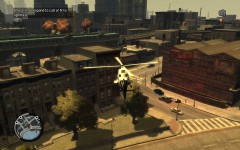 why the hell did you SPAM the gallery with 25 photos of the SAME THING OVER AND OVER AGAIN? Wouldn't one photo of a helicopter been enough?
 -
-
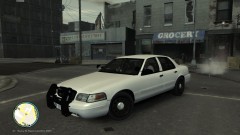 RELEASED - Pending approval on LCPD:FR. Currently available on other GTA police sites if you don't want to wait
 -
You can't "poll" the community on something like this because your results will be so split that you won't gain any usable info. If you make High poly cars some will be pleased and some won't use the cars because they cant. If you make a low poly car, some will be pleased because it will work good in their game and won't effect gameplay in a bad way like a high poly car while others won't use them because they can get away with using higher poly cars without any negative results. I'm planning on doing more low-poly cars this summer to help out those who's PC can't run higher poly cars.
-
CVPI Slicktop V1.3 By NickieB I'm planning on fixing the secondaries to better suite ELSv7 but until then I'll just release the current version and update when I get it fixed, probably this weekend when I'm home. I also realized that I forgot to do LODs for the ELS, lighting and equipment. I'm away from home until Friday so I'll also fix and update that this weekend. I'll post the spotlight coordinates when I'm home on Friday. Also make sure you notice the small additions/changes to the template. Bumper trim is now mapped to the designated section along with the door jams and pillars. Updates/fixes will be released as v1.3b * The rear lights are the secondaries and side IONs are the warning lights - CREDITS - - Model is original Ford Crown Victoria by Schaefft, modified for and converted to GTAIV by Chasez. - This version of the CVPI model has been modified by Bxbugs123 & Lt.Caine with permission by Schaefft and Chasez. Modified by NickieB - Rims By Bxbugs123, Textures By Lt.Caine - LED Spotlight, TIR3, TIR6 Modules by EVI. Edited by NickieB - Spotlight arm, laptop stand, prisoner partition, dash cam, radar pushbar by BxBugs123. Edited by NickieB - Laptop, police console by PFCBarefoot. Edited by NickieB - Bearcat scanner, Motorola Radio, Motorola Speaker, Lo-Jack, ICOP, Radar Remote, window bars by NickieB - Antennas by Priman. Edited by NickieB - Whelen Inner Edge XLP by NickieB - Whelen IONs by NickieB - M4A1, Shotgun by Grimm - Skins by NickieB and Nutt - My BETA testers - Anyone else I missed! ** By downloading this file you are agreeing not to rip the model or its contents ** Please DO NOT upload or distribute this file without my written permission Any issues, comments, concerns please feel free to comment or PM me. http://www.youtube.com/watch?v=e6Neq_ZYQi4
- 18 comments
- 14 reviews
-
I know they are shaped a little bit differently. To be honest I just re textured the Go-Rhino since my searches didn't turn up a decent picture for me to work from. If I can find a decent picture I would make one for the future but everything I found on policecarwebsite was either just a go-rhino or the quality of the photo was so bad you couldn't work from it. Obviously I didn't look through every picture but if you know of a good one PM me
-
![[WIP] CVPI FedSig Arjent](//s3-gallery.int-cdn.lcpdfrusercontent.com/gallery/album_1177/sml_gallery_9139_1177_37053.jpg) I just started this yesterday so like I said, its far from being finished so I don't know yet how I'm going to setup the rest of the car as far as lighting or equipment goes. As for the cameras, I don't really care for ALPR's so I took them off right away but I can see what it looks like, its simple enough to put them back on
I just started this yesterday so like I said, its far from being finished so I don't know yet how I'm going to setup the rest of the car as far as lighting or equipment goes. As for the cameras, I don't really care for ALPR's so I took them off right away but I can see what it looks like, its simple enough to put them back on -
From the album: NickieB Upcoming Releases
WILL BE RELEASED LATER TODAY (5-13) -
From the album: NickieB Upcoming Releases
Something I started today, not even close to being finished. It won't be another LAPD car, although thats the way its currently setup in the photo -
You can just hold ALT and press J and then the primaries will come on first. holding ALT makes the applicable options go in reverse, like the lighting switch
-
haha, no problem man. Its nice to see a decent vehicle since there has been a lot of sub-par stuff lately. Once again good job! I have a question and Im going to PM you, I hope you don't mind.
- 23 comments
- 16 reviews

![[WIP] CVPI FedSig Arjent](http://s3-gallery.int-cdn.lcpdfrusercontent.com/gallery/album_1177/sml_gallery_9139_1177_37053.jpg)