




Cyan
Management Team
-
Joined
Everything posted by Cyan
-
This should be fixed now, thanks for the report.
-
-
Then complain to the author of those plugins. There's no reason for their version limitations.
-
If you feel this topic has been closed in error, please report this post.
-
Ask the developer to provide you a version that doesn't have arbitrary version locks, or an updated version. We don't provide old versions of the LSPDFR 0.4 as only the latest version of LSPDFR is supported. I moved an active support discussion to here: https://www.lcpdfr.com/forums/topic/101577-lspdfr-crashing/ This discussion thread is about the 0.4.7 release. Any support questions or requests should be made in the LSPDFR 0.4 support forums.
-
-
-
Your topic has been moved to LSPDFR 0.4 Support. Please post in the correct location in the future.
-
I'm not seeing any issues right now from our monitoring.
-
RAGEPluginHook.log, please.
-
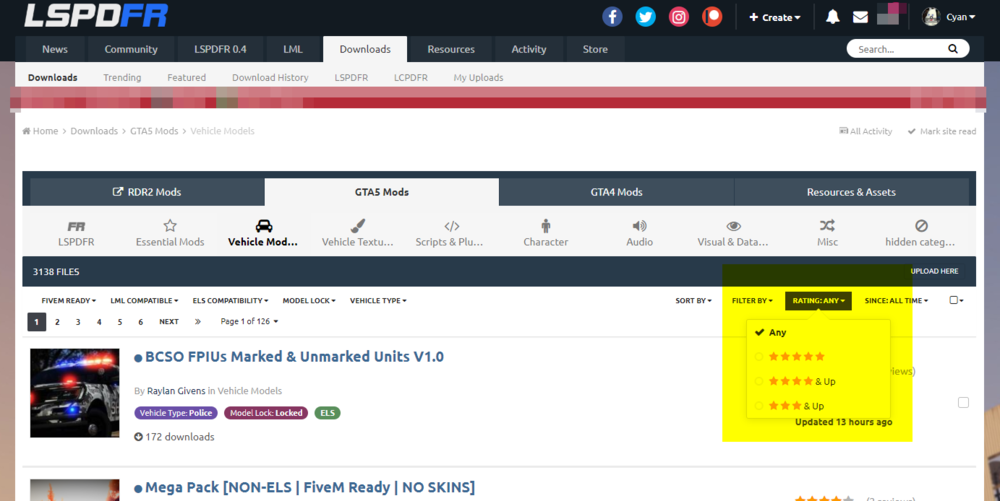
Our changes to how FiveM and LML compatible files are identified are now live. LCPDFR.com will now auto-detect FiveM ready files as well as LML compatible files and have them filterable accordingly. We've also introduced a new 'Rating' filter. You can now filter files to find only five star files, four stars and above, and three stars and above.
-
If you feel this topic has been closed in error, please report this post.
-
Resolved in PM.
-
Usually this occurs because you are using a VPN or proxy. We unfortunately cannot entirely unblock VPNs/proxies but can sometimes change them to registration only blocks depending on the reason for the initial block. Please PM the full IP so I can take a look.
-
That process can sometimes take a few minutes. Glad it's sorted for you now. Any further questions let us know.
-
 Any plugin that does any form of update checking against it's own server will get your IP address based on how web servers work. This isn't exactly unique to this callout. There is no HWID gathering in this plugin, nor was there before we removed it. We removed it based on a concern that one of the networking features could interfere with LSPDFR and that the features weren't documented. Before causing concern, take the time to actually analyse the behaviour. Any further concerns regarding this file, please use the report functionality.
- 255 comments
- 16 reviews
-
-

- 6
-
-
This news post is mostly centered around our work for LCPDFR.com, but I do understand what you're saying. LSPDFR has been through countless optimization cycles and profiling. There's still room for micro improvements, but any more substantial gains will be found from third-party callout packs and other mods being optimized more than they currently are. If you use another modification that overrides LSPDFR's default arrest behaviour, these arrests won't be counted. One of the things we'll be working on when we get some time is a developer API for third-party developers to use the LSPDFR Sync system. It's definitely on our roadmap, I know this has been asked a few times. It's likely code will be added in a future LSPDFR release to support this.
-
Hi everyone, We've really been busy recently behind the scenes working on a few features for the site. We've already soft launched quite a lot, and we thought it was time to sit down and announce a lot of what we've done the past couple months. So here it is, a round-up of all the new features since the start of the year. Some you may have seen, and others you might have missed. LSPDFR Sync: Leaderboard Let's start with one that I think a lot of you have noticed. We're proud to now officially launch our LSPDFR Sync leaderboard system. The LSPDFR Sync leaderboard system currently tracks three core stats right now: cuffs, pullovers and times you've reported for duty. You'll find your highest character rank on the portal page, below the top #5 to quickly identify where you rank in comparison to your fellow officers across the world. We have big plans for expanding the LSPDFR Sync system even further, including a developer API for plugin developers to record their own stats as well as increment other built-in core stats. Downloads: Download History and Trending/Featured and tweaks A lot of feedback we've received from people is that they would like a place where they can see what they've downloaded, and what exactly has changed. Our new Download History page will show what you've downloaded, whether it has an update, if you've reviewed the file, if you're subscribed for updates and more -- all on a single page. You can even sort through the files as if you're on a normal download list page. The new Trending and Featured pages will show all the respective trending and featured downloads. These pages are quite basic right now, but we're working on making them a lot more useful. We've also changed the structure of the file links. They are now far more descriptive, including the game and category. For example: https://www.lcpdfr.com/downloads/gta5mods/g17media/7792-lspd-first-response/ Don't worry! All old style links work and will continue to work in the future. LML: User Contributions Does your favourite LCPDFR.com mod not support LML, but you've already gone through the work of converting it for use for LML? Now you can share your LML install.xml for a mod on LCPDFR.com, enabling automatic hassle-free installation of that mod for everyone. To get started, simply click 'Contribute an LML install.xml' beneath the 'Download with Mod Manager' button on a file page. After your installation file has been added, the 'Download with Mod Manager' button will be enabled for that file, which will use the contributed install.xml file. The original file and download are not modified or changed in anyway. Right now, files with LML contributions are not tagged as being LML-compatible. We'll be making changes to our 'LML Compatible' and 'FiveM Ready' options on files in the coming days, with these things being auto-detected, instead of relying on correct tagging. Resources: GTA5 Native Database, GTA5 Vehicle Database and homepage Whilst creating our new site, Mod-RDR.com, for modding Red Dead Redemption 2 we worked on creating a powerful developer Wiki with a lot of features. Mod-RDR.com is still one of top places for knowledge on modding RDR2, with documentation and lists on natives, peds, clothes, vehicles (horses) and much more. One of the features we were particular happy with was making our RDR2 Native Database, which documents the game's native functions. If you have modded GTA5 or a previous Rockstar Games title you'll know natives are functions exposed by the game for use by the games' developers. Our native database is a little bit different from other native database projects, instead using an actual relational database with rich Wiki features and a comment section on each native. We decided it would be useful to bring this to GTA5, so we have, and you can find it here. In addition, we've partnered with GTABase.com to show their amazing vehicle database on our Resources section, as well as display their news feed on our homepage. Trending mods from LCPDFR.com will now show on their homepage and hopefully attract even more people to the world of GTA modding. Continuing Optimizations We've also been trying to get the website to run a lot faster. Over the past few months, we've been identifying a lot of pages which aren't running as fast as we'd hope. As an example, one of these was the downloads page. Due to a design decision on the side of our forum software vendor, we were seeing the downloads page using up to 200+ queries, with most of these simply querying for screenshot data. On bad days, this took up to 2 seconds to complete. We've made a bunch of changes on our end, rewriting how this system grabs file data, and we managed to take this down to single digit queries to the database. Now the page takes only a few milliseconds to render, making the experience better for everyone. We also changed how our frontends talk to our backend server, optimizing the encryption used by changing to using Elliptic Curve cryptography, which is much faster than before. We're always happy to hear your feedback. If you've got any ideas on what we should work on next with the website, or any comments on the above please let us know. Cyan

-
This topic has been moved to the appropriate forum. Please post in the correct location in the future.
-
Your topic has been moved to LSPDFR 0.4 Support. Please post in the correct location in the future.
-
Your topic has been moved to LSPDFR 0.4 Support. Please post in the correct location in the future.
-
Unfortunately our download system doesn't track which particular sub-file within a file download was downloaded in the database logging. It's been something that we've been wanting to add but we haven't gotten round to it yet, so it's probably not possible. I will look into whether we can give you an answer based on other log data.
-
We're definitely at the size that we do need to consider some recycling policy for old usernames. It's something that we're seriously considering and will need to make adaptions to our software to enable. I'm not entirely sure about loosening the title restriction though, I think it's a good thing to reward people for their contributions with small features like this. But we will review internally.
-
-
Your topic has been moved to LSPDFR 0.4 Support. Please post in the correct location in the future.


