




Cyan
Management Team
-
Joined
Everything posted by Cyan
-
I'll add a button at the top to add a comment to make this a bit more clear, it's not hugely intuitive as is.
-
-
 I've cleaned up the comments. If you have a concern about content, please let us know by reporting the content to us. Please note that FiveM content is certainly allowed on LCPDFR.com. You can use the filters at the top of the download listings if you have an issue with seeing FiveM content.
 -
 @Error 404 Please remove the Plugins folder that contains UltimateBackup/PoliceSmartRadio and then we can approve your file. Thanks!
 -
It matters because this website is bound by the laws in the countries where it operates. The file is Rockstar intellectual property. It doesn't really matter what your view is, it's copyrighted by Rockstar Games and we aren't allowed to break copyright law. Topic closed, that was a hell of a 3 year+ bump.
-
I understand your need, but there's currently no API for downloading files from LCPDFR.com mostly to protect our backend servers and ensure that users are aware of a mod's license before downloading. Additionally, while it can still certainly be done by parsing pages, it is likely to lead to an automated block from our DDoS mitigation, so you might want to be a bit careful here. The easiest way is to redirect users to the downloads page. If you could elaborate on your use case a bit more, perhaps I can point you in the right direction.
-
People should already be sending a private message to the author about that, or sending a report to our team. Some creators just don't want criticism -- legitimate or other, indeed we've had people leave LCPDFR.com entirely for this reason and then blame us when the points stated were valid. My idea is a button for creators to turn off comments/reviews on a certain file. It wouldn't be a recommended thing at all, and it would carry negative penalties (your file would be excluded from trending or featured) but there are definitely some people who don't contribute that I think would if they had this option, especially those that are rather sensitive starting out. It would be in line with what other large platforms do. I can imagine it can be quite intimidating to release a file to LCPDFR.com as it stands today.
-
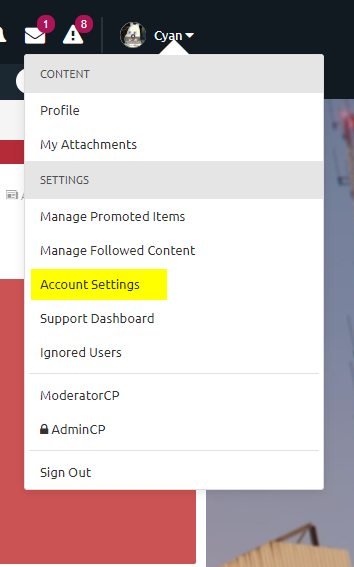
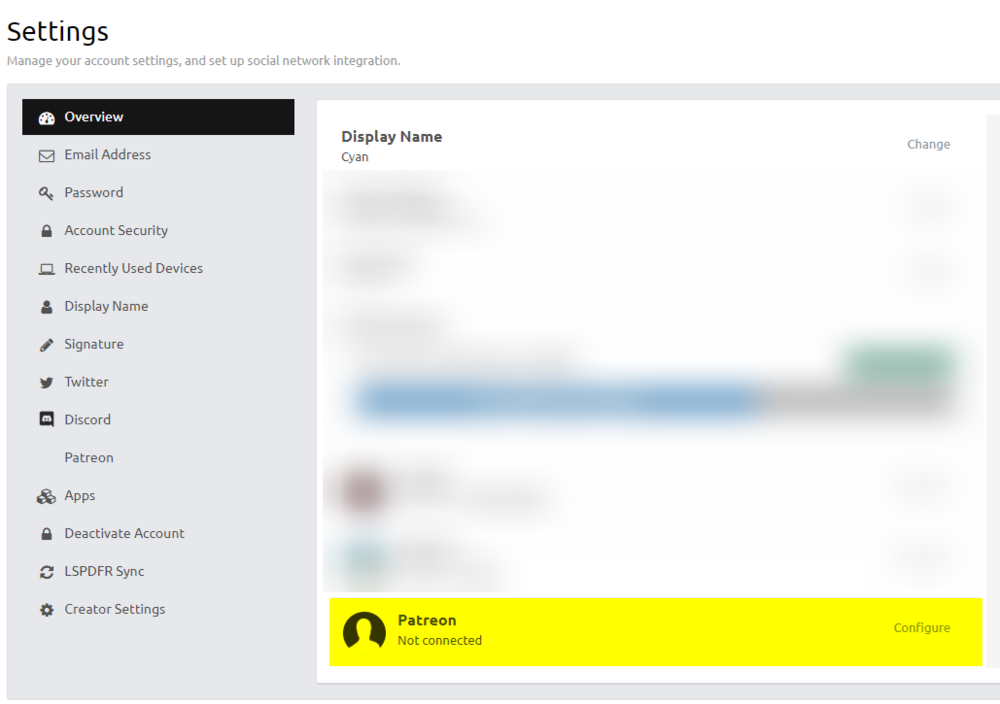
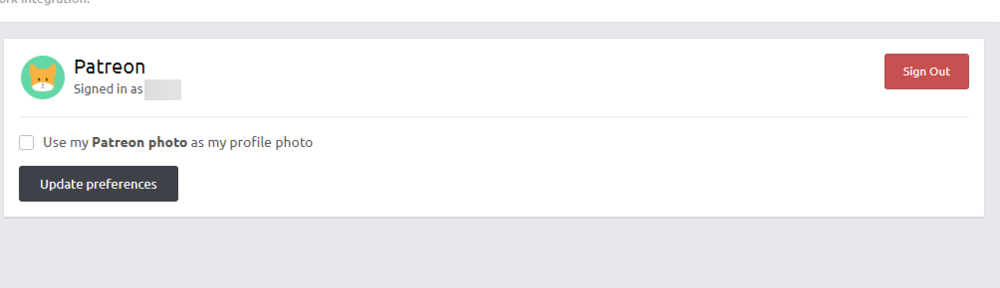
Hi folks, If you've not already seen, LCPDFR.com has launched a Patreon service. Alongside our gracious thanks, being a Patreon supporter entitles you to some forum benefits, as well as early access to upcoming projects. To access these benefits, you'll have to associate your Patreon account with your LCPDFR.com forums account. This is a simple, easy process. From your user menu at the top of the site, choose 'Account Settings'. On mobile, this will be hamburger menu > Account > Account Settings. From your Account Settings Overview, note the Patreon section, and hit the Configure button on the right hand side. From your Patreon settings, choose 'Login to Patreon' You will be redirected to Patreon to login, and you will be asked to grant LCPDFR.com permission we need to verify your Patronage. Make sure to hit the 'Allow' button. And you're done! You will be redirected to LCPDFR.com, and you should see your Patreon name and avatar shown. If you have pledged to our Patreon page, your benefits will be instantly accessible and you should now be part of the Supporter group and have exclusive access to our early access programme for the duration of your patronage. Thank you for supporting us. Thanks again for becoming a supporter. If these instructions don't seem to work for you, please send me a private message and I'll look into it. It may take up to 30 minutes for your Patron benefits to become available after pledging to us, although this seems to vary. This seems to be due to a delay in Patreon sending us your information.


-
Doesn't matter, you just need an official (non-pirated) version.
-
Yes..
-
A little bit delayed, but the first phase mentioned starting 1st October will start later today. Edit: This change is now live.
-
We wouldn't let people pick and choose I think. It would either be the current system or the ability to just turn the entire section off. I'm curious -- would people be interested in being able to disable comment/reviews on their files?
-
Read the supplemental message that it says -- not just the error code. It tells you the problem.
-
-
Your topic has been moved to LSPDFR 0.4 Support. Please post in the correct location in the future.
-
We've made a few more changes in the past week or so to further improve the LCPDFR.com experience. Introducing our Oceania LCPDFR.com region For visitors from Australia, New Zealand and the rest of Oceania, we've deployed an LCPDFR.com region server to the region. This will provide improved speeds when using the website from this region. Oceania now joins the following regions in having their own LCPDFR.com regional server: US East, US West and Europe. You can see what region server you are connected to by highlighting over the bug icon at the bottom right of the site, on the footer. Updating our servers with the latest standards All LCPDFR.com region servers and our CDN provider now support TLS 1.3, along with 0-RTT. These new standards should help reduce the time it takes to connect to LCPDFR.com, and give some speed improvements across the board. Improved monitoring To keep costs with associated with running a community on the scale of LCPDFR.com minimised, we run a lot of our own infrastructure instead of relying on managed services and overpriced bandwidth. However, this does mean we have to keep a track on a lot of what's going on by ourselves. To do so, we have a complete in-house monitoring dashboard that shows us how everything is performing. This allows us to identify and fix issues a lot sooner. A small snippet can be viewed here. Most of these changes are certainly behind-the-scenes. We're also working on more website features (including some new slightly competitive things for LSPDFR Sync!) and hope to have more new and exciting things to share in the near future.
-
-
Characters' birthdays are not currently configurable in any way. Looks like the bug that previously affected stats has re-emerged. I'll look into this.
-
Your topic has been moved to LSPDFR 0.4 Support. Please post in the correct location in the future.
-
-
Your topic has been moved to LSPDFR 0.4 Support. Please post in the correct location in the future.
-
Some anti-virus software programs mark LSPDFR/RPH as a virus. This is known as a false-positive. LSPDFR and RAGEPluginHook make extensive use of memory hooking to achieve a lot of what they do, which can look malicious to anti-virus software. If your anti-virus marks LSPDFR as unsafe or you have odd issues running RPH/LSPDFR, you will either need to exclude LSPDFR and RPH's files (refer to your antivirus documentation for more details) or you will have to disable the anti-virus software. Alternatively, you may elect not to use/trust the software.
-
The new GTA V update changes how the launcher works. To use LSPDFR/RPH launch GTA V normally, wait for it to load to singleplayer, then launch RAGEPluginHook.exe. It will detect the running instance of the game and load from there.
-
Glad you solved your installation issue. Enjoy LSPDFR.
-
Sorry, LSPDFR 0.4.2 is no longer available.




