Cyan
Management Team
-
Joined
Everything posted by Cyan
-
-
Your topic has been moved to GTA V Support, this is not LSPDFR related. Please post in the correct location in the future.
-
Your topic has been moved to GTA V Support, this is not LSPDFR related. Please post in the correct location in the future.
-
Your topic has been moved to GTA V Support, this is not LSPDFR related. Please post in the correct location in the future.
-
Your topic has been moved to GTA V Support, this is not LSPDFR related. Please post in the correct location in the future.
-
-
The person included their RPH log in their post.
-
No LSPDFR plugin should be requring Scripthook V .NET. However, that's not a hugely relevant point to the issue you're having. You have sent a screenshot of your Scripthook V file, that isn't Scripthook V .NET. You can find Scripthook V .NET by Googling it. Or you can remove whichever LSPDFR plugin has that dependency.
-
Your topic has been moved to LSPDFR 0.4 Support. Please post in the correct location in the future.
-
From Steam, Epic or Rockstar Games directly.
-
Your topic has been moved to GTA V Support, this is not LSPDFR related. Please post in the correct location in the future.
-
Your topic has been moved to GTA V Support, this is not LSPDFR related. Please post in the correct location in the future.
-
https://www.lcpdfr.com/forums/topic/89691-read-will-save-your-time-common-issues-fixes-and-bugs/ 2nd point
-
Your topic has been moved to GTA V Support, this is not LSPDFR related. Please post in the correct location in the future.
-
Your topic has been moved to GTA V Support, this is not LSPDFR related. Please post in the correct location in the future.
-
I unfortuantely cannot reproduce your issue.
-
LSPDFR will only work on the latest version of the game. It does not work on pirated or outdated versions.
-
Your topic has been moved to LSPDFR 0.4 Support. Please post in the correct location in the future. Update your GTA V to the latest version. Then, get the latest RPH from the LSPDFR download, not their website. See https://www.lcpdfr.com/lspdfr/how-to-install/
-
Update your GTA V.
-
Your topic has been moved to GTA V Support, this is not LSPDFR related. Please post in the correct location in the future.
-
Your topic has been moved to GTA V Support, this is not LSPDFR related. Please post in the correct location in the future. Scripthook V .NET has a critical bug / design flaw in handling fibres that can occur more with RPH installed. LMS reported this a while back but I don't think anyone has fixed it. There's also a few people in their bug tracker experiencing similar CTD issues.
-
Your topic has been moved to LSPDFR 0.4 Support. Please post in the correct location in the future.
-
Your topic has been moved to GTA V Support, this is not LSPDFR related. Please post in the correct location in the future.
-
LSPDFR crashing at that point means your mods folder is invalid. Something in there is corrupt or installed incorrectly. Rename mods to _mods and see if it still happens.
-
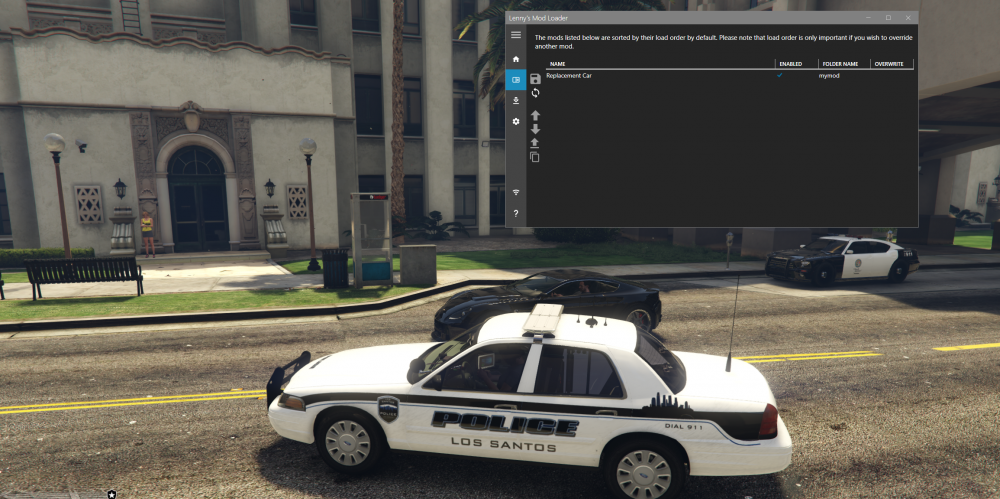
Hello @Cavasi The install.xml references folders from its perspective. So what you want to do, is rename the folder you've created as something like mymod. Then create a folder called replace, and move everything that isn't install.xml into it. So you end up with a structure like: mymod/install.xml mymod/replace/police.yft mymod/replace/police.ytd mymod/replace/police_hi.yft etc This seemed to work for me, but I only tested the police: