




Cyan
Management Team
-
Joined
Everything posted by Cyan
-
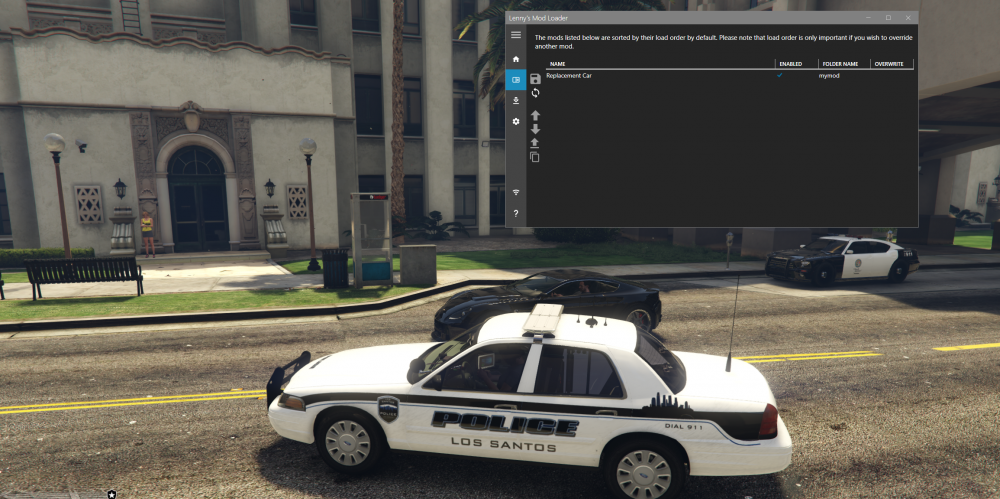
Hello @Cavasi The install.xml references folders from its perspective. So what you want to do, is rename the folder you've created as something like mymod. Then create a folder called replace, and move everything that isn't install.xml into it. So you end up with a structure like: mymod/install.xml mymod/replace/police.yft mymod/replace/police.ytd mymod/replace/police_hi.yft etc This seemed to work for me, but I only tested the police:
-
Your topic has been moved to LSPDFR 0.4 Support. Please post in the correct location in the future.
-
Please read the informational notice above the LSPDFR file. It has been re-submitted to Microsoft for analysis, and from what I can tell, the latest updated definitions fix the issue.
-
Your topic has been moved to LSPDFR 0.4 Support. Please post in the correct location in the future.
-
Your topic has been moved to LSPDFR 0.4 Support. Please post in the correct location in the future.
-
This topic has been moved to the appropriate forum. Please post in the correct location in the future.
-
Your topic has been moved to LSPDFR 0.4 Support. Please post in the correct location in the future.
-
I don't think any callouts should require it, but I at least know one that has a dependency on Scripthook V .NET for some reason. The majority have no reliance on anything apart from their own dependencies, LSPDFR and RPH.
-
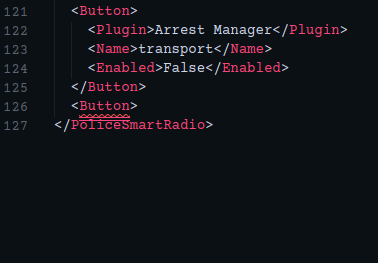
You may want to use something like Visual Studio Code to edit the XML files, you seemed to have an error on OnFoot.xml, on line 126:
-
The current version is 0.4.9, which can be thought of as X.X.X. Assuming we increment the last X, surely the version after would be 0.4.10?
-
Please upload the RAGEPluginHook.log, you can find this in your GTA folder.
-
This topic has been closed because you are asking for support regarding pirated software. We are unable to provide support to pirates, or people using cracks. If you feel this topic has been closed in error, please report this post.
-
Please follow the instructions in the big red box on this page.
-
Your topic has been moved to LSPDFR 0.4 Support. Please post in the correct location in the future.
-
If your Windows installation is salvageable, and you followed the instructions on that page completely, you should no longer have the issue. If you have the same issue still (mentioning System.IO.Compression), unfortunately there is an OS-level issue with your Windows installation which would be beyond the scope of this forum.
-
Post your PC specifications.
-
It looks like your .NET installation is messed up, but oddly you are on Windows 10, where System.IO.Compression should be available. Give System File Checker a go.
-
We can toggle this on for existing files - if this is something you want then please send me a private message. However, please read the drawbacks mentioned here. The ability to disable comments and reviews was made as a compromise between user and creator expectations. Unfortunately people are going to ask repeated questions (see the LSPDFR support forums if you want to see that in stereo). You could also try pinning common problems or common solutions in your comment section to try and reduce the fluff. I am willing to look into adding a 'where to get support / report bugs' type of message, but I do wonder if this would really help. It's really likely that if you directed people to PMs you'd quickly get overwhelmed.
-
You have to complete the initial story first. If in doubt, use a 100% save.
-
Your topic has been moved to GTA V Support, this is not LSPDFR related. Please post in the correct location in the future.
-
Your topic has been moved to GTA V Support, this is not LSPDFR related. Please post in the correct location in the future.
-
Your topic has been moved to GTA V Support, this is not LSPDFR related. Please post in the correct location in the future.
-
If you don't have one, don't bother about it. You likely have some trash DirectX hook intefering with RAGEPluginHook. If you have NVIDIA GeForce Experience, try disabling the overlay.
-
Your topic has been moved to LSPDFR 0.4 Support. Please post in the correct location in the future.
-
That issue is generally caused by a bad mods folder. Rename mods to _mods. If LSPDFR then works, something in there is bad/not working.



