




Will
Management Team
-
Joined
-
Last visited
-
Currently
Viewing Topic: Game beeping a lot of times then shutting down
Everything posted by Will
-
Please explain to me how someone doing things on Discord, in servers that have zero affiliation with us or in DMs, has anything to do with our site. We already disallow selling mods for exactly this reason. We don't control discord. What people do outside the site isn't our problem. We are not the modding police. What exactly would banning him achieve? He would still be free to do everything's he's doing outside the site. You guys are acting like we're cops who can put people in modding jail. If you feel like a law has been violated contact your local police. Just don't get upset when they laugh at you. We've also not received any reports about his mods being stolen or using leaked content (or if we have it has already been handled). If you truly believe this report the mods with proof.
-
LCPDFR.com does not, never has, and never will condone transfer of funds in return for mods. Our site has strict rules forbidding selling or paying for mods. Unfortunately, the situation originally posted here was on Discord and is therefore completely out of our control. We cannot take action against a user for their behavior outside of the LCPDFR.com community. When using the messaging system there is big red notice indicating our rules about purchasing goods and services. I'm not sure what else you expect us to do. If you ignore the message and attempt to purchase goods and services, which is against the rules, coming running to us to solve the problem isn't going to help. We believe in a free and open modding community where you never have to pay for mods. That doesn't mean, however, that we can be the modding police and ban anyone on our site that sells mods outside of our site. If someone attempts to sell mods through our private messaging system, report the message thread and we will take the appropriate action. The same applies to anyone attempting to buy mods. In regards to "getting clicks" and other such comments, that has nothing to do with it. Our community is about being open to all and we take banning accounts very seriously. We aren't going to ban people based solely on a lack of quality in their mods. If someone is scamming people out of their money on our site, we need to be told about it. The best way to do that is through reporting the offending content. I want to reiterate that we are not the modding police. We will not ban users for their actions outside of the site unless there are very serious and proven legal allegations.
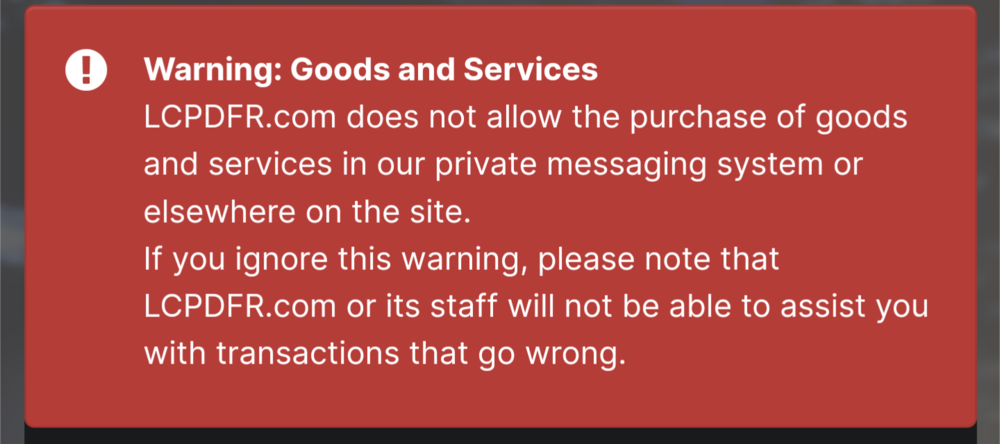
-
I've merged your recent numerous posts into one thread. Please do not spam the forum with numerous support topics, it will not help you get support faster.
-
Defining which agencies respond when you request a certain backup type is done in backup.xml. If you added a new fire department you would add it under <Firetruck> to have it treated as such.
-
If you feel this topic has been closed in error, please report this post.
-
[8/30/2023 12:48:29 AM.072] Product version: 1.0.2845.0 Older versions of GTA V are not supported. Update your game. If you have a pirated copy, buy the game.
-
Sounds like you used this https://github.com/ganeshh123/gta5-cleaner It says it moves all mods to that folder. If you don't intend to restore them then you can delete the folder.
-
There really isn't any "status" other than pending approval. I think it tells you when it's undergoing an automatic security check but once it gets flagged for manual approval by a moderator for any reason it's just waiting for a moderator to check it. If there's a reason it doesn't get approved you should be able to check the reason it was hidden. I'm not entirely sure how this shows to a user but normally you hover over the eye icon indicating it's hidden to see the reason. I also don't see any uploads pending approval on your account.
-
Yeah, that looks like the newer version of mine. Mine is a few years old at this point.
-
I've always been one to keep rules very broad. You really only need 4 or 5 rules to cover pretty much everything, then if you have a good staff team they can apply those rules as they see fit. That's been our concept on the site, if you look at our Community Guidelines they don't really outline specific things you can or cannot do, they just set guidelines to the behavior we expect from our members. We did however post some specific, bulleted rules a while ago so people understand a little better how we enforce the broad Community Guidelines, but what it really comes down to is be respectful. I know with Discord servers it becomes a lot different though, since moderation has to be faster paced and more instant, whereas on the site we can discuss internally before taking action against something or someone.
-
I guess it mainly depends on personal preference - size, curved or not, resolution, etc. I've been happy with my Dell 27" 1440p GSYNC monitor for a while now.
-
Crashing on launch is usually a mods folder issue or ScriptHookVDotNet causing issues.
-
Can you upload the log after that happens?
-
I don't see a crash in that log, does the game close completely? Keep in mind the log only shows the latest session so if the plugin didn't crash in the latest session, it won't show it.
-
The text document.
-
You find it in your main GTA V folder. It's a text document called RagePluginHook.log
-
[7/15/2023 3:49:43 PM.591] LSPD First Response: Exception message: Name cannot begin with the '<' character, hexadecimal value 0x3C. Line 3020, position 65. You have an issue with a config file, seems to be from Ultimate Backup.
-
Have you modified audio files? If it's specifically when getting a callout it could be having an issue playing the dispatch audio.
-
You may just need to reinstall LSPDFR.
-
Please upload your RagePluginHook.log file.
-
I believe the prologue is officially over when you are given control of Franklin at the beach after the opening credits. You start a mission with Lamar but I'm not sure if that has to be finished first.
-
You need to get past the prologue, but once the game opens up to free roam you can start using the mod. You can also find a 100% save online instead. If a controller is not an option then you can just keep playing the game and you will probably get used to using the keyboard to drive. It might be wise to play some of the default game to learn the mechanics if you have never played GTA V on PC before. I'm not entirely sure what you mean by this - you don't have to upload anything to use mods in the game. As for the stuff regarding creating vehicles and hats, that is beyond my expertise but I can say it is more complicated than just downloading a random model from sketchfab and putting it in the game. If you don't have any expertise in creating models it would be best to find something similar to what you are looking for either on this site or another GTA V modding site or perhaps request a developer to make it for you (although finding someone to do it for free may be a challenge). If you're intent on learning, there may be some tutorials out there you can follow or maybe someone with more knowledge here can lend you a hand. I moved this to GTA V Modding Discussion since it isn't really a support request but more seeking information.
-
Your topic has been moved to GTA V Support, this is not LSPDFR related. Please post in the correct location in the future.
-
Did you install a modified gameconfig.xml? It is generally required for installing mods. You may also need packfile limit adjuster. https://www.gta5-mods.com/tools/packfile-limit-adjuster
-
Reinstall Grammar Police in full.




