




Will
Management Team
-
Joined
-
Last visited
Everything posted by Will
-
-
-
This topic has been moved to the appropriate forum. Please post in the correct location in the future.
-
Unpinning due to lack of updates. If you decide to do this, feel free to make a fresh thread 🙂 If you feel that this topic has been unpinned in error, please report this post.
-
We need a PC version of the game first.
-
This topic has been moved to the appropriate forum. Please post in the correct location in the future.
-
As he said, police5 was added to GTA V in the latest update, causing mod packs that normally include police5 as an addon to mess things up. The best solution I can think of is to rename your modded police5 to something like police5addon and be sure to change any references to police5 in the mod's vehicles.meta and carvariations.meta to police5addon as well. As a side note, it is against site rules to involve money in support requests. I am removing any references to cash rewards from your post.
-
This topic has been moved to the appropriate forum. Please post in the correct location in the future.
-
The crash at the end of your log is a result of lore callouts. You can send the log to the developer as it's possibly fixable from their end. Simply removing a bunch of plugins will of course increase stability, as with any game adding a ton of mods increases the chance of having issues. But in this case the crash is specifically related to lore callouts. As a suggestion to anyone giving support, try to address the issue shown in the log file instead of simply telling users to remove all of their mods.
-
This topic has been moved to the appropriate forum. Please post in the correct location in the future.
-
The more likely scenario is the bodycam footage is from an in-game TV show or news segment. Probably the same for a lot of the scenes shown in the trailer.
-
 This would fix it if for some reason the cops do not have the relationship group "cop" or you are trying to get it to work on non-cop peds
- 264 comments
- 21 reviews
-
The AI works on my end. Do you have text in the log like any of these: BackWeapon: Adding best weapon to ped from inventory BackWeapon: Ped with accepted weapon added BackWeapon: Weapon deleted because it was equipped BackWeapon: Weapon created on back of ped because ped put weapon away They should show up whenever the weapon is supposed to show on the ped or be deleted because it was equipped.
- 264 comments
- 21 reviews
-
That isn't going to happen, sorry. The source code is on GitHub if someone wanted to convert it.
- 264 comments
- 21 reviews
-
-

- 1
-
-
I also want to make it a point that if there are violations of our rules on our site, especially in private messages, it needs to be brought up to us. We can't be everywhere, we can't be active in every Discord community out there. Just because all your friends know about something doesn't mean we do. It also doesn't hurt to make us aware of shady interactions outside of the site, but don't expect us to solve the problem for you. It at least lets us know what to look out for on the site. As Cyan said, we have a lot of measures in place to protect users, even those who don't actively use our site. Plenty of people attempt to leak models through alternate accounts only to find out that won't work here. But the biggest defense is the community itself. As they say, "see something, say something."
-
Something illegal like stalking users, exposing their personal information, or other acts that threaten the safety of our users. What happened here comes down to bad financial decisions and any cop will tell you the same and inform you to seek civil litigation. Each time a refund was offered, the buyers declined and just wanted their mod completed. As for leaking, if it wasn't leaked on our site, again there's nothing we can do. We won't ban someone simply for having a bad reputation.
-
Please explain to me how someone doing things on Discord, in servers that have zero affiliation with us or in DMs, has anything to do with our site. We already disallow selling mods for exactly this reason. We don't control discord. What people do outside the site isn't our problem. We are not the modding police. What exactly would banning him achieve? He would still be free to do everything's he's doing outside the site. You guys are acting like we're cops who can put people in modding jail. If you feel like a law has been violated contact your local police. Just don't get upset when they laugh at you. We've also not received any reports about his mods being stolen or using leaked content (or if we have it has already been handled). If you truly believe this report the mods with proof.
-
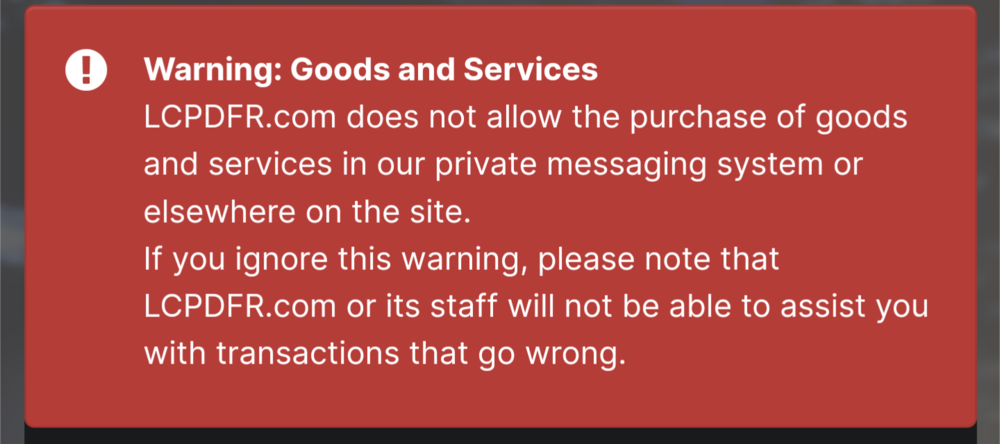
LCPDFR.com does not, never has, and never will condone transfer of funds in return for mods. Our site has strict rules forbidding selling or paying for mods. Unfortunately, the situation originally posted here was on Discord and is therefore completely out of our control. We cannot take action against a user for their behavior outside of the LCPDFR.com community. When using the messaging system there is big red notice indicating our rules about purchasing goods and services. I'm not sure what else you expect us to do. If you ignore the message and attempt to purchase goods and services, which is against the rules, coming running to us to solve the problem isn't going to help. We believe in a free and open modding community where you never have to pay for mods. That doesn't mean, however, that we can be the modding police and ban anyone on our site that sells mods outside of our site. If someone attempts to sell mods through our private messaging system, report the message thread and we will take the appropriate action. The same applies to anyone attempting to buy mods. In regards to "getting clicks" and other such comments, that has nothing to do with it. Our community is about being open to all and we take banning accounts very seriously. We aren't going to ban people based solely on a lack of quality in their mods. If someone is scamming people out of their money on our site, we need to be told about it. The best way to do that is through reporting the offending content. I want to reiterate that we are not the modding police. We will not ban users for their actions outside of the site unless there are very serious and proven legal allegations.
-
I've merged your recent numerous posts into one thread. Please do not spam the forum with numerous support topics, it will not help you get support faster.
-
Defining which agencies respond when you request a certain backup type is done in backup.xml. If you added a new fire department you would add it under <Firetruck> to have it treated as such.
-
If you feel this topic has been closed in error, please report this post.
-
[8/30/2023 12:48:29 AM.072] Product version: 1.0.2845.0 Older versions of GTA V are not supported. Update your game. If you have a pirated copy, buy the game.
-
Sounds like you used this https://github.com/ganeshh123/gta5-cleaner It says it moves all mods to that folder. If you don't intend to restore them then you can delete the folder.
-
There really isn't any "status" other than pending approval. I think it tells you when it's undergoing an automatic security check but once it gets flagged for manual approval by a moderator for any reason it's just waiting for a moderator to check it. If there's a reason it doesn't get approved you should be able to check the reason it was hidden. I'm not entirely sure how this shows to a user but normally you hover over the eye icon indicating it's hidden to see the reason. I also don't see any uploads pending approval on your account.
-
Yeah, that looks like the newer version of mine. Mine is a few years old at this point.




