




Will
Management Team
-
Joined
-
Last visited
Everything posted by Will
-
This topic has been moved to the appropriate forum. Please post in the correct location in the future.
-
Games are overpriced? Ever notice how the price of pretty much everything has gone up in the past 20 years, yet games seemed to have maintained the $60 price tag? Or in some cases actually decreased in price (believe it or not, some games used to cost $80 or more)? Then there's Steam, which manages to have games significantly lower than retail price a lot of the time. In those 20 years, games have also become extremely more advanced, larger, and have needed more people and more money to make. How are games "overpriced"? Especially something as large as GTA V? You do realize there are actual people that make those games, it's not just some corporate building with business men making ridiculous decisions. Those people deserve the money they make.
-
I'll go ahead and move it to GTA V Development Tutorials & Questions. For future reference, you can use the report button to bring a post to our attention This topic has been moved to the appropriate forum. Please post in the correct location in the future.
-
Your thread has been moved to the GTA IV Support Requests forum, as it is not an LCPDFR support request.
-
Hello there -- welcome to LCPDFR.com and thanks for trying out LCPDFR! Please do the following: Make sure you aren't using a crack - We don't support cracks or people using pirated softwareUpdate GTA IV to 1.0.7.0 (the latest version of the game, or 1.1.2.0 for EFLC) - These patches are needed. Make sure that you run the game as an administrator.Make sure that your GTA IV root folder (and every subdirectory) is not set to "read-only"Ensure that AdvancedHook.dll, ScriptHook.dll, ScriptHookDotNet.asi and Dsound.dll OR Xlive.dll are in the GTA IV ROOT folderEnsure that there is a folder titled 'LCPDFR' in the ROOT GTA IV folder.Check that all the above files exist, if they do not, reinstall LCPDFR with the MANUAL installation.Ensure that you are using up to date versions of every LCPDFR dependency and LCPDFR itself.Install these: https://www.microsoft.com/en-us/download/details.aspx?id=30653 , https://www.microsoft.com/en-us/download/details.aspx?id=30679 In some cases, your issue is resolved after following the above steps. If it did help, please let everyone know in the topic that your issue is resolved. If you do have to post a topic, do the following; Give a clear, detailed description of the problem.Explain any circumstances surrounding the problem.State what solutions you have tried.Post ALL relevant logs (LCPDFR.log, Scripthook.log, ScriptHookDotNet.log, AdvancedHook.log).Include as much information as possible.Post your system specifications.Post what other mods you are using. This includes car and script mods.Post a screenshot of your GTA IV or EFLC game directory. Please note that failure to follow these instructions may cause this thread to be closed.
-
You have to be far enough ahead of the ambulance, turn right into the south entrance, then pull all the way up so you are outside of the tunnel and wait. Don't make any U-turns, you might have to circle around. Works every time for me. Here's a video I just made:
-
I think if you want to get notifications in the notification list, you need to enable the comments part. It's a bit dumb.
-
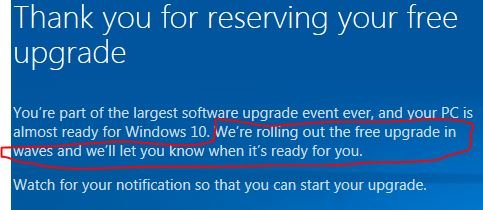
You can do either. The automatic upgrades are being sent out in waves. If you reserved it through the notification, it should start downloading sometime in the next few days. (it actually says this right on the screen....)
-
I'm probably going to wait until after I start school to install the upgrade, but I have it "reserved" so I guess it should download any day now.
-
It really depends...I have everything except games (aside from a few games I didn't transfer to a hard drive) installed on mine, but I got a 500 GB SSD. I guess Windows and other essential programs, like things that start on startup and are always running.
-
Very nice, I like that build much better. Definitely try to get an SSD. It takes less than 2 seconds for Windows to start on an SSD.
-
Really nice job on this. Also moved to LSPDFR Discussion & Suggestions; you posted it in the LCPDFR Media section. This topic has been moved to the appropriate forum. Please post in the correct location in the future.
-
I just got an SSD recently and cloned my OS onto it, and I completely agree with this. It is well worth the extra cost. As for the rest of your build, I also have to ask why you are getting a micro-ATX motherboard? The case supports ATX, and you would have more room for upgrading other parts without having to replace the motherboard in the future. For more future proofing, I would also recommend a stronger PSU. 500 watts is the minimum recommended for your graphics card. If you start adding lots of other parts (perhaps more fans, more hard drives, etc.), you might also need a stronger PSU. Ideally, you want the best basic parts to start with, things that shouldn't need upgrading anytime soon. That way when the new GPU or CPU series comes out, or you need more hard drive space, more RAM, etc., you can just get those parts and not have to worry about replacing things like the motherboard or PSU. To actually answer your question, yes, I believe those parts will work fine together.
-
I also noticed they tend to chase no one now. Could have been broken in one of Rockstar's patches on accident, or could just be a side effect of modding the game.
-
This topic has been moved to the appropriate forum. Please post in the correct location in the future.
-
Your topic has been moved to GTA V Support, this is not LSPDFR related. Please post in the correct location in the future.
-
Your thread has been moved to the GTA IV Modding Tutorials and Questions forum. Please read the Showroom Style Forums announcement before posting in the showroom forums:
-
This topic has been moved to the appropriate forum. Please post in the correct location in the future.
-
Moved to GTA V Support since this has nothing to do with LSPDFR itself. This topic has been moved to the appropriate forum. Please post in the correct location in the future.
-
I'm assuming you want someone to make the siren for GTA V? Moving to Development Suggestions & Requests. This topic has been moved to the appropriate forum. Please post in the correct location in the future.
-
Your thread has been moved to the GTA IV Support Requests forum, as it is not an LCPDFR support request.
-
This topic has been moved to the appropriate forum. Please post in the correct location in the future.
-
If it is downloading files then you installed them wrong. You need to modify files in the mods folder. Make sure to read this part very carefully:
-
You have to use a mods folder for a lot of game data modifications, otherwise it just redownloads the original stuff. See: http://openiv.com/?p=1132
-
Your thread has been moved to LCPDFR Support Requests as it isn't a LSPDFR Support Request.


