



.png.b38616cbc51290fcaa2979c44ee90512.png)
Mrsuperx13
Members
-
Joined
Everything posted by Mrsuperx13
-
 well yes and no. I have a lot of stuff installed so I didn't want to install the whole thing less it mess up my existing setup. I did take the car variations files for the cars though from the DLC and installed them.
- 159 comments
- 10 reviews
-
Is anyone else having trouble with the two vertical strips of lights at the back of the tahoe and explorer? Also really love this pack. Would you consider making ghost skins for the cars as well? I think it would take this pack to the next level. (I have tried myself but the colors are coming out weird for some reason)
- 159 comments
- 10 reviews
-
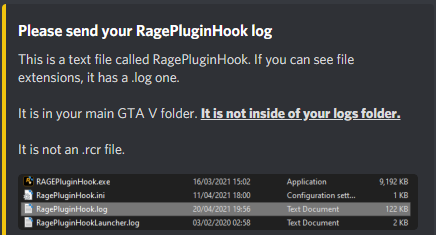
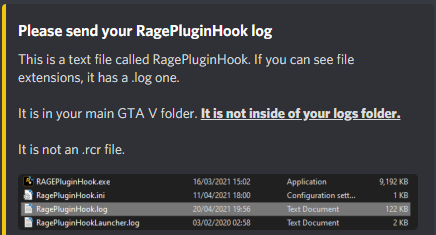
That is not your latest log
-
Try launch **regular** GTA first then once you've loaded in story mode and can move your character around tab-out and launch RagePH.
-
Are you in the part of the game story where michael and franklin are not allowed to enter the city?That is not your most recent log. Your latest log is in the main folder not the logs folder1. We need your log not your crash report. 2. Are you able to launch regular GTA and load in story mode and move your character around?Go in game open compulite when you crash upload your logUpdate Rage NATIVE UI https://github.com/alexguirre/RAGENativeUI/releases . (Drag and drop only the `RAGENativeUI.dll` and `RAGENativeUI.xml` files into the main GTA directory)That is not your latest log we need the one from your main GTA directory. not from your logs folder.For future reference there is almost never a need to reinstall GTA. There are screenshots of what a clean GTA folder is there would be no need to redownload the whole GTA.Most likely then there is an issue in your mods folder but before we confirm that Try launch regular GTA first then once you've loaded in game and can move your character around tab-out and launch RagePH.Do the following 1. Load GTA 5 first. Then, once in-game, tab out and launch RPH. 2. Go into the CommandLine.txt in the Main Directory and remove everything and then add `-windowed` and save and exit the document. Then retry step 1. 3. Add GTA V to the exceptions list in your anti-virus. Then restart your computer. 4. Disable any in-game overlay such as Discord, Steam, OverWolf, or Nvidia GeForce Experience. 5. **If you tried everything above and it still doesn't work**: Follow the instructions on page 4 https://bit.ly/3FLBASBMake sure the whole game folder is in your antivirus exceptions list then reinstall Grammar PoliceTry renaming your mods folder to "_mods" Then try start your game again.Try renaming your mods folder to `_mods` Then try start your game again.Do the following 1. Load GTA 5 first. Then, once in-game, tab out and launch RPH. 2. Go into the CommandLine.txt in the Main Directory and remove everything and then add `-windowed` and save and exit the document. Then retry step 1. 3. Add GTA V to the exceptions list in your anti-virus. Then restart your computer. 4. Disable any in-game overlay such as Discord, Steam, OverWolf, or Nvidia GeForce Experience. 5. **If you tried everything above and it still doesn't work**: Follow the instructions on page 4 https://bit.ly/3FLBASBThere is absolutely no need to redownload the game. If you have enough space and you would like to make a clean version of the game you can simply make a copy of your game directory in the same bas location as your current game directory then clean the new one according to this screenshot. To be clear though you should end up with two Grand Theft Auto V folders in the same directory one called "Grand Theft Auto V - Clean" (or whatever else you would like to call it) and one called "Grand Theft Auto V" nothing else. When you want to do anything with a specific folder (play/verify/install mods etc) make sure the folder you want to use is called "Grand Theft Auto V" and nothing else and the second folder you don't want to use is named something other else. Then lastly verify the clean one (once you've renamed it to "Grand Theft Auto V") to make sure everything is in working order.Please Upload your log
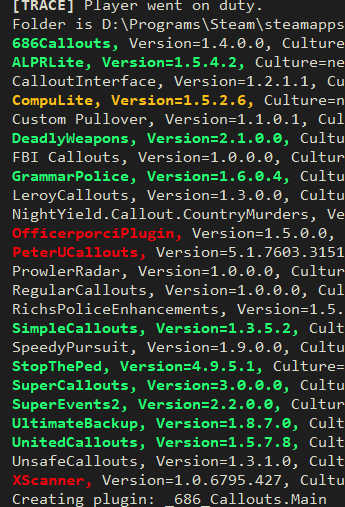
 Reinstall RichsPoliceEnhancements. then remove the following in red and update the one in orange
 then you have too many high quality high poly vehicles...Do the following 1. Load GTA 5 first. Then, once in-game, tab out and launch RPH. 2. Go into the CommandLine.txt in the Main Directory and remove everything and then add `-windowed` and save and exit the document. Then retry step 1. 3. Add GTA V to the exceptions list in your anti-virus. Then restart your computer. 4. Disable any in-game overlay such as Discord, Steam, OverWolf, or GeForce Experience. 5. **If you tried everything above and it still doesn't work**: Follow the instructions on page 4 https://bit.ly/3FLBASB
.thumb.png.20c527cb5cfc433de390bfa6845ed282.png)




