



.png.b38616cbc51290fcaa2979c44ee90512.png)
Mrsuperx13
Members
-
Joined
Everything posted by Mrsuperx13
-
Do you have a vfs.dll file in your main game directory? if you do... Rename the vfs.dll file to _vfs.dll. Then try start your game again. if you don't or that doesn't work Please upload your Asiloader.log and ELS.log (they can be found in your main GTA directory)
-
the thing where you randomly join a pursuit is part of base LSPDFR yes
-
1. Go to Grand Theft Auto V\lspdfr\lspdfr.ini and change Ambient.DisableEscapedSuspectEncounter = false to Ambient.DisableEscapedSuspectEncounter = true 2. you can press F4 in game to bring up the RPH console and you can use the UnloadPlug and LoadPlugin commands to manually restart lspdfr without having to start the whole game again.
-
looks like a random crashTry renaming your mods folder to _mods Then try start your regular game again. if that doesn't work Check if you have a a vfs.dll file in your main game directory... if you do Rename the vfs.dll file to _vfs.dll. Then try start your game again.You are describing a completely different issue. I would recommend starting your own support thread.remove the plugins in redThat is not the latest log. We need the log from your main game folder not your `logs` folder. If there are any numbers after `RagePluginHook` then that is the wrong log.1. Load GTA 5 first. Then, once in-game, tab out and launch RPH. 2. Go into the CommandLine.txt file in your main GTA directory and delete everything inside the file and then add `-windowed` and save and exit the document. Then retry step 1. 3. Add the GTA V folder your antivirus's exclusions list. Then restart your computer. 4. Disable any in-game overlay such as Discord, Steam, OverWolf, or Nvidia GeForce Experience. 5. **If you tried everything above and it still doesn't work**: Follow the instructions on page 4 <https://bit.ly/3FLBASB>.Remove all the plugins in redfor some people the in game lspdfr menu is buggedAre you able to launch regular GTA and load in story mode and move your character around? if not Try renaming your mods folder to _mods Then try start your game again.Move the highlighted in YELLLOW to your LSPDFR folder Delete the ones in RED (or place them in the scripts folder - if you have one - in the main directory) then Try launch regular GTA first, then once you've loaded in story mode and can move your character around tab-out and launch RagePH.Move the highlighted files into the LSPDFR folder then resend a screenshot of just the plugins folder
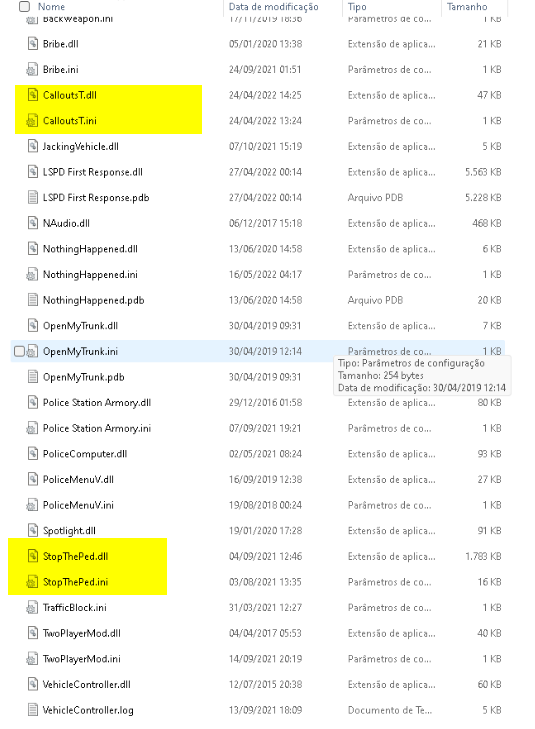 1. you are are running an old version of lspdfr Update LSPDFR/RPH https://bit.ly/3A9CIhX DOWNLOAD THE "MANUAL INSTALL" VERSION, copy and paste EVERYTHING in the zip except for the licenses folder into your main GTA directory. 2. You have a lot of stuff installed wrong please send a screenshot of your GTA/plugins folderif you are crashing before you even load RPH Try renaming your mods folder to _mods Then try start your game again.Try renaming your mods folder to _mods Then try start your game again.Are you able to launch regular GTA and load in story mode and move your character around?open your RagePluginHook.ini in your main GTA folder and change the Plugin Timeout Threshold to 60000reinstall SHV http://www.dev-c.com/gtav/scripthookv/ (Drag and drop the ScriptHookV.dll and dinput8.dll files into your main GTA V folder. **do not install** the NativeTrainer.asi file.)look in your game folder for a file called vfs.dll. if you have it rename the vfs.dll file to _vfs.dll. Then try start your game again. if that doesn't work or you don't have that file Please upload your Asiloader.log and ELS.log (they can be found in your main GTA directory)Try renaming your mods folder to _mods Then try start your regular game again.Are you able to launch regular GTA and load in story mode and move your character around?
.thumb.png.20c527cb5cfc433de390bfa6845ed282.png)

