



.png.b38616cbc51290fcaa2979c44ee90512.png)
Mrsuperx13
Members
-
Joined
Everything posted by Mrsuperx13
-
Make sure you have all 3 installed https://www.microsoft.com/en-us/download/details.aspx?id=48130 http://www.microsoft.com/en-us/download/details.aspx?id=13523 https://www.microsoft.com/en-us/download/details.aspx?id=52685
-
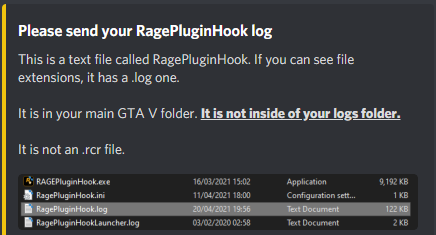
1. Please upload your Ragepluginhook.log your crashlog is useless 2. Is there a specific reason you "- Ticked the function that makes RPH not hook DirectX"?
-
You have RageNativeUI Installed in Grand Theft Auto/Plugins/LSPDFR it is not supposed to be there. Delete it from there go to the link UnitedOrange66 linked download and install the two RageNativeUI files into your main GTA directory.
-
1. Download and install this into your main GTA directory https://www.gta5-mods.com/scripts/simple-trainer-for-gtav 2. Change `KeyBindingsDisabled=0` to `KeyBindingsDisabled=1` in trainerv.ini in your main gta directory 3. open the game and once on duty press F3 and navigate using the Number Pad keys to the model spawning menu
-
go to GTA/LSPDFR and open the lspdfr.ini change "Main.PreloadAllModels = true" to "Main.PreloadAllModels = false"Do the following 1. Load GTA 5 first. Then, once in-game, tab out and launch RPH. 2. Go into the CommandLine.txt in the Main Directory and remove everything and then add `-windowed` and save and exit the document. Then retry step 1. 3. Add GTA V to the exceptions list in your anti-virus. Then restart your computer. 4. Disable any in-game overlay such as Discord, Steam, OverWolf, or GeForce Experience. 5. If you tried everything above and it still doesn't work: Follow the instructions on page 4 https://bit.ly/3FLBASBUpload your new log pleaseUpdate Rage NATIVE UI https://github.com/alexguirre/RAGENativeUI/releases. Drag and drop only the `RAGENativeUI.dll` and `RAGENativeUI.xml` files into the main GTA directoryThis log appears to be from an hours long session... Please launch your game go on duty once you crash upload your log.Try launch **regular** GTA first then once you've loaded in game and can move your character around tab-out and launch RagePH.Clear the commandline.txt file found in your main Grand Theft Auto directory open the file and delete everything inside then add `-windowed` and save the file. then go to gta/lspdfr open the lspdfr.ini and set "Main.DisableGameBlipHiding = false" to "Main.DisableGameBlipHiding = true"There is nothing to show how its very simple https://bit.ly/3A9CIhX DOWNLOAD THE MANUAL VERSION, copy and paste EVERYTHING in the zip except for the `licenses` and `lspdfr` folders (you can ignore them) into your main GTA directory.If you are still having an issue upload your latest log, from your main game directory - not from the logs folderReinstall Callout interface Update Super callouts (but delete the current files first.) Remove the following; Callout Manager Immersive dispatchAdd the whole GTA folder to your antivirus exceptions list. Reinstall LSPDFR then go into the lspdfr ini in gta/lspdfr and change "Main.DisableGameBlipHiding = false" to "Main.DisableGameBlipHiding = true"This is probably not related to your issue but I noticed you have a number of outdated mods from a retired Plugin developer named Albo. Please Remove any of the following that you have; `Arrest Manager` `Assorted Callouts` `LSPDFR+` `Traffic Policer` `Police SmartRadio` (there has been an update to this from another developer if you would like to continue to use it https://github.com/Aschtar/PoliceSmartRadio/releases/) Also remove immersive dispatch (Grammar police has all its features if you want an up to date version of the plugin)It looks like you didn't send one of the screenshots of the top of the directory...For starters update LSPDFR/RAGE (the latest version of rage is only included with LSPDFR (or on the RPH discord)) https://bit.ly/3A9CIhX DOWNLOAD THE MANUAL VERSION, copy and paste EVERYTHING in the zip except for the `licenses` and `lspdfr` folders (you can ignore them) into your main GTA directory.That fixed your crash yes but those other mods are outdated and it is highly recommended to remove them as they will cause you issues in the future.Would you mind uploading your latest log file. Do not copy and paste it. upload the actual file1. Update RageNativeUI https://github.com/alexguirre/RAGENativeUI/releases/tag/1.8.2 2. Remove the following CalloutManager LSPDFR+ Traffic Policer
.thumb.png.20c527cb5cfc433de390bfa6845ed282.png)




Account
Navigation
Search
Configure browser push notifications
Chrome (Android)
- Tap the lock icon next to the address bar.
- Tap Permissions → Notifications.
- Adjust your preference.
Chrome (Desktop)
- Click the padlock icon in the address bar.
- Select Site settings.
- Find Notifications and adjust your preference.
Safari (iOS 16.4+)
- Ensure the site is installed via Add to Home Screen.
- Open Settings App → Notifications.
- Find your app name and adjust your preference.
Safari (macOS)
- Go to Safari → Preferences.
- Click the Websites tab.
- Select Notifications in the sidebar.
- Find this website and adjust your preference.
Edge (Android)
- Tap the lock icon next to the address bar.
- Tap Permissions.
- Find Notifications and adjust your preference.
Edge (Desktop)
- Click the padlock icon in the address bar.
- Click Permissions for this site.
- Find Notifications and adjust your preference.
Firefox (Android)
- Go to Settings → Site permissions.
- Tap Notifications.
- Find this site in the list and adjust your preference.
Firefox (Desktop)
- Open Firefox Settings.
- Search for Notifications.
- Find this site in the list and adjust your preference.