



.png.b38616cbc51290fcaa2979c44ee90512.png)
Mrsuperx13
Members
-
Joined
Everything posted by Mrsuperx13
-
Just to confirm you said you're not crashing when the mods folder is disabled? Try the following gameconfig https://github.com/pnwparksfan/gameconfig/releases/tag/v2545 If that doesn't work then there is an issue in your mods folder and its pretty much impossible for us to diagnose the specific cause.
-
Try launch **regular** GTA first then once you've loaded in game and can move your character around tab-out and launch RAGE.
-
For starters Update Rage NATIVE UI https://github.com/alexguirre/RAGENativeUI/releases. Drag and drop only the `RAGENativeUI.dll` and `RAGENativeUI.xml` files into the main GTA directory.
-
Please do not upload rage logs with no context. Please provide a description of your issue (when, where, what) and what if any troubleshooting methods you have attempted. You have at least one outdated mod. Delete all SuperEvents files and reinstall the latest version from lcpdfr.com Try to reinstall the latest version of callout interface
-
Do not try to go online if you have any foreign files installed in your game folder If you are unable to launch regular gta and load into story mode try renaming your mods folder to `_mods`. Then try start your game again. Also in the future please just upload the whole rage log file - not screenshots or snippets.
-
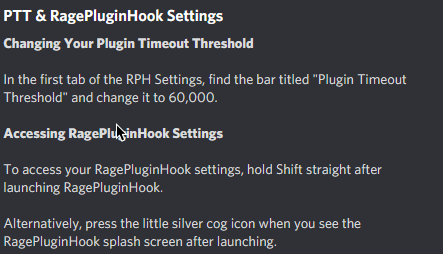
Set you PTT to 60000 (follow the instructions at bottom of this post) Try launch regular GTA first then once you've loaded in game and can move your character around tab-out and launch RAGE.
-
Update Rage NATIVE UI https://github.com/alexguirre/RAGENativeUI/releases. Drag and drop only the `RAGENativeUI.dll` and `RAGENativeUI.xml` files into the main GTA directory
-
Did you install any in game mods (not plugins)? If so you need to verify your game files.
-
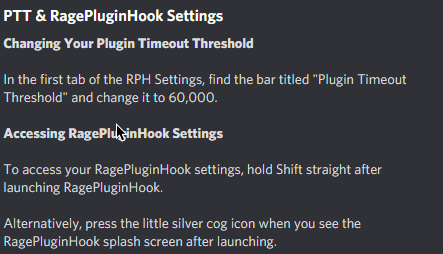
Try renaming your mods folder to `_mods`. Then follow the instructions in the picture below then try your game again
-
try to Update Rage NATIVE UI https://github.com/alexguirre/RAGENativeUI/releases. Drag and drop only the RAGENativeUI.dll and RAGENativeUI.xml files into the main GTA directory
-
If renaming your mods folder stopped your problem that means unfortunately something in your mods folders is corrupt. Either a mod you installed or a file you edited. If you can remember what you installed or edited most recently then you can try and remove it or restore the vanilla version. Otherwise I'm afraid you're gonna have to start your mods folder over again, as it is pretty much impossible for us to diagnose what's actually causing the issue. The only other thing it could be is **if you recently installed a large amount of __addon cars__** you may need to install a custom gameconfig.
-
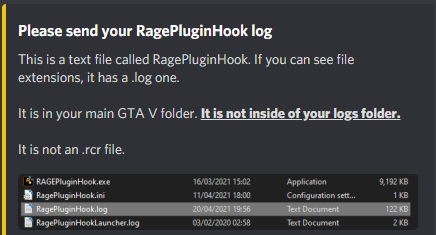
Please Upload your rage log
-
Try updating SHV. http://www.dev-c.com/gtav/scripthookv
-
Update Rage NATIVE UI https://github.com/alexguirre/RAGENativeUI/releases. Drag and drop only the RAGENativeUI.dll and RAGENativeUI.xml files into the main GTA directory
-
Update Rage NATIVE UI https://github.com/alexguirre/RAGENativeUI/releases. Drag and drop only the RAGENativeUI.dll and RAGENativeUI.xml files into the main GTA directory
-
Do the following 1. Load GTA 5 first. Then, once in-game, tab out and launch RPH. 2. Go into the CommandLine.txt in the Main Directory and remove everything and then add `-windowed` and save and exit the document. Then retry step 1. 3. Add GTA V to the exceptions list in your anti-virus. More info on that found in #support-faq - then restart your computer. 4. Disable any in-game overlay such as Discord, Steam, OverWolf, or GeForce Experience. 5. **If you tried everything above and it still doesn't work**: Follow the instructions on page 4 https://bit.ly/3FLBASB
-
-
Do the following 1. Load GTA 5 first. Then, once in-game, tab out and launch RPH. 2. Go into the CommandLine.txt in the Main Directory and remove everything and then add -windowed and save and exit the document. Then retry step 1. 3. Add GTA V to the exceptions list in your anti-virus. More info on that found in #support-faq. 4. Disable any in-game overlay such as Discord, Steam, OverWolf, or GeForce Experience. 5. **If you tried everything above and it still doesn't work**: Follow the instructions on page 4 https://bit.ly/3FLBASB
-
yeah your lspdfr is not gonna load because you don't have LSPDFR installed... https://bit.ly/3A9CIhX **Download the manual version**, copy and paste EVERYTHING in the zip into your main GTA directory. If you already have an LSPDFR folder no need to replace it.
-
open the startup.rphs file in your main directory and delete everything inside. if it crashes again send the new log
-
The game crashed or rage? if rage send the new log
-
Please send a screenshot of your plugins folder
-
Ok so just to be clear about when you're crashing... when you enter or exit the garage? or whenever you drive past the area?
-
can you send a screenshot of exactly what you type and what it reponds
-
press f4 in game and type in ReloadAllPlugins
.thumb.png.20c527cb5cfc433de390bfa6845ed282.png)


