



.png.b38616cbc51290fcaa2979c44ee90512.png)
Mrsuperx13
Members
-
Joined
Everything posted by Mrsuperx13
-
Please upload your rage log.

-
Try to update Rage NATIVE UI https://github.com/alexguirre/RAGENativeUI/releases. Drag and drop only the RAGENativeUI.dll and RAGENativeUI.xml files into the main GTA directory
-
It looks like you may have one or more outdated/unsupported mods from a retired Plugin developer named Albo. Please Remove any of the following that you have; Auto Pursuit Backup Disabler, Arrest Manager, Assorted Callouts, LSPDFR+, Traffic Policer, Police SmartRadio (there has been an update to this from another developer if you would like to continue to use it https://github.com/Aschtar/PoliceSmartRadio/releases/) If you are looking for a similar group of mods that are updated I recommend using Bejoijo's mods found here (specifically Stop the Ped and Compulite) Furthermore remove: Wilderness Callouts Keep Calm Callout manager Traffic Callouts Also: Immersive Dispatch is no longer being supported I recommend switching to Grammar Police
-
When you import in open iv are you importing through open formats? Also check the comments of the siren pack you downloaded, make sure no one else is having any issues.
-
Having white lights from ELS vehicle is a known Issue and what I posted is a known fix. Feel free to google it you'll see the same answer everywhere. It's very unlikely that it's related to the vehicle pack - as he said he just installed ELS.
-
Do the following 1. Load GTA 5 first. Then, once in-game, tab out and launch RPH. 2. Go into the CommandLine.txt in the Main Directory and remove everything and then add -windowed and save and exit the document. Then retry step 1. 3. Add GTA V to the exceptions list in your anti-virus. More info on that found in #support-faq. 4. Disable any in-game overlay such as Discord, Steam, OverWolf, or GeForce Experience. 5. **If you tried everything above and it still doesn't work**: Follow the instructions on page 4 https://bit.ly/3FLBASB
-
Are you able to launch regular GTA and load in game and move your character around?
-
At what point are you crashing? Between step 3 and 4?
-
Make sure the following settings are set to high or above shaders PostFX Particles
-
1. Open the startup.rphs file (it's in your main gta directory) in notepad, delete everything inside and save the file 2. Go to GTA/Plugins there is a folder there called "LSPDFR" rename it to "_LSPDFR" 3. Launch the game 4. If you don't crash, Press F4 type in "LoadPlugin LSPD First Response.dll" 5. If you crash again send the log
-
Update LSPDFR/RAGE (the latest version of rage is only included with LSPDFR (or on the RPH discord)) https://bit.ly/3A9CIhX Download the manual version, copy and paste EVERYTHING in the zip except for the "licenses" and "lspdfr" folders (you can ignore them if you already have them in your gta folder) into your main GTA directory.
-
There is already a ragehook update. It is not on the rage website though. Its included in the LSPDFR download
-
When you say it works without RPH are you loading fully into the game and able to move you're character around?
-
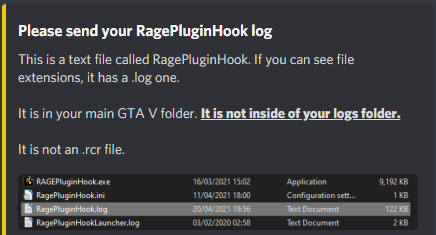
That is because that is not the log.
-
Try renaming your mods folder to "_mods". Then try start your game again.
-
We won't support outdated game versions. Update it. if you still need support. You can reply to this post
-
install this https://download.microsoft.com/download/3/2/2/3224B87F-CFA0-4E70-BDA3-3DE650EFEBA5/vcredist_x64.exe
-
What exactly is not working? What have you tried doing to test? Please upload your rage log
-
Have you made sure to add the whole gta v to your antiviruses exceptions list? also have you tried to launch gta v first then once you've fully loaded into game launching rage?
-
Make sure you have a police carvariations installed for them as well. one can be found here
-
Try to update Rage NATIVE UI https://github.com/alexguirre/RAGENativeUI/releases. Drag and drop only the RAGENativeUI.dll and RAGENativeUI.xml files into the main GTA directory
-
edit the vehicle's vehicle.meta section. in the flags section add the flag "FLAG_EXTRAS_ALL"
-
Try to update Rage NATIVE UI https://github.com/alexguirre/RAGENativeUI/releases. Drag and drop only the RAGENativeUI.dll and RAGENativeUI.xml files into the main GTA directory
-
Please Upload your rage log.
-
Send your rage log
.thumb.png.20c527cb5cfc433de390bfa6845ed282.png)


