



.png.b38616cbc51290fcaa2979c44ee90512.png)
Mrsuperx13
Members
-
Joined
Everything posted by Mrsuperx13
-
Add your whole game folder to your antivirus's exclusions list. then restart your computer. Reinstall LSPDFR https://bit.ly/3A9CIhX DOWNLOAD THE "MANUAL INSTALL" VERSION, copy and paste EVERYTHING in the zip except for the licenses folder (you can ignore it) into your main GTA directory. If it still doesn't work go to Grand Theft Auto V\plugins and rename the LSPDFR folder to _LSPDFR
-
couldn't hurt but I doubt it'll show much
-
Most likely way of a save game getting corrupted is if you saved the game whilst RPH and plugins were loaded. never do so.
-
go in game press F4 type in GoToPD and press enter then press F4 then go inside the station and directly ahead to the right there will be a door with a sign LOCKER ROOM go through that door and immediately to the right there will be another door go through that one as well. if you see a blue circle you are in the right place. go to the circle and press E
-
I am not seeing any consistent issue throughout your logs making me think there may be an issue in your mods folder. Try renaming your mods folder to _mods Then try start your game again. none of your cars or other modded stuff will be working but try play around for the same amount of time it would usually take for you to crash.
-
did you add your whole gta folder to your antivirus's exclusions list like charlie said? If you did please send a screenshot of your antivirus's exclusions list
-
That is not the latest log. We need the log from your main game folder not your `logs` folder. If there are any numbers after `RagePluginHook` then that is the wrong log.
-
you can always remove the shv file until it updates. most of your mods and plugins will work the only thing that won't is scripts and ELS
-
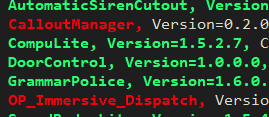
remove the two plugins in RED
-
-
that means there was in issue with something you installed through LML. you can rename your mods folder backRename the vfs.dll file to _vfs.dll. Then try start your game again.1. In the setting set use native EMS to false 2. install this file ems.xml into Grand Theft Auto V\plugins\LSPDFR\GrammarPolice\grammar\en-GENERIC\custom\actionsaccording to this log your game is crashing?Try launch regular GTA first, then once you've loaded in story mode and can move your character around tab-out and launch RagePH.once you've done what charlie said if you are still having an issue. please upload your new log1. I only told you to do that if you were not able to load story mode without RPH, was that the case? 2. Do you have a vfs.dll file in your main game directory?Reinstall LSPDFR https://bit.ly/3A9CIhX DOWNLOAD THE "MANUAL INSTALL" VERSION, copy and paste EVERYTHING in the zip except for the licenses folder (you can ignore it) into your main GTA directory.check your callout interface settingsAre you able to launch regular GTA and load in story mode and move your character around? if no Try renaming your mods folder to _mods Then try start your game again.Update RNUI https://bit.ly/RageNUI . (Drag and drop only the RAGENativeUI.dll and RAGENativeUI.xml files into the main GTA directory).go to and open Grand Theft Auto V\lspdfr\lspdfr.ini and change Ambient.DisableEscapedSuspectEncounter = false to Ambient.DisableEscapedSuspectEncounter = trueClear the commandline.txt file found in your main Grand Theft Auto directory (open the file and delete everything inside) then add -windowed and save the file. Try launch regular GTA first, then once you've loaded in story mode and can move your character around tab-out and launch RagePH.yes you can click the link in my signature and join Public Support channel
.thumb.png.20c527cb5cfc433de390bfa6845ed282.png)

