


Ceril
Members
-
Joined
-
Last visited
Everything posted by Ceril
-
"Ford Style" Vapid Police Cruisers Not much to say here, It's just a vapid with Ford Parts. There is a Code 3 Excalibur version and a Whelen Liberty version. I've included a download for the textures, if they're needed for whatever reason. Permission is granted to edit and re-upload the skins, just remember to give credit. - Original Vapid Cruiser by Rockstar Games - Unlocked Vapid by Lt. Caine - Grilllights by Cj24 - Rambar made by Bxbugs123. - 2009 CVPI hubcaps by chasez. - Whelen Liberty by PFCBarefoot - Whelen Talon by BxBugs123 - Code 3 Excalibur ELS-H lightbar made by AlecDurbin. - Parts and Textures were made by Lt.Caine. - Skins made by Ceril
- 11 comments
- 3 reviews
-
 Thanks! It's not released yet, i should hopefully release the ELS version tonight. The non-ELS will come maybe tomorrow.
 -
From the album: Ceril's WIP
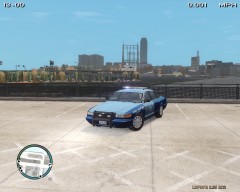
A screenshot of a vapid cruiser as if it were actually a ford. Also a test of some Massachusetts State Police texturing. -
From the album: Ceril's WIP
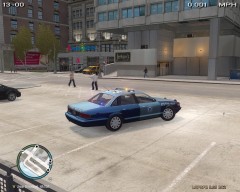
A screenshot of a vapid cruiser as if it were actually a ford. Also a test of some Massachusetts State Police texturing. -
-
-
I've just noticed that in zmodeler my hierarchy is totally messed up. working on a fix now
- 16 comments
- 5 reviews
-
If anyone else is having issues, please let me know. I'm trying to figure it out right now.
- 16 comments
- 5 reviews
-
-
2008 Crown Victoria Police Interceptor with Whelen Liberty, Whelen Talons, and 2009 Steel Rims This 2008 CVPI is based off of the Massachusetts state police cruisers that i see day to day. I originally created this model using a much older CVPI body, that i wasn't as fond of. When i found the unlocked 2008 CVPI, i decided to re-do the entire thing from scratch. The original version of the wtd found in the file has all blue lights, with red and amber wags. I've also included a red and blue light .wtd and texture, as well as a backup of the original all blues. The CVPI has primary and secondary ELS. The secondary activates only the rear lights, none of the front facing lights will activate. Ford Crown Victoria made by Ubisoft (Driver San Francisco), converted to GTA IV by f5544, edited by Sgt.Kanyo - Spotlights, WatchGuard Video System, and Decatur Genesis I by Bxbugs123 - Toughbook C19 by PFCBarefoot edited by Sgt.Kanyo - Grill lights made by CJ24 - Rambar made by Bxbugs123. - Original Tires and Rims with 2009 CVPI hubcaps by chasez. - Whelen Liberty by PFCBarefoot - Whelen Talon by BxBugs123 - ELS Modified by Ceril i think i fixed everything, but please let me know if it's still not working. I'll get to work replacing the Crown Vic badge with the CVPI badge.
- 16 comments
- 5 reviews
-
Find the textures for the red light in the .WTD using spark IV, export them to desktop, open them with GIMP or any other program, change them to blue and import them using spark iv :]
-
Try copying all of the files, textures and all into the same folder, Then import them. If that doesn't work, i would try reinstalling zmodeler.
-
When you first imported them, were the textures there? Or did they disappear after you saved the file? I've noticed sometimes with zmodeler that i have to reinstall it. I have no idea why, but sometimes it decides it doesn't want to recognize the textures in a folder, and after reinstalling it will go back to working normally.
-
Make sure that when you assign a material, that you have selected what you want, and that you're in polygon mode (press 3). then go into your materials list and click "Assign to selected" Also, try to make sure that you've only got one light selected in vertex mode. Do a "select none" before you select any lights to clear it. In terms of your tahoe, make sure that the folder you're importing the tahoe from has the all of the whelen liberty textures in it. This is where zmodeler is going to try to find the textures.
-
You can change the color of the light by remapping the texture onto the object. To do that, you'll want to change to vertex mode (you can just press 1), and then select the light using the select -> separated tool, then Press space to turn on selected mode. Now in your tools, go to Surface -> Mapping -> Edit UV Click on the part in the view mode you want to map, and you'll get a dialogue box. In the second half of the box, you want to select "Generate New" and click the box that says "Force Material". Select your lightsemissive material in the box next to it and then click okay. Change one of your views to the UV Mapper view. Select the material from the 'Material' Menu, and then you should see your object and material there. Go back into object mode (press 4) and disable selected mode (press space). After that, you can move, scale or rotate your object over the texture, and place it where you want it to be! Good luck :]
-
I need help yet again.. I generally like to answer more questions than i ask, but unfortunately i'm having a string of rather bad luck with modding. My problem started when i had the great idea of mapping each light on a lightbar to a different place on a texture, allowing you to change the color of any light on the bar. So i created a 1024x1024 image of all the lights in photoshop, and went about mapping each light to it's respective place on the texture. When i loaded the car in game, it worked! I replaced the texture with a new one, and i had new colors! When i changed it back, however, things started to go horribly wrong. Here's screenshots of what i encountered: I'm honestly stumped as to what to do. I tried replacing the 1024x1024 texture with a 512x512 one, but that didn't fix anything! I'm considering remapping the whole thing, perhaps zmodeler is scaling the 512x512 up? I'm not sure, but it's worth a shot.. I replaced the .wtd a few times, and it would occasionally fix the issue. However, loading the game up the next time it was broken again. Any help, as usual, is greatly appreciated. Thanks!
-
Did you Make sure the socket type of your CPU matches the socket type of your motherboard? Look for a four pin power connector near your Cpu and make sure that there is a power connector attached from the power supply. What is the wattage of your power supply? Maybe its not enough? Things turning on means that your power supply is working. Generally doesn't have to do with the motherboard.
-
I had this problem in my old computer. Unfortunately for me, the motherboard had died. Try replacing the video card, it could be that. Also, when you put the PC in, did you ground yourself to the case with a wrist-strap?
-
So i had to re-download my gta IV, and after i reinstalled the ENB, i noticed this: My ELS taillight is all torn up! I know it has to do with my ENB because before i modified it, it wasn't like that. Any help is appreciated, Thanks!
-
I've got to go to work for an hour, but i'll get some screens up when i get back. Didn't know that about the RearglassR and Radar! the radar was there when i DL'd it, so i never thought of it. Thanks! i'm really not sure what to do, would anyone be willing to download the file and take a look at it for me? i need a fresh set of eyes to look it over, and screenies are kind of a hassle.
-
Police, exporting it as Police All the dummies and Collisions seem to be lined up as they should be, Tried everything that aznairsoftdude suggested and nothing happened. Multiquote doesn't seem to work with google chrome, kinda strange.
-
So i've been working on replacing the rims on an unlocked crown vic, something that i've done before. Everything looks great in zmodeler, but when i load it into the game, this happens: In Game: in Zmodeler: It kind of looks like someone tore the texture on the right taillight. i've added screens of what it looks like in zmodeler. Also accidentally added a picture of my dog from a year ago. Enjoy it! Any help would further prevent me from bashing my face off the keyboard, Thank you!
-
I know it would be ridiculous for them to try and make it stand-alone, but it would be worth it to get rid of those god damned loading screens at the beginning of GTA IV! Lol
-
I'm applying for dispatch jobs at the moment, becoming an officer in my state is tough! Going to have to build connections.
-
Sure, i'll have to change the WAG, because the red on the left would be kind of pointless. How about i replace the red wag light with a blue one, and change the yellow one to red?
- 9 comments
- 4 reviews
