


Ceril
Members
-
Joined
-
Last visited
Everything posted by Ceril
-
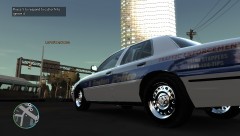 That skin looks awesome! Color is spot on. I'm not sure why everyone keeps doing it, but I've never seen a Boston cruiser with red text on it. Most of the cruisers have "www.bpdnews.com" on them now where it says traffic enforcement. Also just above where it says traffic is normally the cruiser number. Is this going to be release? i'd love to use it :D
 -
If you're using ELS, then you can find the colors in the els config file located in your GTA IV directory. If you scroll down there should be a place in the document set up like this: [ POLICE ] Active = 1 Color_Light1L = 0 Color_Light2L = 0 Color_Light3R = 1 Color_Light4R = 1 Offst_SLights = 0 the number is the color of the light, which corresponds to this chart (also at the bottom of els.ini): Red 0 Blue 1 White 2 Amber 3 Green 4 The look of your file might vary slightly based on the version of ELS you're using. Hope this helps!
-
make sure you download and install drives, then restart your computer. Had this problem when i bought a new monitor as well.
-
i might be reading the bolded part wrong, but If you've added a video card you might be experiencing issues with your HAL.DLL file, which is your Hardware Abstraction Layer. When changing components of your computer, it is critical for you to erase all previous drivers for the piece you're replacing. Not doing so can corrupt your HAL.DLL. If this is the case, try using your old video card, and boot windows into safety mode with the "last known working configuration" remove your old video drivers, then install your new video card.
-
Keep in mind that the processors that you'll be buying are the newest generation. the new 2.8GHz quad core processor should be able to handle it. 2GB of GDDR5 Video Ram is very good. Games in general (as far as i know) probably won't need anything above 1.5GB of video ram. With my PC at home, GTA IV doesn't run above 700MB of my video ram.
-
here's a good comparison tool: http://www.notebookcheck.net/Mobile-Graphics-Cards-Benchmark-List.844.0.html I'm fairly certain that any of the Sagers that start with 91, and the 6350 have more than capable graphics processors. the GTX 670 is definitely a great card, and is well above the minimum for GTA IV, as is the 660. I'd say anything GTX 660 and above with 2GB GDDR5 is great. In terms of RAM for your computer, i would go with 6GB or more (not counting the Video Ram, which is a separate ram) RAM is not cummulative, if you have something that calls for 2GB, and another that calls for 4, you're perfectly fine with 4. The only reason you wouldn't be fine with 4 is if you wanted to run both of the games at the same time, which would just be silly. edit - Video ram works the same way, i see now that you specifically asked about the video ram :]
-
I'm glad that my post helped :] Recommended settings are the what the company thinks that the game would run well on. Not necessarily great, but run okay. Minimum settings are the absolute lowest that the game can actually be played on. Anything below minimum generally just doesn't work. In terms of minimum settings, it really comes down to what the company believes is "playable". I had a laptop that was just above minimum settings for SW:TOR, and the game played at 5-20fps. Most of the time, it was like playing a slideshow. Hardly playable. But yet, the company still deemed it playable. If you were to buy a laptop somewhere between Minimum and Recommended, the game should run. It might not run great, but it will run. I would try to get as close to recommended as possible. I personally recommend getting something above minimum. Nothing sucks more than paying $1000 to play a slideshow, when a few hundred extra would mean a smooth game.
-
This is just a VERY quick look at picking graphics cards for laptops. This is just the absolute basic, "graphics cards for dummies" kind of thing. When picking a graphics card for laptops (and desktops as well), there is always a number involved. For example: Nvidia GeForce 650 The number is quite simple to explain, it works like this. the 6 is the generation. With Nvidia, the higher the number, the newer the card. the 50 is the version within the year. The higher the number, the better the performance. Generally, performance has to do with the internal clock and all that good stuff. People tend to assume that the first number (the 6) is what defines the performance, but it's not. For example, an Nvidia GeForce 480 is better than a 550. The next thing you want to look at is the RAM the graphics card uses. The current best (as far as i'm aware) is known as GDDR5. 1GB GDDR5 ram should be enough for GTA IV, though i might recommend 2 just for security. Now, in terms of the sager notebook, when you do the quick look, you see the 2.40 Ghz. When you select the laptop, and before you purchase it, you get to customize what you get, everything about it. This means you can put in a better processor, larger HDD, different graphics processor (if available), etc. The Nvidia GTX 670MX with 3GB GDDR5 that comes standard with the Sager 17" NP9170 is definitely good enough for gta iv. here are the CPU options: 3rd Generation Intel® Core™ i7-3630QM Processor ( 6MB L3 Cache, 2.40GHz) 3rd Generation Intel® Core™ i7-3740QM Processor ( 6MB L3 Cache, 2.70GHz) [+$170.00] 3rd Generation Intel® Core™ i7-3840QM Processor ( 8MB L3 Cache, 2.80GHz) [+$355.00] 3rd Generation Intel® Core™ i7-3940XM Processor Extreme Edition ( 8MB L3 Cache, 3.0GHz ) [+$875.00] the i7-3740QM is definitely good enough for GTA IV. I definitely recommend that you simply walk through the process of customizing a sager notebook, i'm not sure what screen size you want, but they have 15.6" and 17", and a whole bunch of others. I think the 15" starts at 1099. When i was going through the process of customizing the one that i wanted, i think the end total was 1399, with a beefier processor and graphics processor. Hope this helps!
-
I've heard absolutely amazing things about these: http://sagernotebook.com/ edit - Fixed the link. I've heard these laptops are just as good, if not better, than alienware. While alienware might be great, dell overprices them QUITE a lot. Just as a note, before i built my current desktop, i spent a lot of time researching gaming laptops because i wanted to have a laptop that could play SW:TOR. I eventually settled on building a desktop because it's a hell of a lot cheaper, and i really don't need the portability of the laptop. After all the research i did, it was quite clear that sager / Clevo (pretty much exactly the same, just a different company) is the best bang for the buck, so to speak.
-
-
In terms of a Red / White Lightbar, it should be as easy as tweaking the emerglights and emerglights_emis texture, i'll work on it this week
- 21 comments
- 11 reviews
-
-

- 1
-
-
-
So excited to finally be releasing this! This is a 1989 Ford Crown Victoria LTD, with an Aerodynic ELS lightbar. I've included a template as well. Thank you to everyone who has helped contribute to the Model, Especially KevinDV and Strike. The Lightbar and Textures are just amazing. Enjoy! Soon to come is a taxi and civilian version. I should hopefully also be posting a handling.dat line soon. For now, i've been using the 1983 Impala Handling line by Sgt. Kanyo _________________________________________________________ Original Vehicle by Dodgeboy Pumbars. Converted to GTAIV, and heavily edited by Ceril. Hubcaps By Ceril Aerodynic ELS Lightbar by KevinDV Toughbook C19 byPFCBarefoot Spotlight by CJ24 Decatur Genesis I by BxBugs123 Setina The Bodyguard Petition by Bxbugs123 Police Console by PFCBarefoot NYPD Style LCPD, and LAPD Textures Courtesy of Strike.
- 21 comments
- 11 reviews
-
Wow that's really weird... No idea what to tell you :/
-
what are you using to view the model? edit- nevermind, i see at the bottom of the screenshots that it says OpenIV. Sometimes OpenIV doesn't show the textures, in fact, it never does for me. Try loading the model in game to see if there are textures.
-
Here's the hubcap: Yes i realize i spelt screenshot wrong when i saved it in the file. http://www.mediafire.com/?2bramy6zkyhg28m If you want, i just found out how to make circles with more edges, so i can always remake the hubcap with sharper circles if you're not too fond of this one in game. (should be okay because it's pretty small in game, so it probably won't be that noticeable) Also, it'll have to be scaled down and rotated to face the proper direction. i set up the materials quickly, so you'll have to change them around to be correct. they should be: Mesh(tire) Texture Dirt Bumpmap Specular i just did texture, bumpmap, specular, and the auto sphere environment. I also didn't set up any of the user defined options. Let me know if you need to know how to set those
-
I fixed the bouncy ELS last night ;D Looking at a release of tonight or tomorrow. Anyways, i didn't mean to jack the thread lol.
-
Also, concerning the taillights of your current model; the lights below them should be the reverse lights. They are currently the turn signals. The turn signals were incorporated into the tail light so the entire light would flash. See the second photo's taillights/reverse light. There is a slight arch to those dishes, but that shouldn't be a problem at all. I'll get to work on them in the next hour or two. Yes, i fixed the tail light and turn signals on my car the other day :] I actually had them set to be both the turn signal and the reversinglight, but the turn signal was in front of the reversinglights, so you couldn't see them.
-
If you need the hubcap i modeled, just let me know! I could also model you a correct dog dish version if you could give me good shots of it.
-
Lol you can have a copy of the bouncy model if you want it
-
As some of you may know, i've been working on a 1989 FCV LTD. KevinDV has graciously lent me his absolutely beautiful ELS-H Aerodynic Lightbar, and i'm having an issue. After installing the lightbar, whenever i activate els the car does this: http://youtu.be/o6sYuBOLbFc I've looked over my model a dozen times, and i'm not sure what the heck is causing it. I've noticed that when i switch from WAG to Takedown, the car stays up in the air and stops bouncing. So i'm thinking it has to do with Extras 5 and 6... Have any of you ever seen this? And if so, Can you give me some advice on how to fix it? Thanks
-
Here's a preview of the 1989 LTD with a non ELS Aerodynic Lightbar: http://www.youtube.com/watch?v=zbP02mG6BNI&feature=youtu.be Still waiting for the ELS version, but the Lightbar looks amazing. Many thanks to KevinDV for letting me use it. Still need to put in a spotlight, but i've already added the Toughbook C19, Setina the Bodyguard Petition, and the console. Also have to do a bit of cleanup work, and probably add a COL file for the lightbar!
-
If you have edited the visualsettings.dat at all, you might have increased the brightness of them.
-
here's an update to the 1989-91 LTD! http://www.youtube.com/watch?v=EPxzEgPyUtM&feature=youtu.be Just a short video of me testing the collision. All that's left for me to do is clean up all the errors i'm getting from materials, and i'll be able to upload the civilian version! the video stars again at 0:50, but without audio. Must have been an error when i converted it, not sure why..
-
Might also be a hierarchy problem, i had this same issue with one of my models as well :C
- 22 comments
- 4 reviews
