GTAbear
Members
-
Joined
-
Last visited
Everything posted by GTAbear
-
Also: https://www.lcpdfr.com/forums/topic/125624-rph-does-not-open-game/?do=findComment&comment=728667 Works with all versions, (unless there are errors)
-
What i thinking is that this task needs a timeout or an other way to stop. public Task FightAgainst( Ped target, int timeout ) -should give you that. You may also try to stun the fighting Ped. Peds from callouts will surrender after a stun with stungun, but there is a problem.. STP does not allow stungun. That is one of the absurdities in STP, and one to remember: Dont ever set limitations on what Player can do just because your plugin is loaded. Dictator-ship through plugin is never popular by users
-
You need to post a list of your installed plugins, and your ragepluginhook.log from your GTAV-game folder
-
There is most likely a mod ..or several, in the list that is outdated. Sadly there is no updated list that can be used as a dictionary where you can find the mods you have installed and see the mods present update-status. On Discord' RAGE-server you can post your list, and one of the RAGE mods will tell you witch of your plugins that are dysfunctional.
-
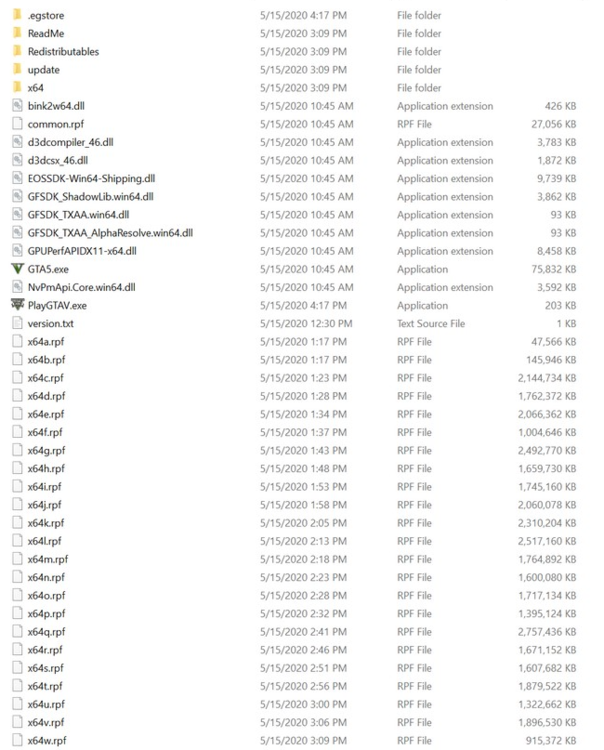
Does it happen constantly? Do you have any custom-plugins installed? -If so witch. A best-practice for general bug-hunt: Make a folder-structure that mirrors your current install. These we will use for containers of files that are currently installed, but does NOT belong in a vanilla-GTAV installation with RAGE & LSPDfr. These are all the files that must be in your LSPDfr-folders: (.egStore is specific for EPIC, and you only have it if your game i from EPIC). Move all the other folder/ files to the container-folders dont delete anything! Do take screenshots, and name them logically! When you are done, you should have a vanilla-GTAV-LSPDfr folder structure. Test if you can play! Not only native GTAV but also base-game LSPDFR If you can you know two things: *) Your base-game is fine! *) One or more of your installed addon-plugins are crashing your game! Now you can re-establish your addon-plugins ONE AT THE TIME!!!! -And retry if you can play both games. When it crashes, you have found a bad plugin, and you can remove it, then continue.
-
Oh.. i posted in Discussion & Suggestions because of " as well as any suggestions. " I felt that this was the closest to reporting a bug. I hope i never need to post another 🙂 -But in case i will post it in support.
-
I would like to see a screenshot of thát .... Be precise when you report an issue. Follow this method for launching game & RPH https://www.lcpdfr.com/forums/topic/125624-rph-does-not-open-game/?do=findComment&comment=728667
-
One option though: Try run as Administrator If it works let us know
-
There are some 'odditities' with tho info in output. f.i. all games are recognized as steam (IsSteamVersion=true) It is not important, and does n ot influence the playability, so ' forgedaboudit ' 😛
-
Just today someone fixed a simila'ish issue by running RAGE as Administrator Maby try that also..
-
O.o interesting! Never seen that issue before.. My guess would be that you have a setting in windows with a rigid limitation, one that is not default, but great that you got in!
-
So retail. You can of cause not update your physical retail disk online.. You ought to be able find a method on R* homepage where you can update the installed binary retail-game to current version, but how -idk
-
Where? I cant see the logo on the popup, is it from RAGE or GTA or Social-club Who is your provider?
-
Njea.. completely no, but the correct sentence and soundfile ought to be "Hello". I think That is default greeting and you select it when you make your avatar. Now you need to change that greeting, in the default-M menu | Dialogue
-
No you have first entered rock-star social-club, you should not do that. If that is through your default shortcut on desktop, disregard that shortcut. Instead find your game-provider launch-app Mine is EPIC What is yours? Now start the game from your game-provider launch-app In EPIC that is done with just a click on this button: Then let the game show the EULAs and do not open social-club! When you see the game-options select Story-mode When Story-mode works and you can free-roam, then step out (alt+TAB) and start RAGE from desktop NEVER start R*-social-club at all
-
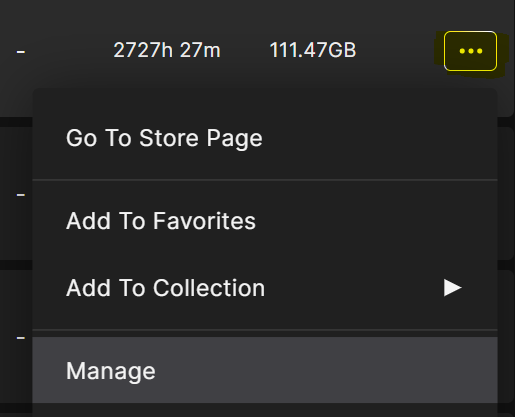
Your game is flawed. Go into EPIC game-library, browse to GTAV Click tripple-dot and select Manage -then verify the game. That takes for-ever-and-some.. 😕 -Or once did for me anywitch
-
You need to be fairly strong in C# to make content for LSPDFR. If you are all the tools you need can be found here: https://www.lcpdfr.com/forums/topic/134944-new-programmer-or-aspiring-to-be-one/
-
When Functions.RequestSuspectTransport(<Ped>); is called, polgauntlet will be used randomly as one of the transport vehicles, that is the content of this bug-report.
-
Please add screenshot
-
No, dont do that. First GTA then RAGE Detailed : https://www.lcpdfr.com/forums/topic/125624-rph-does-not-open-game/?do=findComment&comment=728667
-
Good, but it is always better to add the solution, so someone searching the help-DB can can help themself, so what was the solution you figured out?
-
-
Well you need to terminate anything that you have invoked. That means, that if you want to go off-duty, you need to fist use the CLI-cmd "UnloadPlugin <press space> Here plugin LSPDFR will popup automatically in the CLI cmd list. Select it! Press enter. LSPDFR will shut down, and since all user-loaded plugins are 'children' of LSPDFR, they will also shut down. When you want to again play as the police-officer, you use CLI cmd LoadPlugin <press space> Now plugin LSPDFR will popup automatically in the CLI cmd list. Select it! Press enter. LSPDFR will load Finally you need to type CLI cmd "ForceDuty" All user-plugins inside your plugin-folder of LSPDFR, will also load, and you are back on the beat.
-
@LMS This topic is not a support topic It is a report on a bug. It should not have been moved to support requests.
-
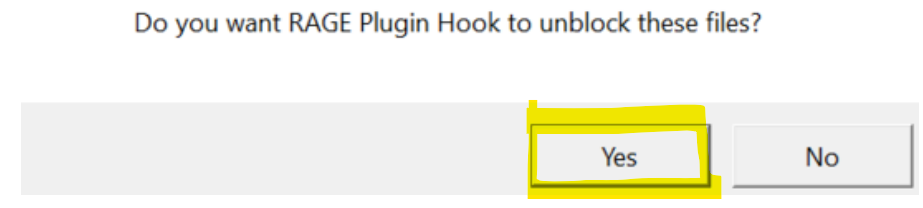
There should be. Each of the steps in that sequence is needed. I think you overlooked the popups with the files you need to unblock, eg this: and now these files are still blocked I do not know what to do to revert there may be a task you could do inside RAGE but i dont know it..