


GTAbear
Members
-
Joined
-
Last visited
Everything posted by GTAbear
-
Could you screen shoot your folder-structure? Obvious you do not mean Game.DisplayHelp("Press 'Y' to talk to the suspect.", false); if (Game.IsKeyDown(System.Windows.Forms.Keys.N)) That should be Y Can you build now? How does the Main code look? Do you have an assembly-statement?
-
Looks like you are missing a reference How does your key-presses code look? There are two different ways to register keypress if (Game.IsKeyDown(Keys.N)) and if (Game.IsKeyDown(System.Windows.Forms.Keys.N)) Also do you have an assembly declaration? -But this is just me guessing. It is not possible to know without seeing the code
-
Nvm that, you got it working, so enjoy the game 🙂
-
I would call that ambience (NOT to be mixed up with the subject Ambient. Ambient-events are a LSPD-feature!) Where is the gameplay for YOU in it? -And as already mentioned, it will happen in current LSPD now and then. You could properly follow any random police car and you would encounter ambience-events like those. But they do not open new gameplay, and because of that, it would imo be of limited value for the Player (You). But in contrast to those non-gameplay events LSPD has Ambient-events They are not part of any call-out, and they are not dispatched! They are just randomly initiated crimes that are shown as a small-sized red dot. I believe those are much better, because they are meant for You. You are supposed to react and inspect/ investigate. I also believe that you can increase the frequency of these ambient-events in LSPDFR.INI WorldEvents.IntervalMultiplier Float 1.0f Likelihood of a world event to happen. The higher, the more likely. Setting this to zero disables world events. -so try a higher value that default 1.0f
-
You need to show code. We cant guess where you are missing something But.. Check your events What flags do you have to enable the shooting? Are they working? What event is tricked and how? Use console debug-strings to inspects your flags inside the execution event(s) eg Game.LogTrivial("<some info> " + <parameter/ flag in here>); But show what you have done.
-
That is a core game glitch. There is nothing you can do in LSPD to change that. If you would like to know why that happens, it has to do with how the sc. collision-box behave in the game-engine. GTAV uses a 'forgiving' collision-box, and that is a good thing! An unforgiving collision-box, will often result in an exception, witch may crash the game or make some insane behaviour where objects shoots out of the mesh like projectiles, or less dramatic let objects fall through the mesh. A 'forgiving' collision-box will also sometimes let objects fall through the mess, though, and that does also happen in GTAV.
-
I would look at this topic Peeps list their plugin favourites there.
-
Super! Then you are in the clear. 'All' you have to do now is not multi-install plugins, and you will be able to flush out the plugin(s) that gives you issues. You could perhaps also make a new topic here with the tittle like: "Witch of these plugins are making LSPDFR crash" If you are lucky, someone with updated insight may tell you witch one are bad -I cant, i have given up on having an updated insight in plugins. The task is just to daunting, especially because i dont use plugins, only use my own 😛
-
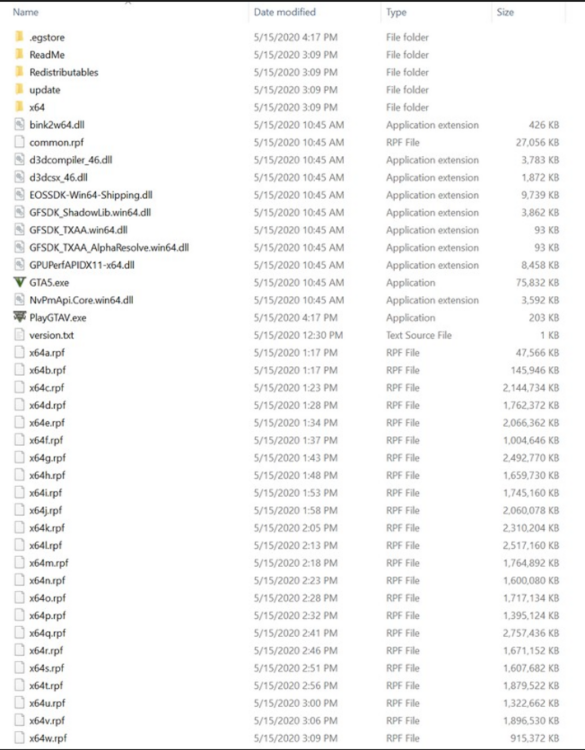
Ok then the crash is before the log is saved. Have you ever been able to play LSPDFR-base-game, i mean LSPDFR without any plugin at all? That is where you need to go now. Move every plugin out of your installation To check that you really do have a 'vanilla' installation folder, here is a picture of the GTAV-folder before any inallation of LSPDFR, ao plugins That is where you should start! When you have made sure that you can play story-mode GTAV, then get a fresh MANUAL!! installation pack of LSPDFR & RAGE, and just copy everything manually into your GTAV-folder That will allow you to play LSPDFR in story-mode. When you have made sure that you can play LSPDFR in story-mode, then install ONE!!!! plugin. Open the game and made sure that you again can play LSPDFR in story-mode, you are ready install ONE new plugin, as instructed in the readme. Continue like that until you crash. Bottom line NEVER multi-install plugins! ALWAYS install Plugins ONE by ONE and TEST after each
-
Do you get an End() event? Add debug output and test where in your while-loop you actually is, when you press keys.end Do you yield your mail loop? Does the plugin run or does it crash I would btw not check for distance on every tick. Use gametime and check in ~250 ms gabs
-
Interesting! I will try your method for my 'floaters', because floating corps is definitively a common issue
-
I dont know what could wrong then. Perhaps remove everything and reinstall ONLY LSPDfr and make that work. i would do that.
-
Did you find away to do that, then it would be nice if you shared it.
-
Here is the vid
-
@Lennyy Is it frowned upon linking to RAGE-@-D ?? I would think that cooperation with those guys would be a HUGE benefit for all ?!
-
Did you use the installer or did you install manually? I recommend you to install manually, not with the installer
-
You have a key-conflict Change one of the plugins usage of F4 to an available other key.
-
-
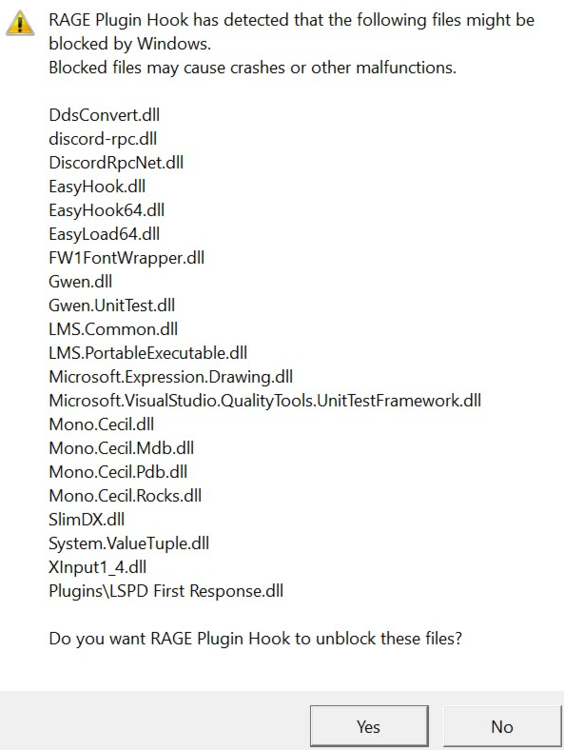
Sometimes you need to set your whole GTAV-foldes as exception for your anti-virus, but1 Do understand that if you have anything malicious downloaded, you have skrewed up your pc! I believe this situation also will happen if you are impatient or not paying attention the pups RAGE shows you during installing. Especially RAGE will show a list of file that windows needs to register. Do remember to 'OK' this form when you install: æ Did you miss that step?
-
That is also a huge issue. I think your best chance is listing all your plugins and show that list to the RAGE-Discord staff Your GTAV/RagePluginHook.log will also work for that, but not the other logs you have posted above
-
I will shoot a video and drop it here, later
-
You start the game in a bad way Follow: https://www.lcpdfr.com/forums/topic/125624-rph-does-not-open-game/?do=findComment&comment=728667
-
Most likely you have a flawed/ outdated plugin. After you removed all plugins did you try and play with only LSPDFR? There is also the timeout settings: Change plugin timeout threshold from 10000 to 60000 in GTAV\ RagePluginHook.ini file; Also in GTAV\ LSPDFR | LSPDFR.ini change Main.PreloadAllModels to false.
-
Then you have an issue that is not connected to LSPDFR. You need to have a perfect playable GTAV before you even attempt to use RAGE-PH and load LSPDFR. You can repair your GTAV through your game-provider (EPIC/STEAM) The real 'fun' is if you have your game through retail ao R*, then things get complicated and i have no idea how to get through in that mess. In that situation, contact R*
-
Follow this https://www.lcpdfr.com/forums/topic/125624-rph-does-not-open-game/?do=findComment&comment=728667


