



Pipeline
Members
-
Joined
-
Last visited
Everything posted by Pipeline
-
-
 I'm having an issue with the Road Management part of this mod right now. Whether I use my Xbox 360 controller or my keyboard, the UI always detects two inputs instead of one. So I scroll twice on any selected item. And when I place what I've selected, it spawns two. Is this something on my end?
- 3,646 comments
- 306 reviews
-
Unfortunately I can't reinstall. I don't have the disks with me... I might try to cleanly install the game when I do, though. I'll just have to remember to reinstall every single mod I use.
-
It also crashes if I disconnect my internet and try to play offline. Can't load the game. I thought it might have been because I installed EVL, but I deleted the ScriptHook files it comes with and that doesn't do anything. Still crashes. I'm trying to play on the version before this one that just came out by using the RageHook backup feature. Also tried disabling my OpenIV mods folder. No use. What's going on with this? If you need more information please ask me because I don't know what else would be important to say. Edit: I've also tried deleting GTAVLauncher.exe and replacing it with the one provided by that "Manual Rockstar Social Club" download on their support site. Same thing. Downloads an update, finishes, Launcher crashes, can't play the game.
-
Nope, it's just me, Gabe Newell. Wait. No I'm not, you're correct. The next poster will be a dog posing as one of our regular users.
-
At a guess, I'd say they'll keep updating it until it both has enough features that they're happy with it, and is relatively bug-free.
-
I'm really excited, and also annoyed. The excited part is obvious. I'm annoyed, however, because I've reached the end of this most recent 'preview'. See you in a week again, beautiful information!
-
Yup, definitely doing that, the file doesn't say "encrypted" any more, only compressed. @TheF3nt0n (Can't quote you in an edit it seems) Here's the vehicles.meta location for the one I've tried to edit: \update\update.rpf\common\data\levels\gta5 Is that not the correct file? Edit (again): Woops! As it turns out, I'm a complete idiot. The reason this wasn't working was because I have an OpenIV mods folder that contains update already. So basically this problem was caused by my own ineptitude. Sincere apologies!
-
I tried that one first and it didn't seem to affect it. Might I be doing something wrong? This is how the flags section looks after editing (and it's definitely police3's flags that I'm editing here): <flags>FLAG_HAS_LIVERY FLAG_EXTRAS_ALL FLAG_EXTRAS_STRONG FLAG_LAW_ENFORCEMENT FLAG_EMERGENCY_SERVICE FLAG_NO_RESPRAY FLAG_DONT_SPAWN_IN_CARGEN FLAG_HAS_INTERIOR_EXTRAS FLAG_REPORT_CRIME_IF_STANDING_ON</flags>
-
I would also not be adverse to testing, if that's something you ever happen to do.
-
Agreed. Pretty excited for ELS V, or whatever it might be called. Who here thinks it'll be out a little after LSPDFR 0.3? That'd be pretty good.
-
I downloaded the V Interceptor Default-Type, mostly for the better textures it brings. However, the lightbar on top of the new model is very weak. Someone in the comments of the mod said that to fix this you need to go into vehicles.meta and add a FLAG_EXTRAS_STRONG to the flags section of police3. I've tried this with both the vehicles.meta in common.rpf and update.rpf but neither seem to affect police3. Does anyone know where the file I need to edit is?
-
Hey guys, Just a quick question here from somebody who isn't exactly that knowledgeable with GTA modding. Are we going to see an animation editor at any point? Is that even possible? The reason I ask this question is because of all the animations present in GTA IV that were quite useful (for instance, frisking). Are we ever going to see those recreated in GTA V with an animation editor, or are animations something that can't be changed? Hopefully someone knows the answer to this.
-
 Has the indicator lights always on (at least at night) been fixed in this version? It's semi-easy to fix manually, I just have to compare the original visualsettings.dat with the new version and change the indicator values back to their originals, but it's a little annoying to have to do that with every new version.
- 246 comments
- 40 reviews
-
Thanks for at least not deleting the files until I had installed one that worked. I thought I was screwed in terms of playing GTA for the foreseeable future for sure.
-
Updated what? x64a.rpf? If you could, that would be great. But I need the latest retail version, because otherwise it's giving me the "CORRUPT GAME DATA" message when starting the game.
-
Nope... didn't work. It said it repaired it successfully, but when I tried to open the game I got the problem I've been having, "Grand Theft Auto V exited unexpectedly". Checking x64a.rpf with OpenIV reports that it's still corrupt. I just don't get this. Oh, and the "Update service unavailable" issue hasn't resolved itself either. EDIT: Tried it again, this time deleting x64a.rpf. I got the CORRUPT GAME DATA error again. My guess is that repairing the game gives me an outdated version of x64a.rpf, which needs patching, which can't be patched because for some damn reason the "Rockstar Update Service is Unavailable". This is infuriating.
-
That's a good point. I'll try it and see if it works.
-
I have the retail version, so unfortunately I don't have that. However, I've thought of a solution. There's a post on another forum related to this. Someone asking for someone who has it to upload x64a.rpf. It's on Mediafire, and I don't really trust it. I assume you have the game? Might you be able to upload x64a.rpf to Dropbox or some other safe file hosting website? I can't redownload the entire game, it would take way too long.
-
I have internet right now. The problem is that the game refuses to believe there's an internet connection. Or it possibly knows there's one, but thinks the Rockstar servers are down when they aren't.
-
On the fifth of July, I accidentally modified the contents of x64a.rpf . I do not have internet where I'm currently living due to circumstances out of my control. Upon attempting to restart the game (I was trying to fix the Sheriff Cruiser's lightbar colours manually), the Social Club threw the "Game requires an internet connection to activate" error. As I'm new to modifying GTA V texture files, I didn't realise that something was wrong. I plugged my phone in and tethered it with mobile data and let the game verify. This is where the problem began. After it had verified, it started to try to redownload x64a.rpf . I didn't have much credit left on my phone and couldn't let it do that, so hit cancel. The next time I rebooted the game, it crashed. I understand why that is now, because x64a.rpf had been deleted. I'm now in a place with internet. I'm trying to make it redownload x64a.rpf so I can modify the game's files the correct way, using OpenIV's mods folder. The problem is the error in the title of the question. Here are the things I've tried: Rebooting my computerDisabling my firewallDisconnecting and reconnecting with the internetModifying the game's version in Regedit as per a suggestion from the Rockstar forumsTethering my phone, connecting to wifi and attempting it that wayI don't know what else to try. I'm at a loss here, and I only have limited time in a place with internet. Can anyone help me with this? I can't play GTA V until this is fixed, because x64a.rpf is gone.
-
If you think you can see a countdown, the staff have recommended you go see a doctor. They're trying to isolate the problem as I speak, and apparently it's something to do with hallucinogenic code on the website. By the way I know there's a countdown but SHHHH.
-
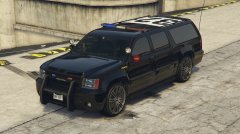 Wish we could add new vehicles entirely so we didn't have to replace other ones, because both the Sheriff and FIB Granger are vehicles I'd like to have as well as a lightbar/LSPD variant of the FIB version.
 -
Is this a modified version of the Sheriff Granger, or the FIB Granger?
-
Yeah, there's no countd- oh god! I can see a countdown now! There are numbers all around me! Three days! Help me!


