



Pipeline
Members
-
Joined
-
Last visited
Everything posted by Pipeline
-
Make sure you're directly behind the one you want to pull over. Press shift, then E to switch on your siren.
-
Thank you.
-
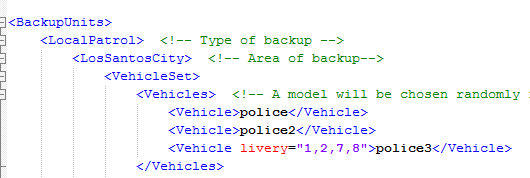
I played 0.3 for a little while last night, didn't play it for long because Traffic Policer wasn't updated (and I really need those perfect pullovers). Anyway, how do I use backup.xml? More specifically, how do I use the livery options? So far, this is what I've tried doing: Is that correct? Or do I need an entry for every livery? Also, how do livery numbers work again? I can't remember if you start from 0 (so texture 1 in the ytd should be 0 in the xml) or if what I'm doing now is correct.
-
 What? What the f-
 -
I am aware that this is off-topic, but what is it going to take to teach you why the speed limits are there? Are you going to have to be in a crash where you or another party is injured before you'll figure out "I should probably obey the speed limit"? For your sake and the sake of others, please don't speed. It isn't worth it. It's better to arrive somewhere late than dead.
-
This happened for me with ELS IV. I think it was a bug though, because whenever I forgot to switch off my siren before leaving the vehicle, once I got back in if I tried to switch it off it would just play another siren tone over the first one. The only solution was to set a marker in the ocean, teleport there while in the car, then teleport back without it. It won't be like that in ELS V, right? If I forget to switch off my siren while getting out, it'll still be able to switch off when I get back in?
-
Thanks, might try that.
-
Oddly enough that doesn't seem to happen. It's only when I have a weapon out that they do anything, with unarmed they don't even flip people off.
-
Well, I do have an Xbox 360 controller and you can map multiple controllers in x360ce. I'm just not entirely sure how to use it. Would I use the right stick for camera control while in a vehicle or are you saying I can't use the keyboard at all in vehicles or on foot?
-
So, there's no solution except making sure I don't have a weapon selected when in a car? Because that'd be somewhat frustrating.
-
I apologise for posting two different topics about the same sort of thing (My racing wheel) in this subforum in such a short space of time, but I do require help with this. As the title says, when I press down on the brake pedal (which came with the steering wheel and also has an accelerator, which doesn't have the same issue) and move the mouse, if my character has a drive-by weapon selected they will start aiming and possibly break the vehicle's driver side window. There is a "solution" to this for me, I have to make sure they are unarmed when in a vehicle. However, I can forget to do that. Not only that but I feel that this shouldn't be happening anyway. I am using x360ce x64 to trick the game into thinking I am using a controller. The brake pedal is mapped to the left trigger and the accelerator pedal to the right trigger. the left bumper, which is usually what makes you aim in a vehicle, is definitely mapped to the left "gear changer" on the back of the steering wheel, and I'm definitely not pressing that accidentally while reversing and moving my mouse. Does anyone know the cause of this? Is there a fix? Or am I doomed to forever be breaking the driver side window of my vehicle because I'm trying to reverse without crashing into something?
-
What mod are you referring to that is "more complex" than LSPDFR that doesn't use Ragehook?
-
When a speeding vehicle overtakes you and you instinctively attempt to activate your lights and siren and floor it after them.
-
Thank you for the reputable source, that is unfortunate news.
-
You are quite possibly a troll and I probably should not reply but I feel compelled to. LSPDFR cannot run without Ragehook. Ragehook is the program that decrypts game scripts and allows modders access to them so they can create their own custom content. If you would go to the Ragehook forum and post a legible bug report about the issue you are having with it not working, you might be able to fix it. You would need to provide logs and explain the circumstances behind it not working, such as your PC's specifications, Ragehook version and game version.
-
Kotaku is not a reputable source. In fact, I would say they were the opposite.
-
Please provide a source, a reputable one. Otherwise this is a baseless claim. I at the very least haven't heard about it.
-
Three months? Damn. Feels longer than that. Curse my impatience!
-
Thank you. I wasn't thinking of installing the shirt without the mod, don't worry.
-
GravelRoadCop, I was wondering, will we be able to trigger manually the "warning" tones that play if you switch on and then immediately switch off the siren in the "vanilla" (Non-ELS) game? And by manual I mean, each individually, the one of our choice.
-
I haven't tried installing this yet but I did use the custom nametags download. Where am I supposed to put the files I've modified? I can't seem to find any clothing items with "uppr" in the name in the pack.
-
You're correct. It's in development but someone told me that they don't expect it to be released "for a while". The door bug is apparently being worked on right now and even though the fix is similar to that of GTA IV (so I've heard) they haven't done it yet.
-
 Alright. It may take a while because I can't exactly remember where all the roads are right now. I'll send you a private message with the screenshots attached when I can get them.
- 200 comments
- 22 reviews
-
-

- 1
-
-
Unrelated, but I've seen quite a few road signs that contradict your plugin's reported speed limit. Would you like me to take screenshots of all the roads I know of with speed limits that aren't what your plugin reports their speed limit as, so you can fix it easier?
- 200 comments
- 22 reviews
-
Oh, I see, I can confirm it's working in 0.32, however the text does flash and flicker sometimes. Not sure if that's because it's not compiled with the latest version of Ragehook or just an unavoidable bug with drawing raw text on the screen.
- 200 comments
- 22 reviews

