




Lennyy
Community Team
-
Joined
-
Last visited
Everything posted by Lennyy
-
Hi YakinDaks, love to see you finding your way back to LSPDFR after a long break! I‘m sure I have some good recommendations for you. You’ll have a few options here: -PLD (PlayerLocationDisplay) -SimpleHUD -RageShowMyLocation Personally I always used PLD however SimpleHUD looks really good (haven’t tried myself) When I actively played, I never had a setup without Forests Of San Andreas Revised. The trees make the game a lot more enjoyable. Sometimes you even forget where you are simply because you don’t recognise the area you’re in due to the different environment. For that I can recommend 686Callouts from @Charlie686 for you. That pack has a lot of calls that work more like an actual police officers day-to-day tasks like fare dodgers, disoriented individuals and subway disturbances. Just to name a few mods that came straight to my head when reading about your requests 🙂
-
No problem. Glad I could help!
-
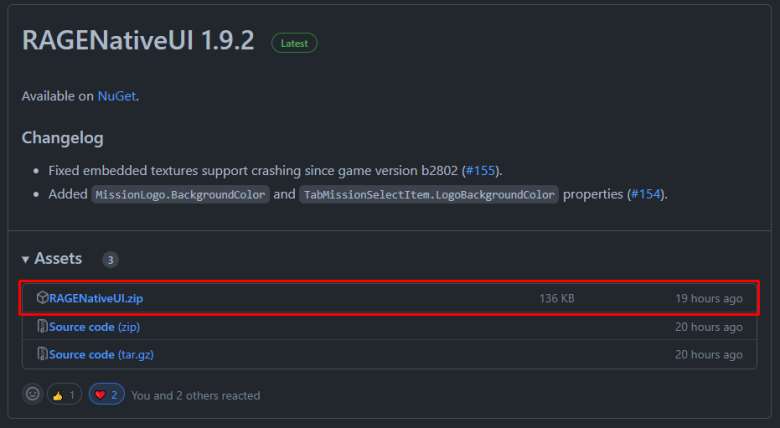
Hi Beb123 Bitte update/installiere RageNativeUI von hier: https://github.com/alexguirre/RAGENativeUI/releases Einfach die .dll in dein GTA Hauptverzechnis packen.
-
You’re most welcome!
-
Im assuming the traffic mod alters the spawn rates of traffic and maybe the selection of cars as well. A gameconfig increases memory pool limits. It‘s just a guess after all to rule out possibly causes that lead to your issue. Let me know how it goes and we’ll go from there.
-
Please attach your RagePluginHook.log. It’s a text document in your main directory either called RagePluginHook or RagePluginHook.log.
-
You’ll find those files in the StopThePed download. They are inside Plugins/LSPDFR/StopThePed. Just drag and drop them from the original download. https://www.bejoijo.com/post/stop-the-ped
-
Try removing RegularCallouts
-
Ensure you have installed the following: Gameconfig HeapAdjuster PackfileLimitAdjuster
-
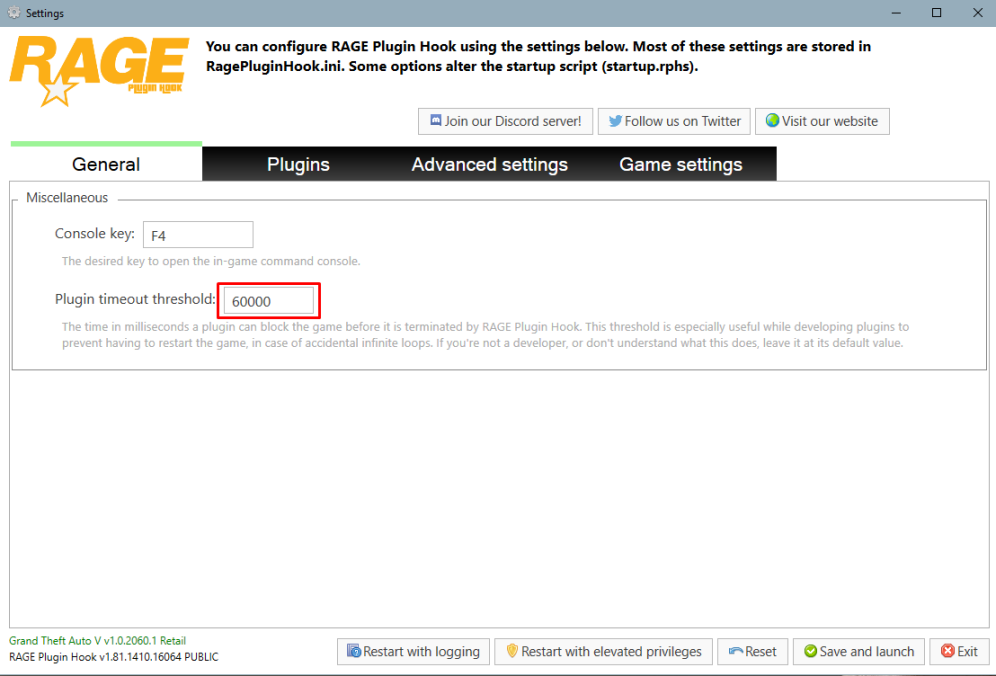
To add on to that, you also want to set your plugin timeout threshold to 60000 instead of 10000. You can do that via the RPH splash screen. Simply launch Rage and click on the cog ⚙️ icon. Additionally you may want to remove PeterU callouts as the plugin is no longer updated.
-
To add on to that, many developers also allow you to disable certain callouts via the respective .ini. If some callouts are completely out of your interest, you can avoid them entirely this way.
-
Hey Flamingo, we‘ll need your Log after the crash occurred during ForceDuty when you get back. Without that file we won’t be able to pinpoint your issue.
-
This sounds really promising to say the least!
-
Hey britishchamp You have an XML error with your stations_eupfr.xml and your stations_sahp.xml. The latter is throwing an error on line 28, pos 1.
-
Hey there, You can find the latest version of RPH inside of the manual LSPDFR download here:
-
Grab the colour from the LSPD uniform in the game files and use a colour picker to get the hex/rgb
-
Hence I said that I may have misunderstood you. Maybe if I put misunderstood in bold letters you can see it... Anyway, as Bastion said, technically you can put decals on pieces of the shirt/uniform. The issue you'll face after doing so is that the shirt models are 3D in game which means your 2D texture of the rank stripes will adapt to the uniform's shape. Also, they'll look weird as they are practically stitched into the cloth as they're part of it. Just experiment with it and see how it turns out.
-
Maybe I am misunderstanding you. Your decals aren’t showing up in game correct? If so, please launch GTA without RPH fully into story mode first and then alt tab out of the game to start Rage. https://youtu.be/GCThuOme5DQ
-
-
I suggest you two take a look at DLS
-
I believe the DLS download archive has a documentation folder that explains some things. I cannot really tell you what to do as I've not messed with that plugin before.
-
GramarPolice's menu can be opened via LCTRL + F3.
-
Please upload your RagePluginHook.log. It’s a text document in your main directory.
-
Are you using StopThePeds realistic weapon system?
-
You’re welcome!





