




Lennyy
Community Team
-
Joined
-
Last visited
Everything posted by Lennyy
-
Please upload your latest RagePluginHook.log. It’s a text document inside your main directory, not from your logs folder
-
Hi Jumpsuit911 Vielleicht kann ich dir ja weiter helfen. StopThePed erkennt die Substanzen für die field tests via bestimmten Wörter die die Substanz enthalten muss. Beispielsweise muss die Substanz das Wort „Pill“ enthalten um erkannt zu werden. Da du Pille anstatt pill geschrieben hast, wird die Substanz nicht erkannt. Das kannst du ganz einfach beheben, indem du in der Sektion in der StopThePed.ini die Wörter entsprechend anpasst. Statt pill -> pille capsule -> kapsel usw. StopThePed.ink Sektion die du bearbeiten musst: // The registered strings/words which will be used to detect suspiciuos substance in search items. It will be used by "Narcotics Field Test". // You may modify these words according to the language on your search items SuspiciousSubstancePowder=powder SuspiciousSubstancePill=pill SuspiciousSubstanceTablet=tablet SuspiciousSubstanceCapsule=capsule SuspiciousSubstanceCrystal=crystal SuspiciousSubstanceLiquid=liquid SuspiciousSubstanceBlotterPaper=blotter paper Falls du weiterhin Probleme hast schreib einfach eine Nachricht hier in den Thread.
-
Please upload our RagePluginHook.log. It’s a text document found in your main directory. It is not from your logs folder.
-
It is either in DefaultRegions or CustomRegions. You want to search for the SAHP section and change the stuff within the vehicles tag from for example police4 to whatever the cars are named that you installed. You can also take a look at this video for visual help. It has timestamps so you’ll find the things you’re looking for easily.
-
Hi For changing the configuration for UB backup units you want to edit the xmls found in Plugins\LSPDFR\UltimateBackup. SAHP is using police4 by default, hence why you’re seeing the unmarked cruiser spawn when calling for backup.
-
Please upload your RagePluginHook.log. It's a text document inside of your main directory, not from your logs folder.
-
Glad I could help!
-
Some things: 1. Update/Install RageNativeUI. Drag and drop the DLL into your main directory. 2. Update: JM Callouts Remastered SpecialCallouts SuperCallouts AssortedCallouts 3. Remove: BetterEMS FederalCallouts Metro Callouts 3 More Robberies PriorityCallouts (SirenCutout - discontinued and might not work as intended) 4. Move CalloutInterfaceAPI.dll to your main directory. If you continue to experience crashes, send a new log
-
Were you using NVR? If so, you could simply delete the NVR emissive folder inside your dlcpacks to fix this. That allows you to still use the graphics mod.
-
Please upload your RagePluginHook.log. It’s a text document inside your main directory, NOT in your logs folder.
-
Glad I could help 🙂
-
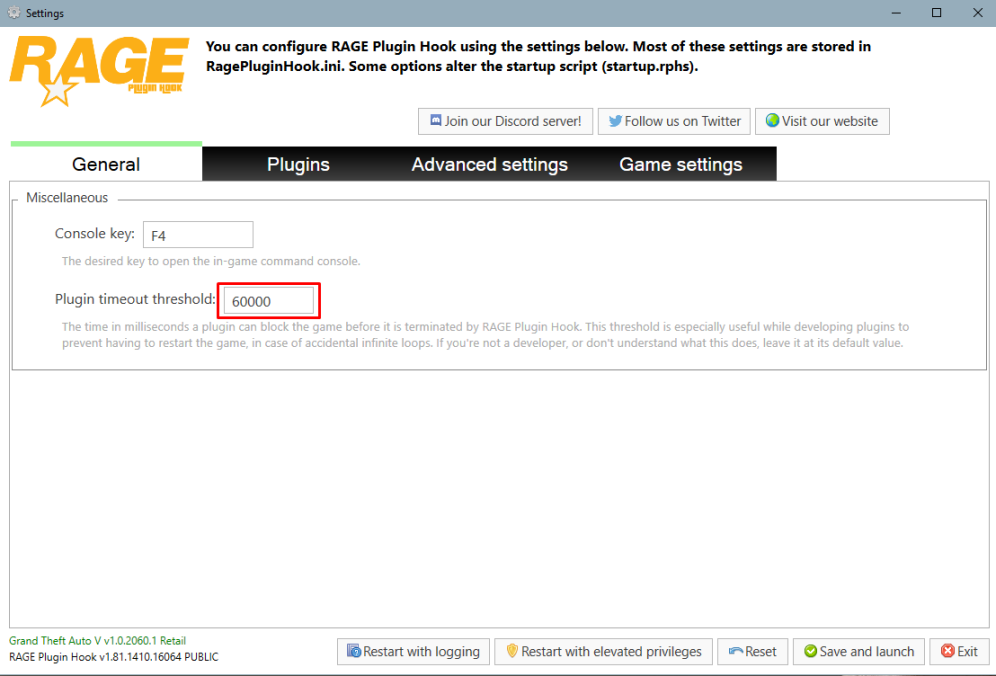
Set your PluginTimeoutThreshold to 60000 instead of 20000. You can do that via clicking on the cog ⚙️ icon on the RPH splash screen.
-
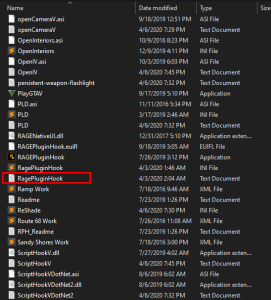
Please upload your RagePluginHook.log. It’s a text file in your main directory, not from your logs folder
-
It sounds like you requested first responder backup which uses the FBI2 slot by default. Either call for the actual EMS backup OR change the slot in the UB configs (Plugins\LSPDFR\UltimateBackup)
-
If you can meet the GTA V recommended graphic settings comfortably, you’ll have no issue with LSPDFR.
-
Please upload the log directly to this thread by dragging and dropping it here.
-
Update SuperCallouts Remove (or update) ArrestManager PoliceSmartRadio TrafficPolicer
-
Hi VxBtw You appear to have an issue with your Police2 model. Try to revert any recent changes made to the model or its meta files. Additionally, for good practice, I'd recommend setting your PluginTimeoutThreshold to 60000 instead of 10000. You can do so by clicking on the cog ⚙️ icon on the RPH splash screen. View the attachment below for visual instructions. Fyi, you can upload your log directly to the forum by dragging the file into the text box.
-
ELS no but you can find tons of lore packs on 5mods which are generally low poly. If you install DLS along with some configs for the cars, you’ll basically the experience as if you had ELS.
-
Please upload your RagePluginHook.log. It's a text document inside of your main directory either called RagePluginHook or RagePluginHook.log. It is not inside your logs folder. Just drag and drop the file into this thread.
-
-
No problem. It has been a few months since I've messed with this but I'm pretty sure you'll get the idea by looking at this stations XML, specifically the ambient spawns section. You can get coordinates and headings via the PrintInfo console command. Try and report back otherwise I'm happy to try for you Monday or Tuesday when I get time.
-
Yes it is possible. You’ll need to edit the corresponding stations xml in the LSPDFR data files.
-
Try to rename your mods folder to _mods and see if that works. If that’s the case the mods you installed messed up your game. Either: -Revert recent changes -Start over with a new mods folder
-
No problem! Just send a message to this thread if you have more follow up questions.



