




Lennyy
Community Team
-
Joined
-
Last visited
Everything posted by Lennyy
-
Send your RPH log, a screenshot of your scripts folder and screenshots of your main directory.
-
 Sounds good!
 -
Bonsoir Non, nous ne savons pas. Peut-être plusieurs jours ou plusieurs semaines.
-
Dafür nicht!
-
-
Please keep in mind this is an English-only forum.
-
Das freut mich zu hören!
-
No Problem. Glad I could help!
-
-
Moin Senfkatze, Ein paar Dinge die ich dir raten würde: RageNativeUI ins GTA Hauptverzeichnis verschieben (von Plugins/LSPDFR) RestrainTheDeceased in den Plugins Ordner verschieben (von Plugins/LSPDFR) ForceACallout löschen (outdated) in der lspdfr.ini (GTAV/lspdfr/lspdfr.ini) AmbientSpawn.DisableRandomUnits = true setzen.
-
Your policeold1 model seems to be invalid. Revert any recent changes you made to the model itself or its meta files.
-
Gerne. Lass mich gerne wissen ob funktioniert oder ob du noch Hilfe benötigst!
-
Please upload your RagePluginHook.log. It’s a text document that can be found inside your main GTA directory, NOT from your logs folder. Your topic has been moved to LSPDFR 0.4 Support. Please post in the correct location in the future.
-
Your topic has been moved to GTA V Support, this is not LSPDFR related. Please post in the correct location in the future.
-
All good. Make sure it is in your main directory and re-try.
-
As for the error in your screenshot, ensure you have CalloutInterfaceAPI.dll in your main directory. Have you removed/updated the plugins as bastion said?
-
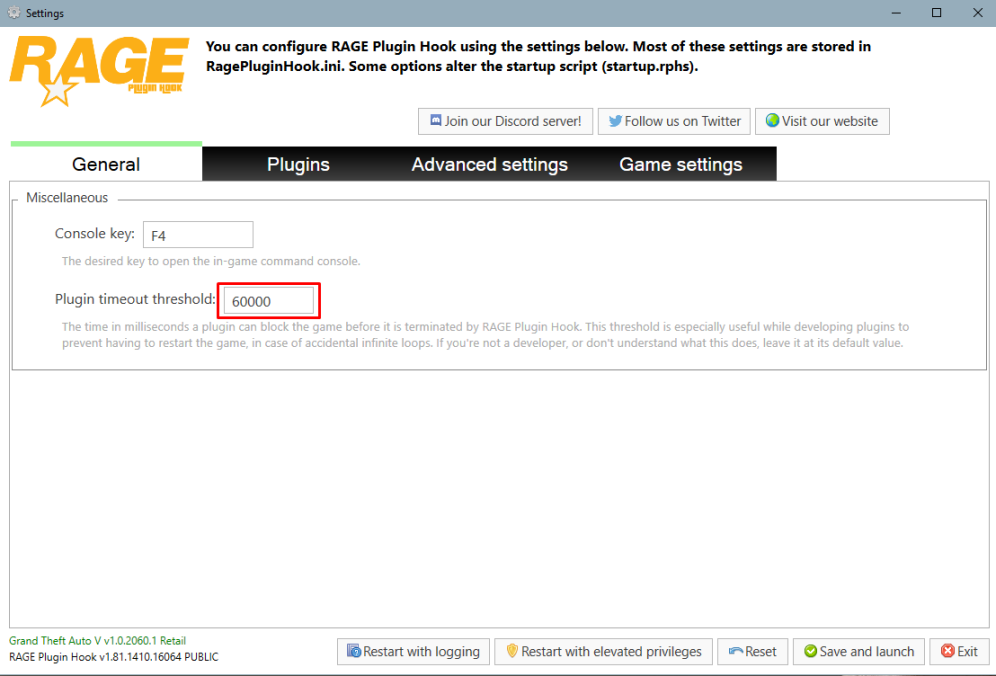
Set your PluginTimeoutThreshold from 10000 to 60000. You can do that by clicking on the cog icon ⚙️ on the RPH splash screen. UPDATE/Install RageNativeUI.
-
Make sure you add your GTA directory to your antivirus exception. If that doesn’t help, try to rename the LSPDFR folder inside of the plugins folder to _LSPDFR and go on duty.
-
Please upload your latest RagePluginHook.log. It’s a text document found in your main directory. NOT in your logs folder.
-
If you want a radio-like plugin you may also want to check out GrammarPolice.
-
A few things to do: Set your PluginTimeoutThreshold to 60000. You can do that by clicking on the ⚙️ icon on the RPH splash screen Update: CrazyPursuits, Riskier Traffic Stops, SpecialCallouts, Remove: AutomaticSirenCutout (No longer maintained, may not work as intended), TrafficPolicer (Could also try updating it here). Move CalloutInterfaceAPI to your main directory instead of Plugins/LSPDFR
-
Lade bitte mal deinen asiloader.log und deinen ELS.log hier hoch.
-
Are you able to stop peds at all via STP?
-
Are you talking about LSPDFR (GTA V) or LCPDFR (GTA IV) since you’ve posted this in the support section of the latter.
-
Upload your entire RagePluginHool log please.



