




Lennyy
Community Team
-
Joined
-
Last visited
Everything posted by Lennyy
-
Exception message: Die Datei oder Assembly "RAGENativeUI, Version=1.9.2.0, Culture=neutral, PublicKeyToken=null" oder eine Abhängigkeit davon wurde nicht gefunden. Das System kann die angegebene Datei nicht finden. RNUI updaten: https://github.com/alexguirre/RAGENativeUI/releases/download/1.9.2/RAGENativeUI.zip
-
I'm glad I could help you! Have fun playing.
-
 A preview of the sound in game would be nice!
 -
-
Lies mal durch den Thread hier: Der SlimDX error ist mit das nervigste GTA Problem welches du haben kannst.
-
Die Datei oder Assembly "ScriptHookVDotNet3, Version=3.0.2.0, Culture=neutral, PublicKeyToken=null" oder eine Abhängigkeit davon wurde nicht gefunden. Das System kann die angegebene Datei nicht finden. Eines deiner Callout-Plugins benötigt ScriptHookVDotNet. Entweder deinstallierst du das Callout-Plugin oder installierst SHVDN. Ich würde zu zum Ersteren raten, da SHVDN dafür bekannt ist, Probleme mit RagePluginHook zu haben.
-
-
 Hi again. The MK2 weapons are indeed not part of the "normal" weapons.meta. It's located in mods\update\x64\dlcpacks\mpgunrunning\dlc.rpf\common\data\ai. I hope that clarifies it for you and let me know if it works!
- 30 comments
- 4 reviews
-
I haven’t touched the game in a while but I do believe that it’s either CTRL+F2 or F3 to bring up the menu and the C key to bring up the radio. You can always check your keybindings in the grammarpolice.ini (Plugins/LSPDFR/GrammarPolice/)
-
I didn’t include the mk2 carbine rifle with my mod by default. The featured comment shows you which lines to edit for different weapons to be accessible while driving a car. Just find the mk2 entry, swap the group and you’re good to go!
- 30 comments
- 4 reviews
-
That would be the .ini found in Plugins\LSPDFR
-
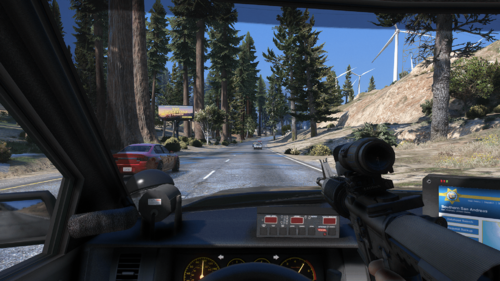
Thank you! This is the rifle I used in the preview pictures: https://www.gta5-mods.com/weapons/m4a1-eotech-acog-carry-handle-animated
- 30 comments
- 4 reviews
-
Exception message: Could not find a part of the path 'E:\Program Files (x86)\Steam\steamapps\common\Grand Theft Auto V\Plugins\LSPDFR\StopThePed\Localization.ini'. Dir fehlt eine Datei von StopThePed.
-
Looks promising to say the least. Can't wait for updates on this!
-
CalloutInterface throws an error. Make sure it's properly installed and perhaps reinstall it fully.
-
Upload your latest RagePluginHook.log please.
-
LeroyCallouts is crashing because it cannot find RageNativeUI (at least version 1.9.0.0). Make sure it's properly installed in the game's root directory.
-
This will do the majority of the work for you. If you want to further customise those uniforms, you must alter the configs shipped with this download. You can use a mod like this to use your EUPMenu presets for your AI officers.Attach a screenshot of the error you see. The latest build of RPH can be found inside the latest version of LSPDFR. Just download the file that is labeled as "manual".RageNativeUI updaten https://github.com/alexguirre/RAGENativeUI/releasesGlad it is working again! You're welcome!Salut Je ne parles pas français très bien mais j’essaie de t’aider. Créer un exclusion de RagePluginHook.exe sur ton antivirus. Utilise Google pour chercher comme tu fait un exclusion pour ton antivirus (comme Windows Defender, Norton etcétéra). Si tu a besoin d’aide après, écrire un message ici!You are most welcome!ScriptHookV ist nicht installiert.



