




brenden.iannetta
Members
-
Joined
-
Last visited
Everything posted by brenden.iannetta
-
You are missing a critical file for LSPDFR. Please: Download the LSPDFR Manual installer > Go to LSPDFR\DATA in the zip > Extract outfits.xml > Drag outfits.xml from LSPDFR Man. Installer. into Grand Theft Auto V\lspdfr\data Let me know if this works.
-
This is obfuscated. Also I don't know what you mean by "It still crashes even after validating all files". Those were not the instructions on that post. Have you tried loading with your mods folder named "_mods"
-
Try updating RAGENativeUI.dll. Put RAGENativeUI.dll from the zip folder into your GTAV root. https://github.com/alexguirre/RAGENativeUI/releases/download/1.9/RAGENativeUI.zip
-
Hmm. So you're saying when you go into Wardrobe > Create Outfit there are no custom EUP items that you installed? Can you try re-installing them and making 100% sure that you are placing the files in the correct directory.
-
I mean, id say just disable the airhorn all together through ELS. You probably won't be using it anyways, so why even bother. I'm not sure of the strings for regular horns though. Welp looks like i'm dumb... Im gonna look for the strings im curious. Have you tried: RESIDENT_VEHICLES_CAR_HORN_MED_1 or something of the like? This is all of the horns for cars
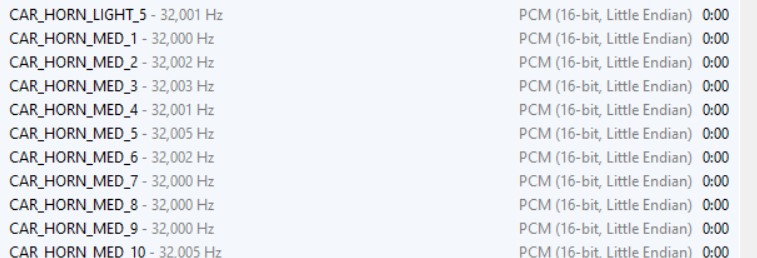 Are you editing the file correctly? Please send a screenshot of what the error is and what you are trying to tweak.Try installing these: https://www.gta5-mods.com/tools/heapadjuster https://www.gta5-mods.com/tools/packfile-limit-adjusterNo problem!EUP looks to be installed wrong, please retry that. Secondly, you don't have the most recent RAGENativeUI.dll. Install it here: https://github.com/alexguirre/RAGENativeUI/releases/download/1.9/RAGENativeUI.zip Lastly, if another crash happens, it looks like there is an issue with your LocalSWAT.
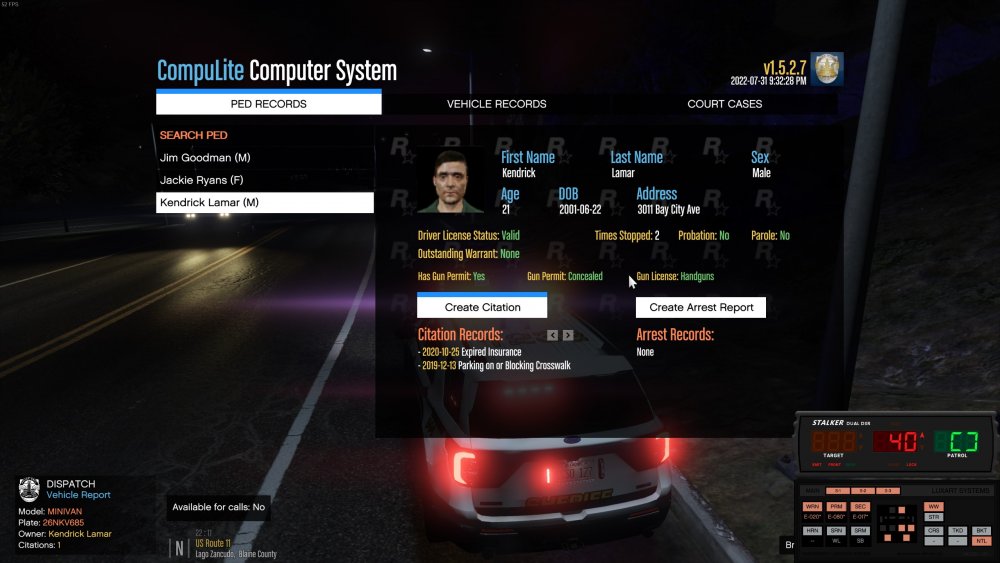
 Install RAGENativeUI.dll. Download this zip file, then drag RAGENativeUI.dll into your GTAV root. Let me know if this works. https://github.com/alexguirre/RAGENativeUI/releases/download/1.9/RAGENativeUI.zipYep. Coastal Callouts is having some issues and causing users to crash. Best of luck!No, as soon as you see that EUP has crashed, close your game, then send me a RAGEPluginHook.log file located in your GTAV root.Thats not an error. That looks like its functioning normally. Can you try to get EUP to crash, close your game, then send me a RAGEPluginHook.log file located in your GTAV root.Please remove CoastalCallouts. It has been causing issues for some due to the new update.https://www.gta5-mods.com/tools/heapadjuster https://www.gta5-mods.com/tools/packfile-limit-adjuster Try installing these. You will need ScriptHookV if you don't already have that. http://dev-c.com/files/ScriptHookV_1.0.2699.0.zipPlease send a RAGEPluginHook.log file which is located in your GTAV root.Gonna be 5 to 10 for this one. Busted him for Illegal Possession of an Automatic Weapon & Speeding. Wondering what happened to Kendrick, his photo ID looks a bit different than i'd imagine...
 Send a RAGEPluginHook.log please.No problem! Just mark it as a solution.Do you know the controls of ELS, and have you installed the ELS xml file in pack_default?Please send your whole RAGEPluginHook.log file which is located in your GTAV root. This is cut off.Can you send me a video of the car and you using ELS? Also please send a RAGEPluginHook.log file located in your GTAV root.




Account
Navigation
Search
Configure browser push notifications
Chrome (Android)
- Tap the lock icon next to the address bar.
- Tap Permissions → Notifications.
- Adjust your preference.
Chrome (Desktop)
- Click the padlock icon in the address bar.
- Select Site settings.
- Find Notifications and adjust your preference.
Safari (iOS 16.4+)
- Ensure the site is installed via Add to Home Screen.
- Open Settings App → Notifications.
- Find your app name and adjust your preference.
Safari (macOS)
- Go to Safari → Preferences.
- Click the Websites tab.
- Select Notifications in the sidebar.
- Find this website and adjust your preference.
Edge (Android)
- Tap the lock icon next to the address bar.
- Tap Permissions.
- Find Notifications and adjust your preference.
Edge (Desktop)
- Click the padlock icon in the address bar.
- Click Permissions for this site.
- Find Notifications and adjust your preference.
Firefox (Android)
- Go to Settings → Site permissions.
- Tap Notifications.
- Find this site in the list and adjust your preference.
Firefox (Desktop)
- Open Firefox Settings.
- Search for Notifications.
- Find this site in the list and adjust your preference.