




brenden.iannetta
Members
-
Joined
-
Last visited
Everything posted by brenden.iannetta
-
This is most likely a one-off. If it happens again, send another log. Also, follow this:
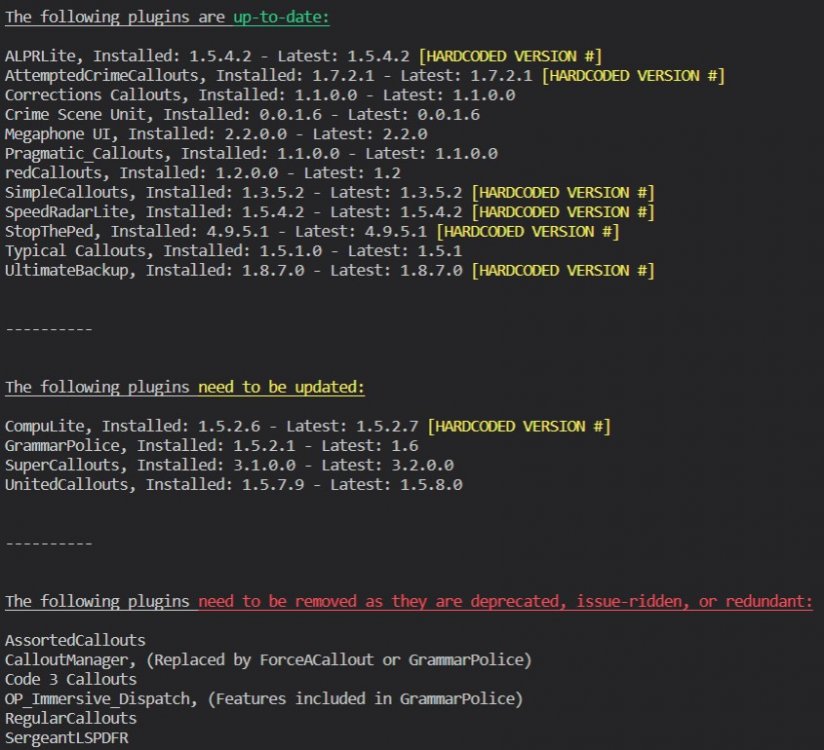
-
Please send the RAGEPluginHook.log file from your GTAV root.
-
@Officerporci I think I tagged you in a post similar to this, but have a peek and see if this is an issue on your end.👍 Also, please follow this @martijnstreijl:
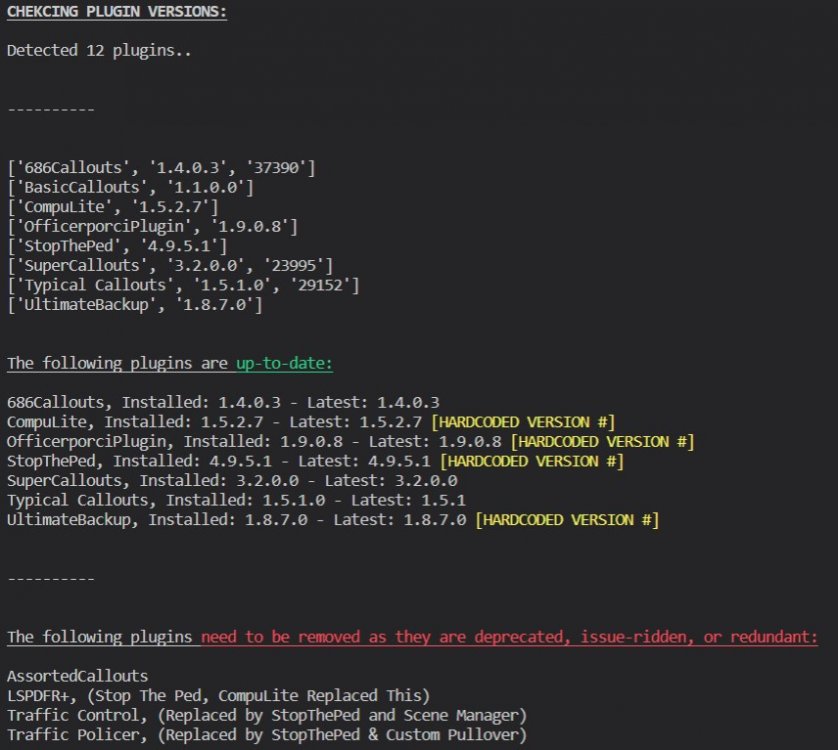
-
Did you edit the vehicles.meta?
-
Totally forgot about the ENB stuff... My bad. Try what Super said, might just be the conflict with ENB. Also, I just said to rename the mods folder, not delete it entirely. Renaming the folder disables it.
-
Let me know if it happens again, and send a log. Might just be a one off.
-
No problem! I have a feeling there is something broken in your LSPDFR install, so i'd recommend following this:
-
I realize that, but there isn't much use of a shaders mod that renders the game inoperable, is there.
-
This is not the correct folder to move in here. The "lspdfr" folder in your main directory should be there as it contains assets which LSPDFR uses. Please move that folder back to your root, and make a new folder called "LSPDFR" inside of your plugins folder.
-
Rename your mods folder to "_mods".
-
You seen the have deleted the LSPDFR folder out of your plugins folder. Make a folder in GTA/plugins that is called: "LSPDFR".
-
Attach the RAGEPluginHook.log file from your GTA root.
-
Odd. Have you done all of this: https://ragepluginhook.net/Requirements.aspx
-
What pack are you using that is causing this issue? Might just be a bad config on the dev's part. Does this happen with every pack you use?
-
Try this:
-
Nice. Enjoy!
-
Did re-installing CalloutInterfce solve this?
-
Re-install CalloutInterface. You have installed it wrong. Also, can you send a photo of both of these directories: Grand Theft Auto V\plugins\LSPDFR Grand Theft Auto V\plugins
-
It explains how to right on the error... Follow those links and download the required files.
-
You need to install ScriptHookVDotNET. Follow this: Link: https://www.gta5-mods.com/tools/scripthookv-net
-
That means that you installed them wrong, and also deleted the LSPDFR folder by accident. First, make a folder called LSPDFR inside of GTA/plugins. Now, you need to move the files in blue to that LSPDFR folder you made, and the files in yellow should go to your root GTAV folder: Make sure to read the readme of plugins before installing to avoid all of these mistakes.
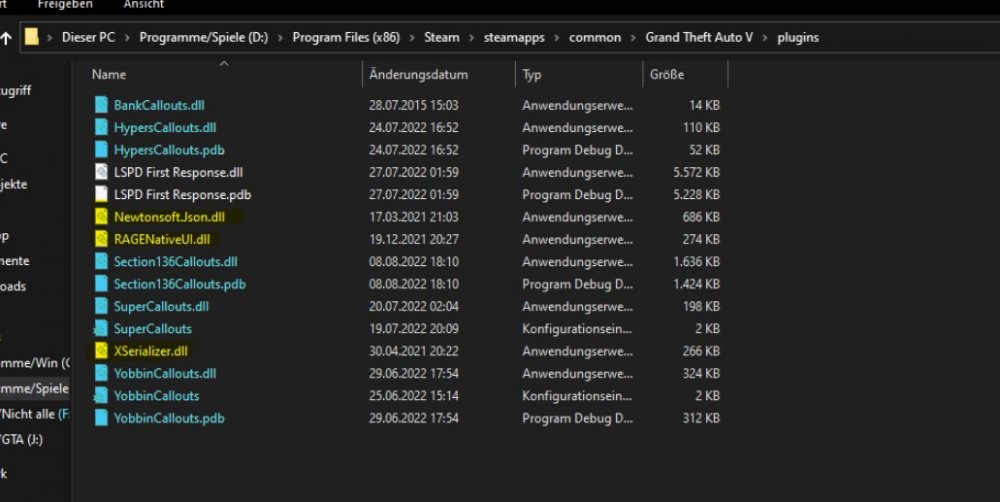
-
Try temporarily removing Coastal Callouts. I'm curious.
-
Does this happen every time you request prisoner transport?
-
Please send the RAGEPluginHook.log file from your root GTAV folder. This is the incorrect log.
-
Looks like you put an invalid keybind somewhere. Try going through your INI files and such to find it. Update BetterPrescence.





