




brenden.iannetta
Members
-
Joined
-
Last visited
Everything posted by brenden.iannetta
-
One last shot. Are you using ScriptHookDOTNET or any ASI scripts by chance?
-
Try renaming your mods folder to "_mods".
-
Hmm. Are you using any antivirus? Add the GTA folder to the exclusions list if so.
-
The plugins in GTAV/Plugins/LSPDFR will only show when you go on duty in LSPDFR. Make sure that you reverse any file moving from your troubleshooting, and ensure that the files are in their right places.
-
No need to yell... Explain a bit more please, this doesn't make any sense. Also, you can try this: & Make sure to set PostFX to "Very High" or "Ultra".
-
Send the RAGEPluginHook.log file from your GTA root.
-
Then you can ignore it. Sometimes LSPDFR does this, but if it happens again, send another log.
-
Can you try re-installing RPH. You may have a broken install.
-
Why did you delete OpenIV? OpenIV is just a file viewer/editor, and doesn't do anything in terms of storing modded files... You have to manually remove mods if you don't want them. Also restart your PC, a file was being used by another program that OpenIV was trying to use.
-
Try launching normal GTA, then launch RAGE when you get to the main menu.
-
I'm pretty sure it should work. You can give it a shot, and in the future, make sure to use a mods folder.
-
Send the RAGEPluginHook.log from your GTA root.
-
Please send the log from your root GTA folder, not the logs folder.
-
Go to the lspdfr.ini and turn Main.DisableGameBlipHiding to true.
-
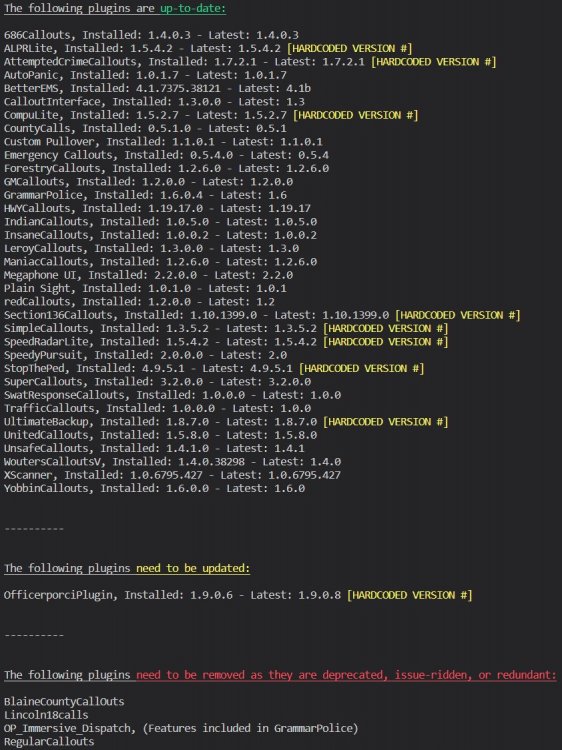
Can you explain a bit more? Looks like everything loaded fine here. Also:
-
Does this happen consistently?
-
x64/audio/sfx/resident.rpf Did you not make a mods folder? If you did, just export the one from x64/audio/sfx/resident.rpf and use that to override the one in mods/x64/audio/sfx/resident.rpf.
-
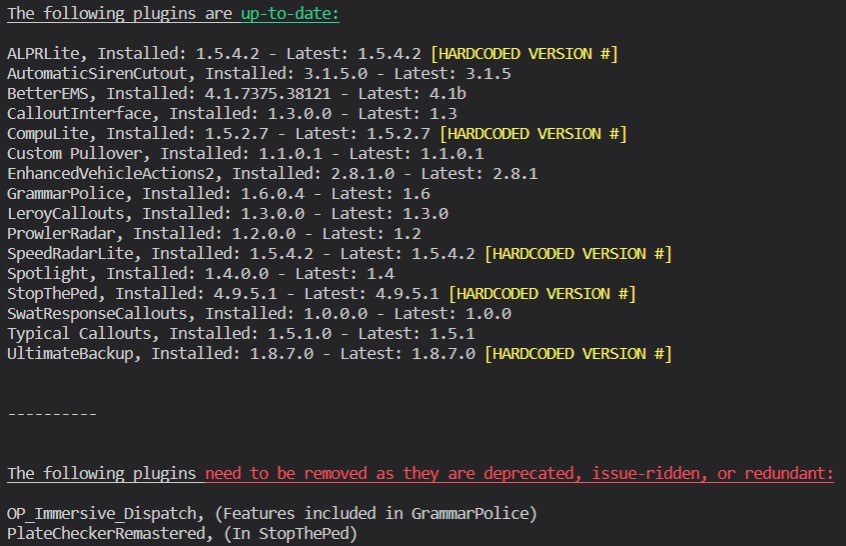
Nice. Also just an FYI, GrammarPolice has all of the features of Immersive Dispatch. Feel free to remove it if you'd like.
-
Very weird. Kind of a silly idea, but try verifying your game files, and making sure your mods folder is named "_mods".
-
Try removing your modded policeB bike, and make sure that the meta lines for the model are also stock.
-
https://www.majorgeeks.com/files/details/microsoft_visual_c_2010_redistributable.html If that doesn't work, try using Google. It saves a lot of time.
-
Click "Quote". This is a bad mod. Try removing this. You may have to make a new mods folder if you didn't back it up, or you can look through the OIV file if you know how (WinRar).
-
Send your RAGEPluginHook.log file please. It will be in your root GTA folder.
-
Please send the RAGEPluginHook.log from your main directory, not your logs folder.
-
Launch normal GTA, then launch RAGE once GTA gets to the main menu.


