


TreadRed
Members
-
Joined
-
Last visited
Everything posted by TreadRed
-
Traffic Policer crashed you and your not on the latest version. You don't have the latest version of Albo1125.common either and Im not checking tha rest for ya.
-
theres something wrong with the stations file in your custom folder, you should remove it
-
Proobably because you need to be installing this instead of EUP outfit settings for lspdfr, that was for EUP 7.0 and EUP has updated now
-
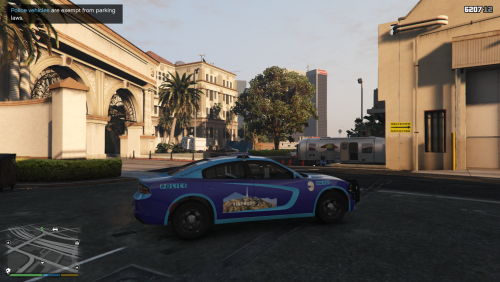 Charger for Vinewood. First time trying to make a livery. I know its not so usual looking for a police unit but I like it non the less. Made for the 18 charger in this pack. Im currently looking at which other models it will work for.
 -
and now I pay attention and see you included your custom folder lol. ...
-
Start rage, press settings In the general tab set the threshold to 50000 and tick disable text rendering in the advanced setting make sure nothing is ticked in the game setting>command line switches make sure the only things ticked are directx11 and forced windowed mode.
-
-
If you have "cops ignore me" setting in your trainer enabled then it will cause this issue also
 Download this over what files? The ones I provided in XML's for Jurisdictions? You wouldn't, this download is for people who don't want jurisdictions, sorry I didn't know you downloaded Jurisdiction, you were commenting on a totally different mod earlier lol.
- 170 comments
- 11 reviews
 Lmao my bad Johnny, You don't have my files so you will not get a gang unit. I got confused because I thought you was commenting on my download.
- 263 comments
- 20 reviews
I didn't add raincoats anywhere in ultimate backup because I cant get them to wear that when its raining. To get the gang units. You would use Ultimate Backups menu, in the Code 3 menu you will see the option to select Gang Unit- 263 comments
- 20 reviews
Need the file from Grand Theft Auto V>RagePluginHook (textdocument)
well by default 0.4 does not use EUP peds. If you download everything to do with EUP Configurations, then yes, it will be using those peds.- 170 comments
- 11 reviews
This is a complete set of xml files for setting up Ultimate Backup to have EUP Uniforms. Files are ready to play as-is but, they are very easily customizable for your chosen vehicles. Required before using these xml scripts: Emergency uniforms pack - Law & Order Emergency uniforms pack - Serve & Rescue EUPFR Basic or EUPFR Ultimate Ultimate Backup (All In One Backup) We also suggest you install some custom/add-on vehicles/liveries for your new jurisdictions! For any help/support, you can get help on this Discord- 170 comments
- 11 reviews
-
-

-

- 25
-
If you are wanting one agency patrolling the entire map I can make a version of xml's like that. You wouldn't have to delete outfits.[3/19/2019 5:18:26 PM.824] Command line option "windowed-disableCustomLoadingScreen" is specified twice. Please remove one. [3/19/2019 5:18:26 PM.825] Command line option "windowed-disableCustomLoadingScreen" is specified twice. Please remove one. [3/19/2019 5:18:26 PM.825] Command line option "windowed-disableCustomLoadingScreen" is specified twice. Please remove one. [3/19/2019 5:18:26 PM.825] Command line option -disableCustomLoadingScreen is specified; disabling custom loading screen rendering. Idk if this is causing your issue, but try this 1. Start rage, press settings In the general tab set the threshold to 50000 and tick disable text rendering in the advanced setting make sure nothing is ticked in the game setting>command line switches make sure the only things ticked are directx11 and forced windowed mode.
Hey what do you mean by uploaded wrong files for 1.0.0? That's the one I got. All the outfits seem to be fine. I based all of Ultimate Backup uniforms off those outfits files from 1.0.0, just wanna be sure I am not missing something I cant see.- 263 comments
- 20 reviews
-
-
- 1
-
Try setting these settings in rage 1. Start rage, press settings In the general tab set the threshold to 50000 and tick disable text rendering in the advanced setting make sure nothing is ticked in the game setting>command line switches make sure the only things ticked are directx11 and forced windowed mode. If your still crashing post a new log please

