


TreadRed
Members
-
Joined
-
Last visited
Everything posted by TreadRed
-
 yea, you need to add the highway patrol into lspdfr/data/backup.xml like in highlight of this screenshot
- 263 comments
- 20 reviews
You need this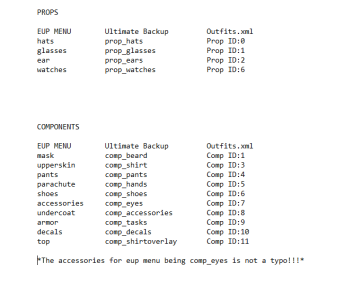 LSPDFR outfits are located in lspdfr/data/custom, all the outfit_ .xml's you see will have the numbers inside for each outfit. I will attach a picture of a document so you can match them together with ultimate backups xml's.
.png.b0f3424b9eb589a2a989465af90d7595.png)
 These configurations are outdated and you should not be installing them unless you are using version 7 of EUP, if your using version 8, then the configurations you need are link on the EUP Law and Order page.
- 195 comments
- 24 reviews
-
-

- 1
-
 Im not sure what you are trying to install? These require manual installation which would not give an error. Sounds like you are using a auto installer for something.
- 170 comments
- 11 reviews
Those files would only change the vehicles when calling for backup using ultimate backups menu. \ If your wanting to change the vehicle that you would see randomly patrolling, you would need to edit the agency_eup.xml in lspdfr/data/custom. Look for the High patrol agency within that file- 170 comments
- 11 reviews
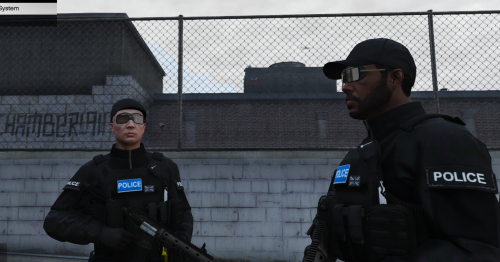 Im fairly certain it will not. If its brought to my attention that this is recommended versus the texture pack I used to the configuration files, then I could configure them for this instead.
I should not have them as available for backup in the pursuit menu but I do, this needs changed. Swat should called be called in the Code3 menu only. As far as them falling out when being called code3, Idk. Its not cause by these files Im pretty sure. The Ultimate backup mod itself would cause that or some other plugin interference with the mod.
Im fairly certain it will not. If its brought to my attention that this is recommended versus the texture pack I used to the configuration files, then I could configure them for this instead.
I should not have them as available for backup in the pursuit menu but I do, this needs changed. Swat should called be called in the Code3 menu only. As far as them falling out when being called code3, Idk. Its not cause by these files Im pretty sure. The Ultimate backup mod itself would cause that or some other plugin interference with the mod.- 170 comments
- 11 reviews
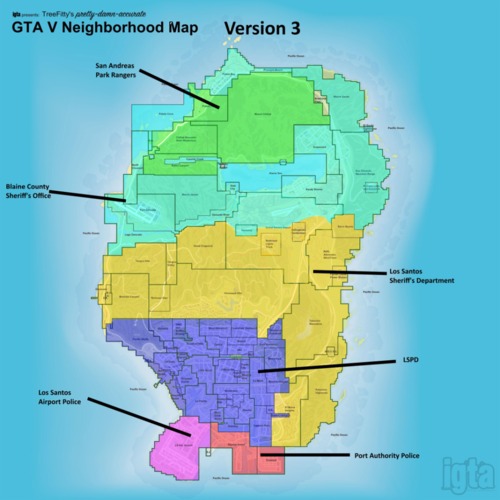 What's New in Version 1.1 Released April 28 Fixed the outfit issues of incorrect badges and patches. This was due to files in lspdfr/data still being read. I added the 3 files necessary to go into lspdfr/data to keep the data from there from being pulled.
- 62 comments
- 1 review

.png.a8d148335ece01800223796cb7d34c87.png)

.png.b0f3424b9eb589a2a989465af90d7595.png)


Account
Navigation
Search
Configure browser push notifications
Chrome (Android)
- Tap the lock icon next to the address bar.
- Tap Permissions → Notifications.
- Adjust your preference.
Chrome (Desktop)
- Click the padlock icon in the address bar.
- Select Site settings.
- Find Notifications and adjust your preference.
Safari (iOS 16.4+)
- Ensure the site is installed via Add to Home Screen.
- Open Settings App → Notifications.
- Find your app name and adjust your preference.
Safari (macOS)
- Go to Safari → Preferences.
- Click the Websites tab.
- Select Notifications in the sidebar.
- Find this website and adjust your preference.
Edge (Android)
- Tap the lock icon next to the address bar.
- Tap Permissions.
- Find Notifications and adjust your preference.
Edge (Desktop)
- Click the padlock icon in the address bar.
- Click Permissions for this site.
- Find Notifications and adjust your preference.
Firefox (Android)
- Go to Settings → Site permissions.
- Tap Notifications.
- Find this site in the list and adjust your preference.
Firefox (Desktop)
- Open Firefox Settings.
- Search for Notifications.
- Find this site in the list and adjust your preference.