




Yasd
Community Team
-
Joined
-
Last visited
Everything posted by Yasd
-
Command line option -nodx is specified. Remove that line from RPH
-
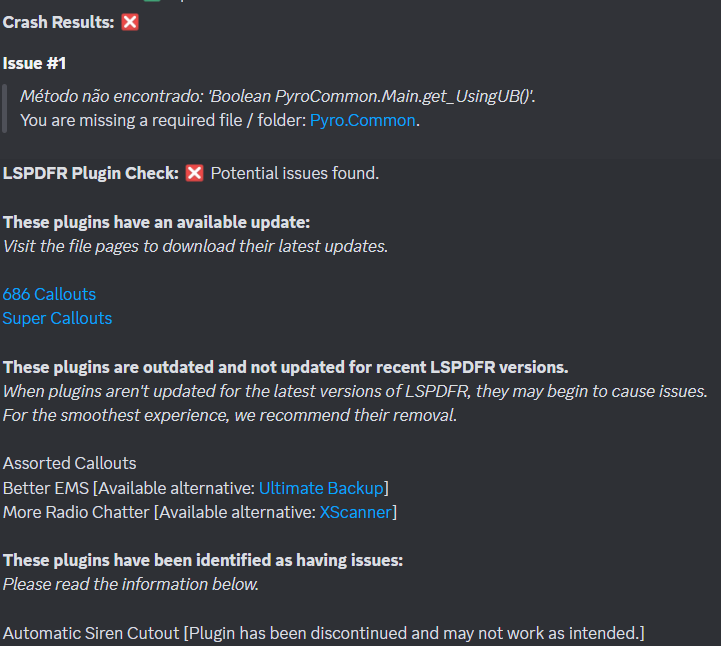
Oh, maybe you got that error from SuperCallouts because Pyro.common was missing
-
it says invalid characters in path, whats your gta path?
-
Pls post a screenshot of the error.
-
Probably not, but glad to hear!
-
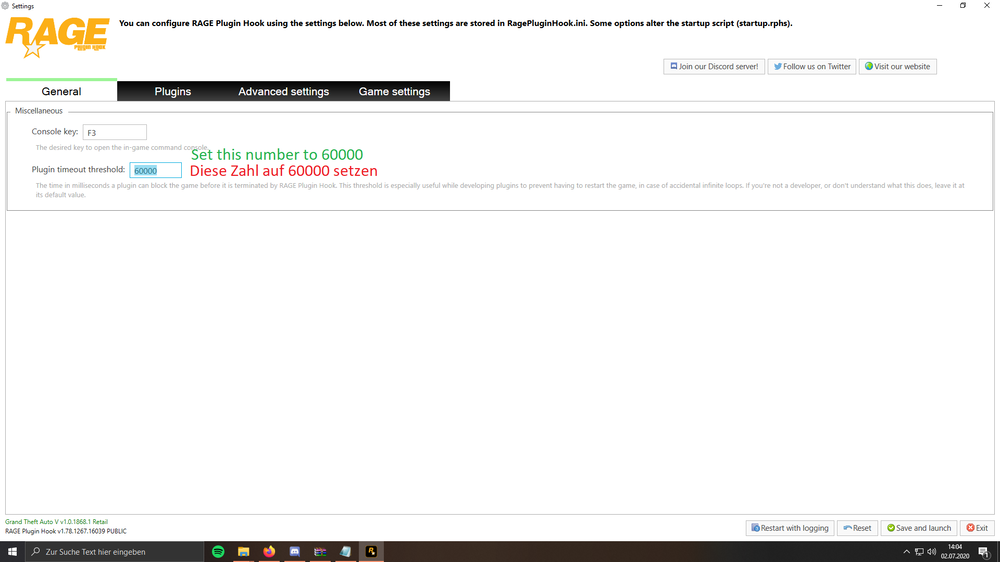
set your ragepluginhook loading time to 60000. Your topic has been moved to LSPDFR 0.4 Support. Please post in the correct location in the future.
-
do you get a crash with every addon vehicle or just certain ones?
-
not really sry, im not into that.
-
Failed to parse value for WorldEvents.IntervalMultiplier; make sure it is f.e. "1.0f" there was one crash with eup and charactercreator, i wouldnt worry about that. i dont think plugins are causing your lags. It could be a lot of scripts from SHVDN or .asi files, also graphic mods require a lot of performance.

-
Note: I edited your title, stop writing in CAPS please
-
SuperCallouts: Loading config. [01/02/2024 22:15:37.377] LSPD First Response: Error while initializing plugin: @Ӗ: String was not recognized as a valid Boolean. Have you changed anything in the settings of SuperCallouts?
-
you can check the gta requirements, those are the same. https://support.rockstargames.com/articles/203428177/Grand-Theft-Auto-V-PC-System-Requirements
-
686callouts update is available, but thats not related to the crash. what i can see from the log, you were on duty at 6:12 pm, went off duty 6:13 pm (why?), then 15sec later you went on duty again and then again you got a crash from riskiertrafficstops while checking for updates. then you played for 20 min and a random crash occured.
-
ok, perfect! rename mods folder to _mods rename vfs.dll & lml to _vfs.dll and _lml temporarily remove scripthookv.dll and dinput8.dll try again
-
<FILEV> Found file: [ LSPD10.xml ]. <FILEV> Verifying vehicle model name [ LSPD10 ]. (ER) Model specified is not valid, discarding file. <FILEV> Verifying vehicle model name [ saspvics ]. (ER) Model specified is not valid, discarding file. Automatic Siren Cutout [Plugin has been discontinued and may not work as intended.]
-
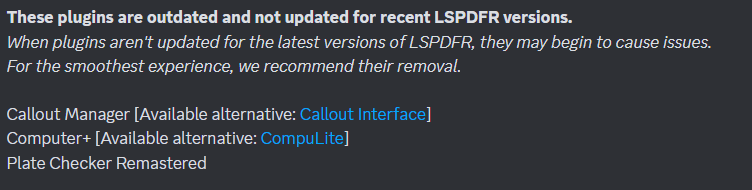
please remove towtruck callouts, its broken and didnt load. This topic has been moved to the appropriate forum. Please post in the correct location in the future.
-
Have you updated to the newest gameconfig? for the new vehicles there was an lspdfr update released where they were integrated in the police garage, ensure agency.xml up to date you can spawn them manually. - gauntlet interceptor: spawn name polgauntlet - Stanier le Cruiser: spawn name police5 (looks like police) also you need to add the line set Main.WorkaroundDLCVehicles = true in LSPDFR.ini to enable
-
https://www.bejoijo.com/post/compulite this is the official download. I’m not sure if he removed 1.2.7.
-
because renaming means disabling it from loading. the issue is within the mods folder. revert the latest changes or start a new folder
-
rename mode folder to _mods
-
rename mods folder to _mods
-
No problem!
-
Update available for CompuLite The crash was caused once by RiskierTrafficStops because it couldnt connect to the update check server. Try to let the game load a bit longer before going on duty.
-
Its a though one. I guess its sth permission related. Have you added the gta folder as an exception in the default windows antivirus and check out the faq on page 4, where you set the permission for the folder: https://docs.google.com/document/d/1Hp2Qco0qsgKfohkhjYWUxTr2OF7NSCkp8uSZwWz6rRQ/edit
-
No problem!👍🏽





