




Yasd
Community Team
-
Joined
-
Last visited
Everything posted by Yasd
-
Poste einen Screenshot von deinem GTA Ordner 🙂 Benutzt du Overlays für Discord oder von GeForceExperience?
-
This topic has been moved to the appropriate forum. Please post in the correct location in the future.
-
Welches Antivirensoftware hast du? Oder nur Windows defender? installiere lspdfr manuell neu. starte deinen pc neu und probiere es erneut
-
Are you talking about gta 5 or gta 4? your title says gta 4, but you have posted in GTA V Support. I can move it to gta 4, just tell me what you mean 🙂
-
This is the French forum, I need to tell you that its not that active.
-
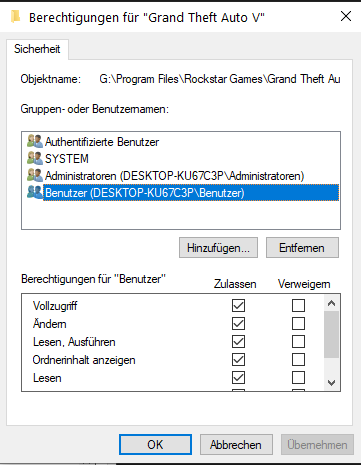
Hallöchen! - Funktioniert GTA alleine? - Füge deinen kompletten GTA Ordner als Ausnahme in deinem Antivirenporgramm hinzu. - Rechtsklick auf deinen GTA Ordner -> Eigenschaften -> Sicherheit -> stelle sicher, dass SYSTEM, Benutzer und Admin alle Haken, also alle Berechtigungen haben - Starte RPH als Admin
-
Hello! post the ragepluginhook.log from the main gta folder 📂
-
 Awesome cleanup mod! Especially for modders! The only mod, that cleans annoying blips, that were leftover!
 -
Link to it: https://www.microsoft.com/en-us/download/details.aspx?id=48145 Those are the requirements: https://ragepluginhook.net/Requirements.aspx
-
Unfortunately your mods folder is invalid, then. You need to revert the latest changes or start a new folder, again.
-
To find out what causes the crash exactly, pls post a screenshot of the gta folder. 👍🏽
-
Do not ask for gta game files, since it’s forbidden to share those.
-
Can you post the new log? Does it crash later than first time?
-
You cant change the keybinds of nativetrainer, which comes with scripthookv. also this trainer is just a basic trainer with limited functions. Dont worry, there are many trainers out there, that are better/ have more features and there you can change keybinds, f.e. SimpleTrainer.
-
Additionally update RageNativeUI in the main gta folder.
-
Hi! 🙋 pls post the ragepluginhook.log from the main gta folder 😄
-
Hello 👋 pls post the ragepluginhook.log from the main gta folder, maybe we can find sth in there 👍
-
Pls keep the mods folder renamed to _mods until we get the game to work.🤗 pls temporarily remove scripthookvdotnet.asi and only start gta again 👍
-
What are the names of the trainer? Normally the trainer comes with an .ini file, there you can edit the keybinds.
-
Once you've added the gta folder as an exception, re-install manual LSPDFR and restart your pc. Pls let me know how it goes! 👍🏽🙂
-
Hello there! Your log is from 27th of january, is that the last time you tried to play? According to that, you were ingame, can you describe it further? 🙂 Chris
-
Hello 👋 Post the Ragepluginhook.log from the main gta folder.
-
Hi! Try to remove dinput8.dll & ScripthookV.dll, then start only gta again👍🏽 Let me know how it goes! 😄
-
Hello 👋 Please add the whole gta folder as an exception in your antivirus. Then make sure User, System & Admin has all permissions, right click on the gta folder, go to properties and then permissions and make sure those have all hooks activated. You can try to start rph with administrator permissions, too. There is also a french forum, if dou want to check that out. 🇫🇷
-
This topic has been moved to the appropriate forum. Please post in the correct location in the future.

