


JBin818
Members
-
Joined
-
Last visited
Everything posted by JBin818
-
Ok. Yeah, with the last update I just deleted the mods folder and made a new one. Copied the new Update and X64 into it with X64C and E because a couple of my mods needs those files. Took some time but I eventually reinstalled the 6 or 7 so mods ,not including vehicles. I don't know how to update the mod folder. Maybe can you copy paste the update and x64 from the main into your mods? Actually I know you could do that but will it delete the mod files since those weren't in the original? Maybe I'll try it next time on a big update. Unfortunately that vehicle I have is a CHP Dodge Monaco 75(?) from SOLO. The files goes into the police1 slot. I can't find any other CHP Monaco. I could still use it but it would spawn in the city. If I can't change it then oh well. I almost thought I saw somewhere instructions to convert replace files to add ons and it was a lot of steps. I'll look around some more. The policeb slot is for the only police motorcycle which usually spawns on the freeway and has an HP officer on it. I actually have the Hurk's CHP BMW cycle in that slot. I don't mind the motorcycle police even though they don't last long in pursuits, I kinda laugh when they bite it. If I were to add the b at the end of the files I don't think the handling would be right since it is a handling for a bike not a car. Unless I could change the policeb handling to some other car. Just thinking out loud here.
-
I have never done an add on vehicle yet but would like to. The vehicles I have now are all replacements. I like those because their quick and easy to put in but when a big update happens like the last R* I couldn't start the game and found it was due to the mods folder being messed up after the update. I heard on add ons those aren't affected by updates because they are installed in other areas. That True? What vehicles types do you prefer to install, replace or add? Also can you change a vehicle that is meant for replace to an add on? I have this one vehicle that is to replace police slot but it's a HP vehicle and I want it as an add on. I want the police 1-4 to stay city PD but the HP vehicle I have is for the police slot. Wondering if that can be changed.
-
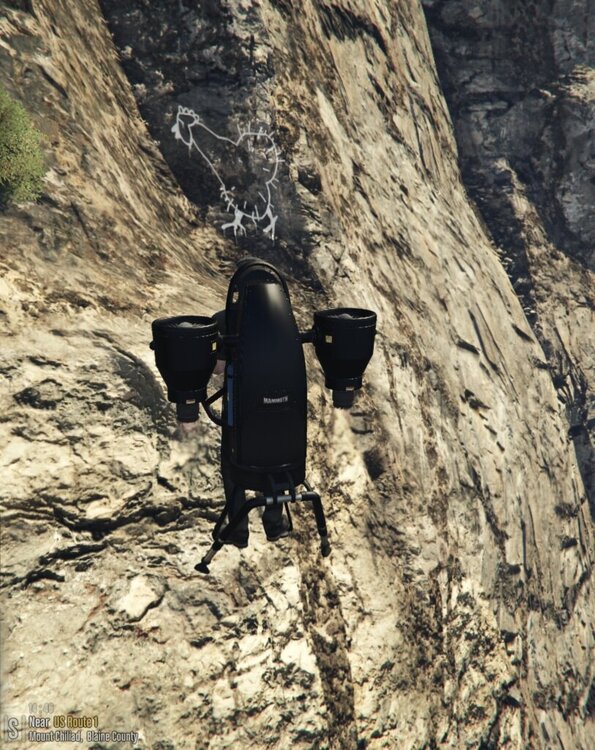
So I was just thrusting around on my thruster, you know the Mammoth Thruster and I saw this. Never saw it before. You could play GTA V for years and probably miss something. So now the big question. What does it mean?
-
Well I guess it was the mods folder for me. Read elsewhere to rename the folder to mods-copy or just something else. I did that and the game loaded. I thought it had to do with the different version numbers above but I guess that doesn't matter. So I'll have to update the mods folder.
-
Click ESC to bring up the map. Find your car on the map. I think you double click where your car is to set up a route from where you are to your car. Press ESC again to go back to the game. You have Simpler Trainer? Use that to teleport to your car and there you are.
-
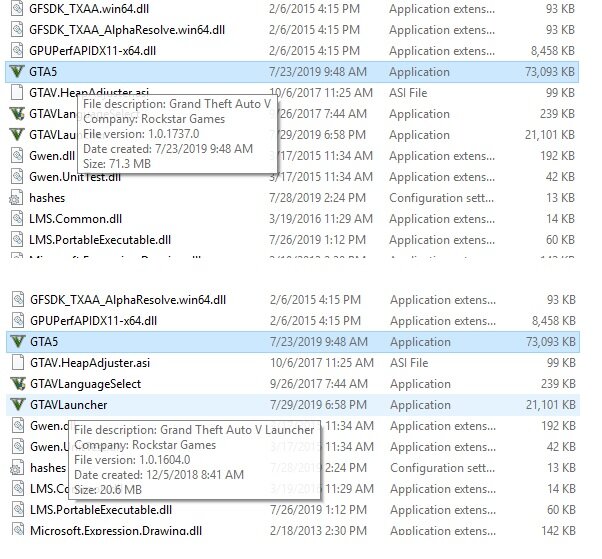
I can't seem to start GTAS through the GTA Launcher or RAGE. When I try to start through the GTA Launcher it crashes after clicking Story Mode. Then I get that popular message that GTA closed unexpectedly or something like that. When loading through Rage it will load all the way to where it list the plugins but never goes into the game. Just stuck on trying to load. Everything is up to date except I did note this difference and i wondered if you had to same thing. Check pic. GTA app says 1737 but the GTA launcher says 1604. Maybe that is why it's not launching? I noticed that when I tried to start GTA it updated twice instead of updating and installing all in one shot like it usually does. Wonder if something glitched there.
-
This is what you want. EP. 2
-
Oh I see. Yeah that is about the time I would play too.
-
When a new update comes out I learned ( the hard way) to backup everything before. I also set up a firewall outbound rule, thanks to Albo's video that you can block the update and still play but you would have to play offline, which is what LSPDFR is, single player. Just play with the old Rage, Scripthook and GTAV (which updates are blocked) until everyone gets their mods updated. That way you can still play. Like I said I learned the hard way. There was a scripthook that had to be updated and it took a while. I couldn't play. I learned what to do for next time that happens. After a couple months everyone should be updated and then you can update everything. It's annoying though between the R* updates, then Rage may have to be updated and scripthook may have to be updated and then the mods. When LSPDFR gets a new version the mods usually have to be updated. It's a pain but there are ways around it. I'm still playing right now. I blocked GTAV updates with the firewall outbound rule and with Rage it says there is an update. I click "continue without updating". Outdated, don't ask for support? Understood, click OK. Good to go. I really like the game. GTAV graphics and so cool and to play a LEO side with these other mods is great. But there are downsides to it like this. Reddington: I've never created a mod but have modded LSPDFR by downloading and installing the mods. Is that considered modding? Anyway what do you mean "these updates are Christmas". Have to do with the Christmas folder? I don't know what the Christmas folder does but if a mod says to put something in it, i do. 😀 So a lot play at 1-3am in the morning? Wish I could do that but I have a day job and i need my sleep. LOL
-
HI Everyone, When you load the game it automatically puts you at different stations. If I want to play a City PD and it spawns me at Sandy the I would have to teleport to whatever city station I would like. Can you change it so it will put you at a station you want each time you load the game? Sometimes it spawns me at the FIB which I don't know if you can even go in it to go on duty. I know you can go on duty thru Rage but I just like actually going in to the station. Anyway, thanks!
-
I would reinstall smart radio. Have you seen Albo's vid on how to install Smart Radio. It's not hard to install but in his vid it shows what it would look like once you get in game after you install it. So watch the vid, if you haven't seen it yet and just do what he does. You should get that message after you install in and start the game.
-
Umm, I don't think I do. The computer+ ticket is good enough for me and i don't type in the additional details where you can type out start to finish what happened. That is a bit more than I want to do. I hear paperwork is the most boring part of the job.
-
Yeah Stop The Ped is more popular than Arrest Manager. I like STP better. When I first started playing a year and a half ago I DL's most of Albo's mods. Now I just use Traffic Policer and Smart Radio of Albo. Stop The Ped and Ultimate Backup do all of Albo's mods and offers a little more. So STP and Ultimate Backup does what Arrest Manager and LSPDFR+ would do. I think you still need Traffic Policer for STP which is fine for me because sometimes I use the mimic or follow me feature of Traffic Policer on Traffic Stops. Albo's Assorted Callouts is ok but there are a lot of other callout mods that I think are better.
-
Start Rage in Windowed Mode. It's in the Rage settings. I think that is how you fix that if I remember.
-
After you install STP or Traffic Policer load the game through Rage of course. I think it shows after you go on Duty. Once you go on Duty there will be a message right in the middle of the screen from ALBO saying if you want to add the Tow Truck Button to the smart radio. Read the messages carefully. Also I could be wrong but for the Tow Truck Option to show in Smart Radio you have to be by a vehicle that you want towed. It doesn't show every button that you added every time you bring up smart radio. It will show the buttons that are relevant to what you are doing currently.
-
Not sure where that is. Maybe it is a texture install.
-
LOL I like that Duty Belt walking style. Makes my wimpy looking guy look like he trying to be tough. 😄
-
You mean LSPDFR's backup? Go to your main GTA folder and then lspdfr folder then keys file. Find line: BACKUP_MENU_Key=NONE Yours will say B so change it to NONE
-
 I'm going to check this out. Just playing today and a stolen car, car alarm blaring zooms right past me but no call and game doesn't see it as a suspect yet. I go after it, code 3 but can't blip and call backup because game doesn't see it as a pursuit. So if I can force the vehicle so the game sees it as a suspect then they can help me stop the suspect. I try this out.
- 74 comments
- 24 reviews
-
-

- 1
-
-
I use this pack. I don't remember if it says City or Los Santos or Angeles. The door logo where it would say that is so small you would have to zoom in quite a bit to see. The Highway Patrols I want CHP theme and some models say San Andreas and some say California. I just pick and deal with the imperfections until someone comes out with a more accurate pack. I like the packs so I don't have to DL a lot of different models. I don't know how accurate this pack is to the real life vehicles and I live where LAPD operates LOL. I just never compared how close the models are to the real life. I see it as, these models look good to me so I'll try it. As long as they are good skin wise. Features and Types on and of the vehicles? I'm not too concerned.
-
No not yet. Not too concerned about it either now. Would be nice if someone could find a fix though. I just add one by one the weapons and then save it to a weapons slot. So when I want those weapons I just go and load the slot it was saved in.
-
I don't think you need to uninstall Radiance V. The only file is the visualsettings file. On Realistic Radiance there is a visualsettings file that you will have to put in to replace with openIV. Since it is a replacement you don't need to delete the first RadV visualsettings file. Just install the Realistic Rad visualsettings and it will replace the file.
-
Maybe your character is performing a magic trick. Is he trying to be the next David Blaine? 😁
-
Ok, Thanks Red!
-
Yeah, I've briefly saw what's inside the VS file. Haven't explored it too much. You just have to know what lines to change and how high or low. I've had limited time these past few months so I just prefer to DL a good visual from someone. And like most the main reason to install one of these is because the ELS vehicles lights are too dim. I would also like the lights bouncing of the walls and buildings. So I'm not sure if that is another line to change in the VS file. Again. don't have much time to explore it.


