



CRAWFORDx96
Members
-
Joined
-
Last visited
Everything posted by CRAWFORDx96
-
You need to use ZModeler. There is no other way to do it. If you want to make a car that already has a lightbar on it ELS enabled, you add it in the ELS.ini. But if you want to put a lightbar onto a car then make it ELS enabled, you need to use ZModeler to put the lightbar onto the model of the car itself then put it in ELS.ini EDIT: As for the ZModeler, that's where my help stops, I have no knowledge of how that works. I know there are tutorials on the internet, as well as a pretty extensive tutorial database on this site on how to use ZMod. But I don't know how to use ZMod at all. I was actually thinking of getting into it and trying to make a car or something. BUt LCPDFR.com has some tutorials on using ZMod.
-
Thanks! Like I said, I'm still pretty new at this so sorry if everything isn't very good! I just recorded a new CoD4 video but the screen was black for the whole thing(found out when I went to review it afterwards) so I'm gonna do another one of them hopefully soon. Thanks for the feedback!
-
Well that escalated quickly!! lol. That was really entertaining!! WW3 in a matter of seconds! Glad to see you weren't killed.
-
Hey there fellow LCPDFR players!!! I decided to make a new thread of my LCPDFR videos that I have and will be making. I thought that I had already made a thread a while back for my videos, but I guess it was deleted because of inactivity, no matter! I made some new ones!! Any time that I release a new video to YouTube, I shall post it here! Sorry for the bad quality, I run LCPDFR on my laptop since my desktop doesn't ever want to work anymore, and sorry for the lag because my laptop doesn't like to run GTA and record at the same time!! *sighs* Well hopefully that should change as I might be getting a new processor! Anyhow, less of the talking more of the videos!! I hope you guys enjoy them and feel free to subscribe!! PS: I also do videos of Call of Duty 4: Modern Warfare, so I will upload the first one, and if you guys like that, I'll keep doing them and post more!! My first video: My newest video: My CoD4 Video:
-
At this point, I may not even buy GTA V unless LCPDFR is released at some point in time because of the work these guys do! I mean, its freaking amazing! There is no need for me to get GTA V if ELS V7 is coming out, and who knows what else!! SO EXCITED FOR THIS!!!!!!!!!!11!!111!!!!!!1!!!!!!!!1!!!1!!!!!!!!
-
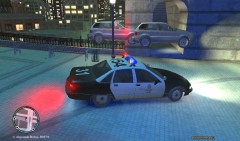
From the album: Miscellaneous Pictures of Things
I was on patrol when I got a call about an MVA involving 2 vehicles on near the Algonquian Bridge. With me, Charlie 96 responding and an Ambulance and Fire Engine en route in case of any serious injuries, I rolled upon this scene. I called off the ambulance and fire crew and then drove away. I had no idea what to do so I came back to the scene of the accident and requested City Works and fire crews to help the involved drivers. The Algonquian Bridge was closed for 6 hours as the City Works crew dislodged the vehicles. Both drivers were not seriously injured physically, but their wallets were seriously injured as the drivers were responsible for the damages which was an estimated $1,350,000. -
-
-
I am currently in the market for a new processor! I wasn't really looking at Intel, but hey! it's a chance to win one for free!! lol
-
Just do a Google search for them or go to different modding websites and search on those sites.
-
OK, so here is a comparison, PPM is like an old beat up jalopy car that doesn't work a large amount of time, and LCPDFR is like the Ferrari 458 Italia, beautiful, powerful, full of options, always working. There really is no comparison. @ Tom H, lol, love the facepalm!
-
Braveheart, I know you said this isn't to be distributed anywhere else, so I was gonna ask if I can link this in the description of my LCPDFR video of this script. Is it ok to do so? I don't want to go ahead and do that incase you don't want it to be up.
- 356 comments
- 140 reviews
-
To my knowledge, which is limited on this kind of stuff, I think in order to do that you would have to edit the model in ZModeler or something similar and use different colored nodes and save it. Don't take my word for it, but from messing around with ZMod for a little, I think that's what you do. Probably not though, but I'm not sure. LOL. Just trying to help.
-
I was in pursuit of a drunk driver (I use Braveheart's script, love it!) and during the pursuit he stopped and picked up a hooker, before I could get up to the car he sped off again. I called in some back-up and was chasing them when the hooker opened fire!! I use ELS so I wasn't able to return fire so I dropped back and called for a roadblock a few block up ahead. Sure enough, the driver was boxed in and tried to bail, but was taken into custody before he could go far. As for the passenger, she began to flee and open fire on me as I chased her so I returned fire and fatally shot her. Luckily she dropped around $10,000 from her night job, so I was paid a nice little bonus! Lol
-
This should have been posted under the LCPDFR.com Random thread. No matter. There is already a topic on this in the previously stated thread, fraps or bandicam are the top ones.
-
There was a small chase a few weeks ago close to me, a cop rolled up on a house for a drunk and disorderly call and the guy ran out back and took off on his riding lawn mower, but fell off because he was drunk. LOL. Those were some pretty scary chases.
-
I use FRAPs and it is meh. The FPS drop is nuts!!! I already get low FPS, around 20-25, but when I try to record with fraps it drops to around 5-10 fps. I have been wanting to make more LCPDFR videos because I have one, but it lags sooooo much I can't, and if I record for too long the file is huge! I recorded a 25 min long video and the file size was almost 55 gigs. So I'll have to try bandicam.
-
I'm looking on upgrading my processor, possibly motherboard if needed, and maybe RAM. Any suggestions? Specs: AMD Phenom 9600 Quad-core @ 2.30 GHz each 4.00 gigs of RAM Win7 64 bit 640 gig HDDs ATi Radeon 6700 HD Graphics card w/ 2 gigs of dedicated memory (i think)
-
I have a vanilla vehicle.img I can put in the downloads section later on in the day. It's for the GTA IV base game 1.0.7.0 or whatever the newest version is.
-
So I've been getting a fatal BSOD error on my desktop PC for a while, A clock interrupt was detected on a secondary processor, and I have a quad-core PC, I know that the processor needs replaced and that it is indeed a problem with the processor. But I have been looking for quite sometime for a decent to good quad-core or more processor for not a shit-ton of money. I'd like to stick with an AMD processor, that what I have on my laptop and desktop and I love them, they run great, except when it goes wrong on my desktop. So do any of you guys have any suggestions?? Thanks for your input!
-
I'll play! Just let me know what cars you're using and if you're using ELS. GFWL: CRAWFORDx96
-
Not all the time. Only if something goes wrong. My GTA will crash to the desktop (CTD) whenever it lags too much and the PC can't give enough resources. Have you gotten any errors?
-
I think they should make the colors pink, green, brown, and purple. XD But I have always wondered why any lightbar I've seen they always seem to have the same color setup. I get the red and blue part, just not the order.
-
I'm not sure I'm understanding your question. You were told the you're supposed to get and error when GTA randomly closes, but it does shut down and give you errors? Could you please rephrase your question?
-
ITS THE SEX PISTOL!

