



CRAWFORDx96
Members
-
Joined
-
Last visited
Everything posted by CRAWFORDx96
-
From the album: Miscellaneous Pictures of Things
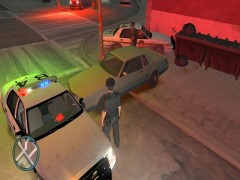
While conducting a routine traffic stop on the grey Sabre, the driver stepped out of the vehicle and opened fire, prompting a pursuit. During the chase, several shots were fired out of the vehicle by the driver. The pursuit lasted for a while until a state trooper performed a PIT maneuver. The driver bailed out and continued on foot, still opening fire. Officers were forced to return fire, fatally wounding the suspect. No major civilian injuries, minor scrapes and bruised caused by MVAs from the pursuit. One officer was fatally shot by the suspect from the vehicle, he left behind a wife and a son. -
From the album: Miscellaneous Pictures of Things
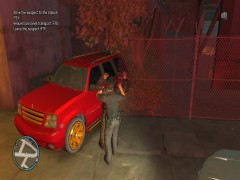
I attempted to pull over the Red Cavalcade for a minor traffic infraction but when I hit the lights, he took off. The pursuit lasted a few city blocks and ended with a PIT maneuver and the suspect reversing into a fence, then a tree. No one was hurt in the incident and the suspect was apprehended and awaiting a court date. -
From the album: Miscellaneous Pictures of Things
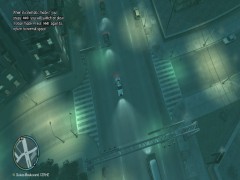
I was driving during my patrol when I came across this intersection near FIA. I found it odd that All of the lights were green at the same time, and switched at the same time. I watched the intersection for sometime, but luckily there weren't any traffic collisions. -
my gamertag is CRAWFORDx96. I'd love to play but my GFWL doesn't work with GTA IV. If one of you guys can tell me where/ how to fix it I'll gladly play. EDIT: My GFWL is working and I really want to play some MP right now. Haha. I don't know how to do LCPDFR with other people, so if we do play, be patient, I'm learning. lol. But I'm ready to play some MP if anybody wants to!!!
-
Oh, yeah, I value my patrol cars, lol. I tried braveheats script a while back, and it kinda confused me. lol. I may have to try it again. But if there are gonna be new callouts in the next PoliceHelper mod then I'm definantley gonna get that. I've been trying to download it now actully, but my desktop is really pissing me off and crashing w/the BSOD. Here's hoping it works long enough for me to download your policehelper and try it out! EDIT: I downloaded the towing script, policehelper, and the new police station, wow! They are awesome! Keep 'em rollin!!
-
-
This Criminal Acts script, what does it exactly do? Like, can it be used with LCPDFR to add more of a variety of callouts? That's the main thing that I look for. Although, I do occasionally do a foot patrol and look around for suspicious activity, but Id like a wider variety of call outs. Multiplayer, that always sounded fun to me. I've never tried it. Mainly because I don't know what I need, and my pc is EXTREMELY prone to random crashes that involve 1 of 4 BSODs. But I'm down to try it with you guys. :) lol. It always seemed fun.
-
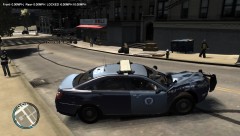 Well there's your problem...I like the skin though, quite nice.
 -
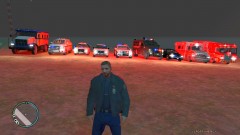
From the album: Miscellaneous Pictures of Things
This is the Fleet. The cars that I use in game for LCPDFR. From Left to right: unmodified LCPD Stockade Inmate Transport, Pennsylvania State Police Chevrolet Tahoe, Pennsylvania State Police Ford Crown Victoria Police Interceptor, Pennsylvania State Police Ford Crown Victoria Police Interceptor Slick Top, City of Pittsburgh Police Department Chevrolet Impala, LAPD Riot Control Lenco Bearcat APC, Unmarked Ford Crown Victoria Police Interceptor, FDNY GMC Ambulance, Montgomery Firetruck. Credit is Given where Credit is due: All rights belong to the original owners and creators of these cars, I just took pictures of them, I just don't remember whose cars and skins they belong to. Enjoy! -
I've always saved, then rebuilt, then saved again. No problemo for me.
-
Wow. People really don't wanna pay that extra money. haha
-
Lol, I saw a picture on reddit a while ago of a guy in I think it was Australia with a boot on his wheel, but it didn't cover the lug nuts, so he just took the booted tire off, and put the spare tire on and drove away. Like a fucking boss right there. haha
-
-
They'd ticket it for it now being not road worthy...then ticket it for having and unpaid ticket...
-
You and all your high-tech setups! Lol. I run LCPDFR on my Samsung Laptop. 500GB HD, AMD A6 Quad-core ~2.6 gHZ, Radeon HD Graphics card, and laptop set to best performance! Lol. I wish I had the money to buy stuff like that. I'm just trying to slowly, and i mean slowly, save up for my first car. haha. But y'all got some nice rigs here. lol
-
Lololololololololololololol. That's hilarious. They tend to be stupid and hardasses that gets them into trouble. But I completely agree, the fact that people try to troll is kinda of pathetic in my mind. I mean really, what does it actually prove? That you can click on a button? That really doesn't take any skill. I think the appropriate action was taken, and I applaud the Community Team for doing what they did.
-
I've always rebuilt. lol. i haven't a clue what it means. haha. But any clue how to fix the problem? EDIT: Ok, now sparkIV just quit working. it just now stopped. I downloaded again, but it just quit out of no where.
-
Yes, I will add the cars through sparkIV and click save then rebuild then save again then close it. But when I go into GTA, the car is still the stock police car from rockstar. I know that the cars that were causing the problem weren't police cars because I use the same ones on my laptop and desktop.
-
I already deleted all of my modded cars. It was a civilian car that was causing it. But when I went to put a police car in, it didn't show up as the car I put in, just the stock one from the game. I don't have sparkIV open. I never have either. it's the Invalid Resource Error, but as I said in the OP, I already solved that, and the only car that is saved in the spot is Roman's taxi. The problem isn't the game crashing, but the game not registering the modded cars that I put into the game.
-
Dell XPS laptops aren't really suited for gaming. And to set the CPU to bes performance, go to Control Panel>System and Security>System>Advanced System Settings>Advanced>Performance>Settings then select Adjust for best performance
-
Try going into the Control Panel and looking for the CPU or Processor settings and setting the PC to run at best performance, because (not 100% sure) I think most PC's are set to best look.
-
It could just be that your pc isn't strong enough, but I'm guessing you have a pretty decent one.
-
So I was getting a CTD and some error about an invalid model or something, but got it resolved by replacing the modded vehicles.ide file with a clean one from a separate install, but when I went to place a the cop cars that I was using back into the game via sparkIV, they won't show up. I tried adding them in groups, one by one, and pretty much everything else. It kinda irritates me because I really wanna play! Lol. But any and all help is appreciated! Thanks in advance!
-
And you can also call in back-up units. There is a post or something floating around here somewhere with all of the hot keys and controls for LCPDFR availible for download. It really helps.
-
You could also do what I do on both my desktop and laptop, I know for windows 7 there is a setting in the control panel that allows you to set how your processors run and lets you adjust the computer for either best graphics or best performance, or anywhere in between. But I have my laptop set at best possible performance, and it runs pretty well, not at 60 fps, but pretty well. You could try that.

