


FCV96
Members
-
Joined
-
Last visited
Everything posted by FCV96
-
You're looking pretty good with that, though I'd personally go with a higher wattage on the power supply; it is arguably one of the more important elements of the build and keeps the other components safe - perhaps a minimum of 600w. Not sure about the processor though, or if it will bottleneck with the GPU you have. I know the favored Intel processors strictly for gaming are the upper Core i5s though.
-
You should be good to go, TomballPD - your setup is very nice and has all of the bells and whistles you could ask for. :D
-
You need to provide a bit more detail than that, otherwise you have no hope of replacing GTA IV's files.
-
I live in Queens, NY, and it seems as if all the NYPD uses as marked cars in the boroughs that aren't Manhattan are Impalas and the occasional Fusion. I'd love to see a few more CVPIs and perhaps the new Taurus and Caprice around.
-
The color-scheme seems a bit random; the blue is nice but then abruptly changing it to white on the front doors makes it seem as if the department visited a local junkyard for replacement parts and didn't bother getting them painted.
- 9 comments
- 8 reviews
-
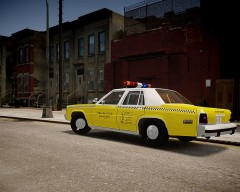 Seems very inconspicuous! :D
 -
Same to you! :D Just watched the ball drop in Times Square on TV; one day I'll attend that, but for now I'll stick to Queens. :D
-
One of the nicer vests out there; glad it spawns randomly too! :D
- 22 comments
- 15 reviews
-
- LCPD
- Traffic
- Officer
- Traffic Officer
-
Tagged with:
-
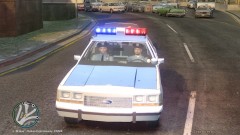
From the album: LCPDFR Escapades
Getting through traffic in 1980s-era LCPD was notoriously difficult! -
-
-
Yup; you should be able to run everything without a hitch. Fraps in conjunction with GTA IV shouldn't be much of a problem either. It is all dependent on how stable your GTA IV will be, however - memory leaks plague the game because of bad porting on Rockstar's part. Try to minimize unnecessary mods as well, like keeping car mods limited to only the emergency vehicles. Good luck! :D
-
Glad to help. ^-^
-
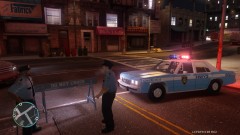 Let the experimentation commence! I actually have a close family friend that has been in the NYPD since the late 1980s [and he still is]. His first patrol vehicle was a Plymouth Gran Fury; perhaps I can get some color-related info from him. ^-^
 -
No problem. :D That's odd; I don't think that Kanyo ever did a version with the spotlight up. Perhaps this was either edited by the person making that video with permission, or that it may possibly be a completely different CVPI. The closest you can get to it that I've seen are the links above though.
-
I don't believe that is it; the model you linked to is the schaefft version of the CVPI, and the one in the video appears to be the Driver San Francisco model.
-
I believe that the first one is Sgt Kanyo's 2009 California Highway Patrol CVPI; A great model - I used it for a bit before replacing it with this one by Ceril; --- The second one appears to be Sgt Kanyo's 2003 California Highway Patrol CVPI;
-
The uniforms are actually from the link below; I'll be using them until NYPD98 can correct some of the issues he has with his. I used the ones in the photo in conjunction with the short-sleeved mod and some GIMP editing; And I'm still trying to get the car color just right. Yours was somewhat too blue for me, but this one is a bit too light as well. Perhaps one day I'll find the perfect combo! :D
-
-
12:50PM on December 31st here in the eastern USA; we're almost there! xD
-
You should definitely be able to play GTA IV without breaking a sweat. Not sure how Windows 8 interacts with LCPDFR though; I've heard about problems pertaining to it. 7 is the superior OS IMO. Here's the guide I used [along with Newegg's excellent videos] to build my PC. They have example parts lists for budget, mid-range, and high-end rigs; http://www.diyallday.com/how-to-build-a-computer/
-
-
-
Took this photo in-game; I tweaked the color of Strike's awesome textures a bit to make it brighter and also threw in some of the older light blue NYPD uniforms in addition.
- 21 comments
- 11 reviews
-
From the album: LCPDFR Escapades
I'm glad that this request was finally picked up, by somebody as talented and dedicated as Ceril to boot! The car looks wonderful, and paired with a classic light blue NYPD uniform it looks even better. :D


